
File input system of record extension overview (beta)
The file input system of record extension imports documents from an external system of record into a Workflow Builder workflow. Instead of requiring users to manually search for documents that they need to include in an envelope, this extension enables workflows to dynamically retrieve files such as contracts, supporting documents, or templates from external systems like CRMs, document management systems, or internal databases. The workflow defines which files are needed, and the external system determines how to locate them. This separation allows workflows to remain flexible while delegating retrieval logic to the system of record.
For example, the extension can be invoked from a workflow that processes loan applications. When an applicant completes their application package, the workflow is triggered; the extension sends a request to the system of record to locate all of the applicant’s supporting documents, apply any required business logic (such as selecting the current versions), and return the documents to Docusign. The workflow then continues using those files in a Send Documents for Signature step.
Use a file input system of record extension in a workflow
After a file input system of record extension app has been installed and connected to a Docusign account, you can invoke it as a step in your workflows. In the example described here, a process builder defines a workflow that adds an applicant’s supporting documents to an eSignature envelope. The workflow steps include:
- An applicant confirms that they have completed a loan application in a web form and submits it.
- The extension imports the applicant’s supporting documents into an eSignature envelope.
- The loan officer receives the eSignature envelope containing all the client’s supporting documents and the loan application in a single package for review.
Expand the sections below to see how a file input system of record extension functions during workflow configuration and execution .
Workflow configuration: The process builder selects the extension
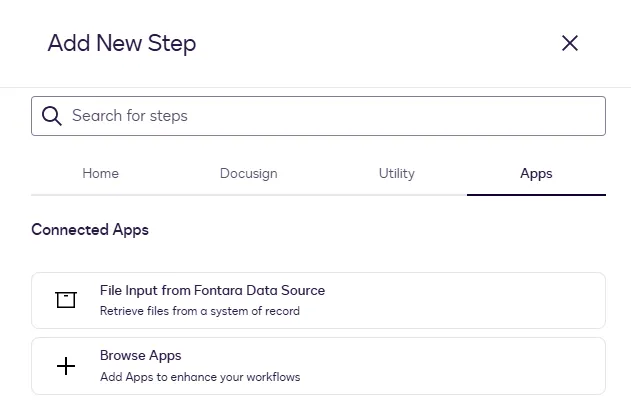
When adding a workflow step to import a file from a system of record, the process builder selects the extension that has been installed to their Docusign account.
Workflow configuration: The process builder selects the file location
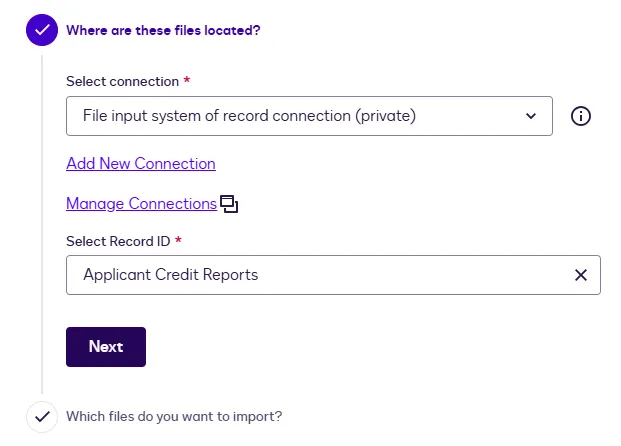
The process builder configures the file input step. During step configuration, the process builder selects a connection and a record ID. The record ID that the builder selects in the configurator is the unique identifier for the record or object in the data source from which the file will be imported.
In the Select Record ID list, the process builder selects a record ID from the system of record containing the files to be imported into the workflow. In this example, the record ID is a folder within the external data source that contains applicant credit reports. This value identifies the data source from which the file is imported.
Workflow configuration: The process builder selects the files to import
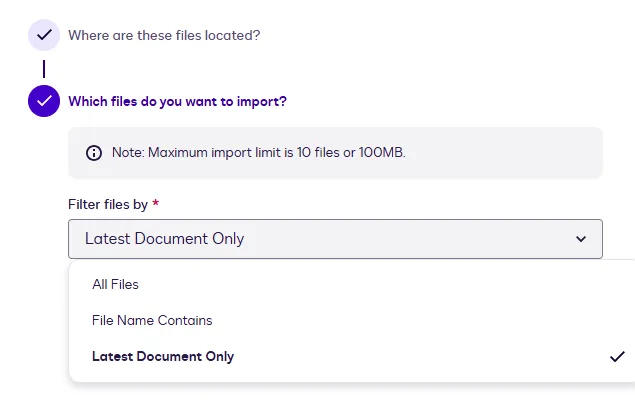
Next, the process builder specifies which files to retrieve from the data source. This can include filtering by document types and setting criteria to identify the correct files. The process builder can choose to import all files, filter files based on matching criteria, or retrieve only the latest document. The maximum import limit is 10 files or 100 MB per request. When the workflow executes, the extension uses the search criteria to locate and retrieve the matching documents.
Workflow execution: The customer completes a web form
The example workflow is triggered when the applicant submits a web form confirming their application package is complete and ready for review.
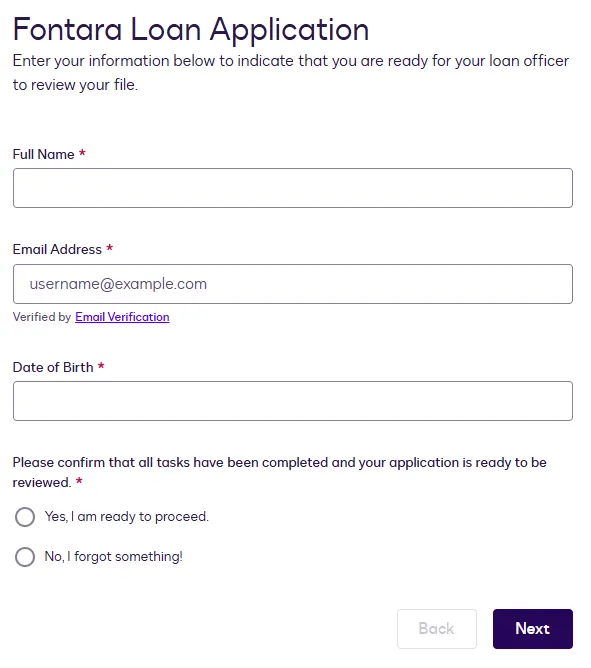
After the customer completes the webform step, the workflow proceeds to the Prepare eSignature Template step. The template fields are populated with the information the customer entered into the web form.
Workflow execution: The supporting documents are imported from the system of record
Docusign sends a request to the external service to retrieve the required documents based on the configured workflow. This request includes the container ID and filter criteria that define which files to locate within the system of record.
Docusign includes session context with the request, which includes an upload URL where files should be uploaded to and a callback URL that is called when the upload is complete.
The external system retrieves the appropriate files and uploads them to Docusign-managed storage. Each successfully uploaded file is assigned a document ID, which is then used within the workflow.
Workflow execution: The envelope is prepared and sent for signature
When the workflow instance reaches the Send Documents for Signature step, the loan officer reviews the envelope, which includes the applicant’s signed loan paperwork and the imported supporting document.
Get Files action
A file input system of record extension app implements the Get Files action, which is executed when a Workflow Builder workflow reaches a file input system of record step. At this point, Docusign sends a request to the external system to retrieve documents from the system of record.
The external system locates the relevant files based on criteria set by the user or process builder, and returns them to Docusign. The retrieved files are then made available for use in downstream workflow steps, such as a Prepare eSignature template step or a Send Documents for Signature step.
In the extension app manifest, this action is identified as FileIO.Version1.GetFiles.
Restrictions
These restrictions apply when implementing the file input system of record extension:
- When you register an extension app, you cannot include both a file input system of record extension and a file input cloud storage extension in the same app. If you need to use both input types in workflows, register a separate app for each extension.
- The maximum supported file size for import from a system of record is 10 MB or 100 MB per request. The workflow process builder must ensure that the documents imported from the system of record are within this limit.
Mechanisms for starting workflow instances
Docusign supports multiple options for starting workflow instances that import files from a system of record. A workflow instance is a runtime execution of workflow steps that enables a customer to complete tasks such as filling out a form and signing an agreement.
To review the options for manually starting workflow instances, see How to Start a Workflow.
To start workflow instances programmatically, you can implement a Docusign Workflow Builder API integration that includes the Workflows: triggerWorkflow request. See Workflow Builder API 101 overview for an introduction to the API, and see How to trigger a Workflow Builder workflow for example code and a detailed walkthrough.
Next steps
- Get an overview of the process to build an extension app.
- See File input system of record extension contract reference for details about the action requests and responses.
- Learn how to programmatically trigger workflows that write files to cloud storage.