
File input system of record extension contract reference (beta)
This extension can be invoked from a step in a Workflow Builder workflow to retrieve files from a system of record. The files to import can be identified using workflow data, such as values captured earlier in the workflow or returned from other extension steps. See File input system of record extension overview for details about how the extension is invoked in Workflow Builder and other behaviors and restrictions.
The file input system of record extension defines a structured interface between Docusign and the external service provider:
- Docusign initiates a request for files using context data populated by the workflow users.
- The external system identifies the relevant records and returns the corresponding file metadata.
- Docusign retrieves each document through a secure, managed pipeline for ingestion.
You can include this extension when you register an extension app. If you register the extension app using a form, select the File Input System of Record extension in the form-based UI, as shown in this figure:
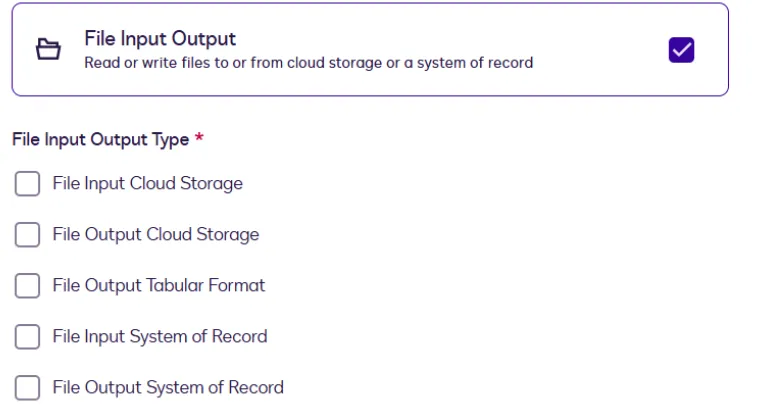
During the form-based extension app registration process, if you select a file IO extension, its required actions are automatically added to the app. You can then configure the actions’ endpoint URIs and other properties on the Integration Details page. The extension’s optional capabilities can be added or removed only by editing the app manifest file. After you’ve added capabilities via the manifest file, you can edit them on the Integration Details page. See Action schema for information about action and capability properties in the app manifest file.
If you register the extension app using an app manifest file, make sure that you:
-
Set the
extensions.templatevalue in your app manifest toFileIO.Version1.GetFiles. -
Include a definition for the required action in the
actionsobject, using these values:name: get-filestemplate: FileIO.Version1.GetFiles
-
Include the value from the
actions.nameproperty in theextensions.actionReferencesarray.
See Update extension and action settings for information about defining actions using the form-based registration process. See Action schema for information about action properties in the app manifest file.
When registering an extension app, you cannot include both a file output system of record extension and a file output cloud storage extension in the same app. If you need to use both types of output in workflows, register a separate app for each extension.
Action contracts
Get Files (FileIO.Version1.GetFiles)
A file input system of record extension app requires the GetFiles action. This action is executed when a Maestro workflow reaches a file input system of record step, triggering a request to the external system to retrieve documents from the system of record. The retrieved files are then available for use in downstream workflow steps, such as a Prepare eSignature Template step or a Send Documents for Signature step.
See Example extension app use cases for a complete sample app manifest for file input from system of record.
HTTP method
This action initiates a POST request to the external API service.
Request
Response
Error handling
The external system should return a 200 response code to Docusign if a request succeeded. Any other response code indicates that the request was not successfully executed. Developers are responsible for providing an error code and message for each error.
Next steps
- Get an overview of the file input system of record extension and how to use it.
- Explore how to Use extensions in workflows.
- Find out about other supported extensions.