
Workflow configuration for file output scenarios (beta)
Expand each section below to see the steps in an example workflow that implements a specific combination of options for the file output destination record identifier and the file source.
Record identifier: Workflow variable value File source: Send Documents for Signature step
Below is an example workflow that uses a workflow variable value to identify the record to which files are written. The source of the files is a Send Documents for Signature step.
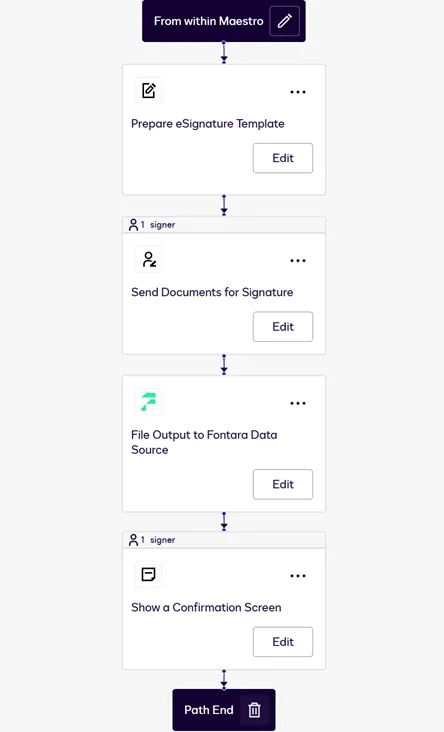
The workflow components are:
- Start method: From within Maestro: In this example, a user manually starts a workflow. Other start methods, such as starting from a link or from an API call, can also be used.
- Prepare eSignature Template step: Identifies the eSignature template from which the envelope will be generated.
- Send Documents for Signature step: Displays or delivers the envelope to the customer.
- File Output step: Invokes the file output system of record extension to send a Write File request to the external system. This exports the file generated from the Send Documents for Signature step to the system of record. The request includes the destination object and a workflow variable value that the external system can use to identify a destination record.
- Show a Confirmation Screen step: Displays a message to the customer indicating that the workflow is complete.
See File output system of record test: Workflow step creates envelopes for details about how to configure this example workflow.
Record identifier: Workflow variable value File source: Envelopes sent from the account
Below is an example workflow that uses a workflow variable value to identify the record to which files are written. The workflow stores files from envelopes sent from the Docusign account if they meet specified conditions.
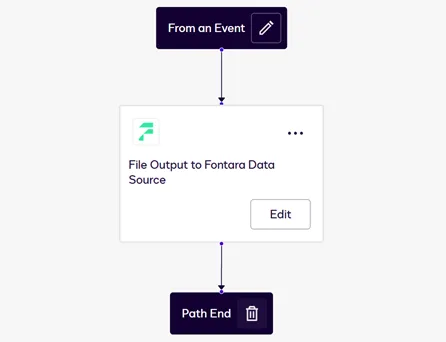
The workflow components are:
- Start method: From an event: A workflow instance starts automatically for any envelope sent from the account. The envelope event that triggers workflow instances is specified in the start method setup. The setup also specifies conditions that must be met in order for workflow instances to be triggered.
- File Output step: Invokes the file output system of record extension to send a Write File request to the external system. This exports the files from the envelope that triggered the workflow instance. The request includes the destination object and a workflow variable value that the external system can use to identify a destination record.
See File output system of record test: An event triggers the workflow for details about how to configure this example workflow.
Record identifier: ID returned by a Read from step File source: Send Documents for Signature step
Below is an example workflow that uses a record ID returned by a Read from step to identify the record to which files are written. The source of the files is a Send Documents for Signature step.
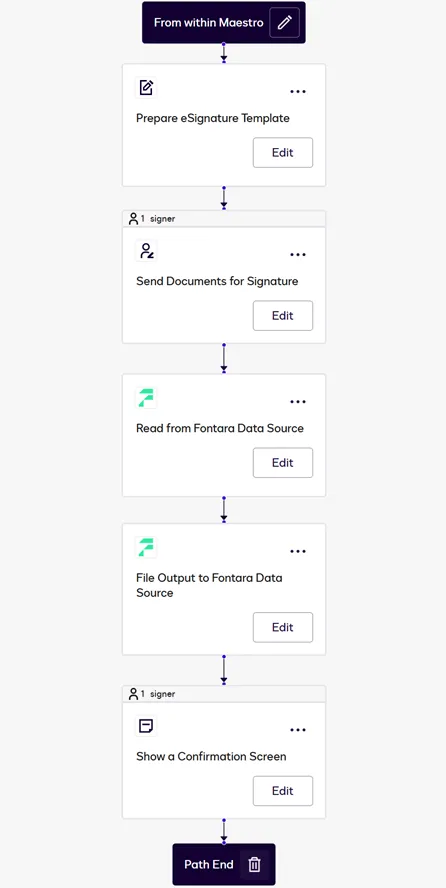
The workflow components are:
- Start method: From within Maestro: In this example, a user manually starts a workflow. Other start methods, such as starting from a link or from an API call, can also be used.
- Prepare eSignature Template step: Identifies the eSignature template from which the envelope will be generated.
- Send Documents for Signature step: Displays or delivers the envelope to the customer.
- Read from step: Invokes a data IO extension to send a Search Records request to the external system. This request returns the ID of the record to which the file will be written. During configuration of this step, the process builder defines a query that will be used in the Search Records request.
- File Output step: Invokes the file output system of record extension to send a Write File request to the external system. This exports the file generated from the Send Documents for Signature step. The request includes the ID of the data source record identified by the Read from step and the data source object associated with that ID.
- Show a Confirmation Screen step: Displays a message to the customer indicating that the workflow is complete.
Record identifier: ID returned by a Read from step File source: Envelopes sent from the account
Below is an example workflow that uses a record ID returned by a Read from step to identify the record to which files are written. The workflow stores files from envelopes sent from the Docusign account if they meet specified conditions.
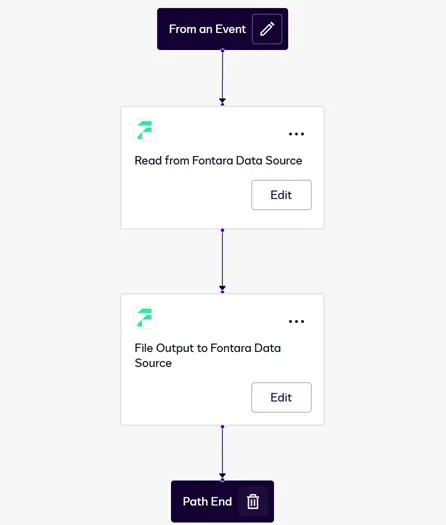
The workflow components are:
- Start method: From an event: A workflow instance starts automatically for any envelope sent from the account. The envelope event that triggers workflow instances is specified in the start method setup. The setup also specifies conditions that must be met in order for workflow instances to be triggered.
- Read from step: Invokes a data IO extension to send a Search Records request to the external system. This request returns the ID of the record to which the file will be written. During configuration of this step, the process builder defines a query that will be used in the Search Records request.
- File Output step: Invokes the file output system of record extension to send a Write File request to the external system. This exports the files from the envelope that triggered the workflow instance. The request includes the ID of the data source record identified by the Read from step and the data source object associated with that ID.
Next steps
- See how the file output system of record extensions and actions function during workflow configuration and execution.
- Review options to consider when you plan a file output to system of record implementation.
- Get an overview of the process to build an extension app.