
Connection behaviors and best practices
A connection is required for an extension app to obtain authorization from an external service and to send requests to its endpoints. You must establish a connection to the external service after you install an extension app on the Developer Console testing page or in the App Center.
If an extension app’s connection is deleted or invalidated, any Docusign agreement process that calls the extension app will become inoperable. Agreement processes that can be affected include eSignature envelopes and workflows.
This topic provides information about connection behaviors and guidance to help ensure that connections function correctly. Some sections in this topic apply to specific extensions, while others apply to all extensions. Applicability is noted at the beginning of each section.
Connection behaviors
The sections below explain how connections behave when various extension app processes occur.
Data model definition storage
Applies to: Connected fields and data IO extensions
For connected fields extensions and data IO extensions, Docusign executes Get Type Names and Get Type Definitions actions to obtain information about an external system of record’s data model. These actions are executed when a connection is established between Docusign and the external system. Docusign stores the data model definition with the connection and uses this information for:
-
- Display the available connected fields in the Add Fields view so that template and envelope preparers can add them to documents
- Return the available connected fields in response to a Connected Fields API TabInfo:GetConnectedFieldsTabGroups request
- Process verification requests when users populate connected fields in envelopes
-
- Display the available objects and properties on the Workflow Builder workflow configuration screens for data read and data writeback steps
- Process data search, create, and update requests when end users complete steps in workflow instances
For connected fields extensions, eSignature relies on the data model definition associated with the connection that a preparer selects during template or envelope creation. For data IO extensions, Workflow Builder relies on the data model associated with the connection that a process builder selects during workflow definition.
Connection deletion
Applies to: All extensions
The connection for an extension app that’s installed to your developer account will be deleted when you:
- Uninstall and reinstall an extension app on the Developer Console Testing page
- Update the extension app registration in the Developer Console, which causes an automatic uninstall and reinstall of the app
- Uninstall and reinstall the extension app in the App Center
- Delete a connection or reconnect in the App Center
When you take an action listed above while logged into your developer account, it affects the extension app’s functioning only in your own account. Live versions of your extension app that Docusign App Center users have installed in production will not be affected. See Envelope, template, and workflow repair after connection issues for steps to continue working with existing templates, envelopes, workflows, and workflow instances after a connection deletion in your account.
For an extension app in Live status, connection deletion will occur for any production account where the app is installed if the account administrator:
- Uninstalls and reinstalls the extension app in the App Center
- Deletes a connection or reconnects in the App Center
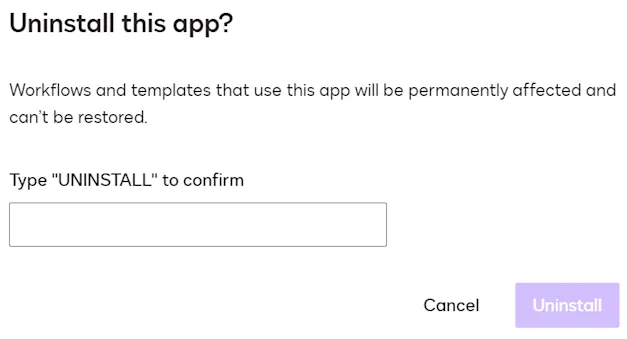
App Center administrators see this warning when uninstalling an extension app:
Connection invalidation
Applies to: All extensions
An extension app’s connection can become invalidated as a result of authorization issues. Depending on the cause, connection invalidation can affect one, multiple, or all Docusign accounts that have an extension app installed.
Causes of connection invalidation can include:
-
Changes to the authorized user’s account, such as:
- A password change
- The account being deleted or disabled
- The user revoking consent
- An account administrator revoking the user’s access token
-
Restrictions imposed by the external service, including:
- Security policy updates
- Changes to authorized scopes or access to resources
- Concurrent sign-in limits
- Login from a new device or location
See Envelope, template, and workflow repair after connection issues for steps to continue working with existing templates, envelopes, workflows, and workflow instances after a connection invalidation in your account.
Connection best practices
Follow the guidance in the sections below to help ensure that connections function correctly.
Connection refresh for minor data model changes
Applies to: Connected fields and data IO extensions
If minor data model changes are made in a system of record that’s being accessed by a connected fields or data IO extension in Live status, Docusign recommends refreshing the connection for the extension app in the Docusign App Center. A connection refresh should be performed for any accounts that have the extension app installed. This keeps the connections intact and causes Docusign to execute Get Type Names and Get Type Definitions actions to retrieve the latest data model.
Minor data model changes include updates to property labels, which will not cause breaking changes for existing templates, envelopes, workflows, or workflow instances.
Version upgrade for major data model updates
Applies to: Connected fields and data IO extensions
Major data model updates will cause breaking changes for existing templates, envelopes, workflows, and workflow instances. These include adding a required property to a type, removing a required property, or changing an optional property to be required.
For major data model updates where a connected fields or data IO extension app in Live status is accessing the data source, Docusign recommends creating a new version of the extension app in the Developer Console. You should then test the new version, submit it for Docusign review, and publish the new version. On publication, existing production accounts that have the previous version installed will be automatically upgraded to the new version with no disruption to the connection and no impact to existing templates, envelopes, workflows, or workflow instances.
Envelope, template, and workflow repair after connection issues
Applies to: All extensions
If an extension app’s connection is deleted or invalidated, an account administrator must re-establish it. Afterward, the administrator can complete the following to make sure existing envelopes, templates, workflows, and workflow instances that used the old connection continue to function:
-
Connected fields and data verification extensions:
- For envelopes that have been sent but not completed by the recipient, follow the procedure to Correct an Envelope. During the correction process, delete the connected fields from the document, and then add them back.
- For templates, follow the procedure To edit a template, delete any connected fields from the document, and then add them back.
-
Data IO and file IO extensions
- For workflow instances that are in progress, follow the procedure to Cancel a Running Instance, and then start new instances if needed.
- For workflow definitions, edit them and reconfigure any data read, data writeback, or file output steps.
Next steps
- Get an overview of the supported extensions.
- Review the properties in the connection schema.
- Learn how to test an extension app.