
Extension app manifest
An extension app’s JSON app manifest file contains its publisher and metadata, its connection settings, and the actions and capabilities that it can execute.
See an example extension app use case with manifest or view the app manifest reference for a full list of supported elements.
As an alternative to registering an extension app by constructing a manifest file, you can register it using a guided, form-based process.
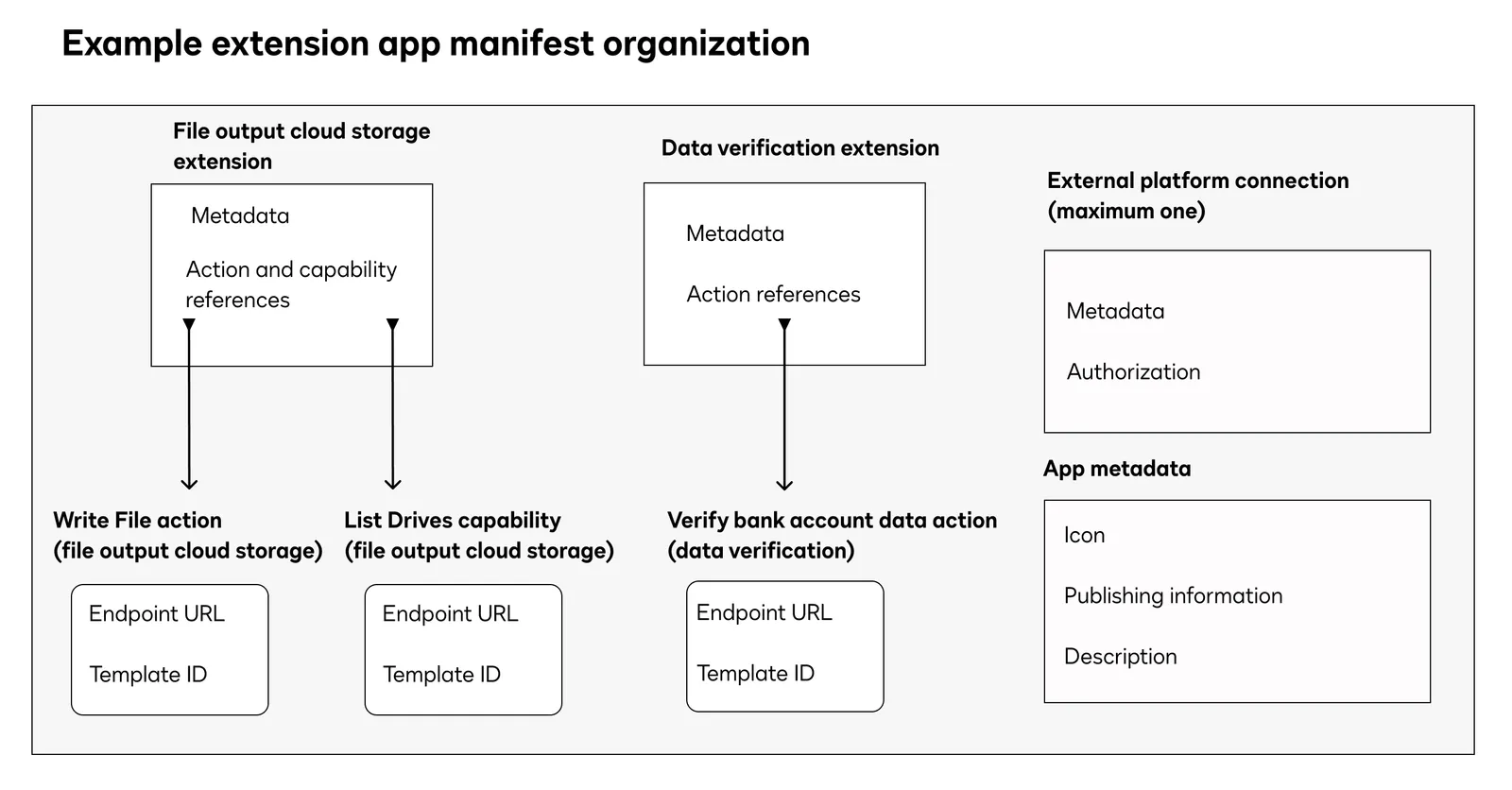
An extension app will connect to a single external platform. The extension app’s manifest file defines:
-
A connection. This connection holds the parameters required to access the external platform’s APIs, typically authorization data for the account that will make the API calls on that platform. To extend your workflow to multiple external platforms, you can create and apply multiple extension apps, one for each platform.
-
Any number of extensions. An extension is a group of related external actions and capabilities that are displayed and enabled together in the Developer Console. Extensions represent sets of workflow tasks, such as archiving data or validating sets of input data.
The value of the extension’s
templateproperty determines which external platform actions your extension app must implement to support its functionality. For example, a data validation extension contract must implement at least one action to validate a dataset.Note: The action names in the extension’s
actionReferencesobject must match the names in theactionsobjects. -
Any number of actions. Actions specify the external platform endpoints to call from your Docusign workflows. Each action calls into a specific external platform API endpoint (such as to archive a document) when an applicable extension point trigger is reached (such as to write a file to cloud storage), and the response data will be integrated back into your Docusign workflow, when possible, as a confirmation or prompt for further action.
The value of the action’s
templateproperty determines which specific request/response contracts and sets of extension points it will use. See Actions for details about these IDs and a full listing. -
Any number of capabilities. Capabilities are optional actions that an extension app can implement to offer features beyond the base functionality defined by required actions. Like actions, they use specific request/response contracts and may be invoked at designated extension points to enhance the workflow with additional behaviors. See Capabilities for implementation details.
-
A set of metadata that describes the extension app, publisher, and distribution options. This metadata is referenced when the extension app is published in the App Center.
See Publish an extension app for details on the requirements and best practices for setting this metadata in order to pass validation and review.
This diagram illustrates how the pieces of an extension app manifest file are organized.
After you have created your extension app manifest, you can begin testing and publish your extension app to the Docusign App Center.
Example app manifest
Next steps
- See an Example JSON manifest file.
- Learn more about connections.
- Learn more about actions.
- Learn more about capabilities.
- Browse the complete list of extensions and extension points.