
Skip to navigation

Data IO extension contract reference

View as Markdown

The data IO (input/output) extension enables you to add data reading and writing steps to a custom Workflow Builder workflow.

You can include this extension when you register an extension app. If you register the extension app using a form, select the Data Input Output extension in the form-based UI, as shown in this figure:
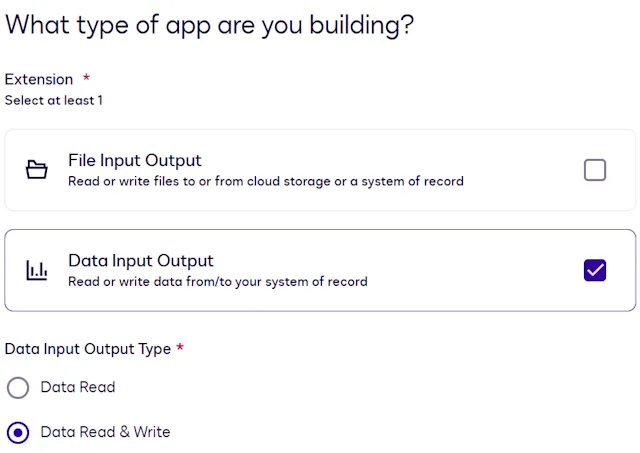
Creating a data IO extension app

If you register the extension app using an app manifest file, set the extensions.template value in your app manifest to DataIO.Version6.DataInputOutput.

This extension has five actions. The action names you specify when you register an extension app depend on whether you register the app using a form or using an app manifest file. The app manifest file values listed here appear in the actions.template property.

Form-based action nameApp manifest file value
Get Type NamesDataIO.Version6.GetTypeNames
Get Type DefinitionsDataIO.Version6.GetTypeDefinitions
Create RecordsDataIO.Version6.CreateRecord
Patch RecordsDataIO.Version6.PatchRecord
Search RecordsDataIO.Version6.SearchRecords

For details about what each action does and when it is invoked, see Data IO extension overview.

You provide the details required for action execution when you register an extension app. See Update extension and action settings for information about defining actions using the form-based registration process. See Action schema for information about action properties in the app manifest file.

You can implement data input as a standalone capability without also implementing data output. To do this when registering an extension app using a form, select Data Read as the Data Input Output Type, as shown here:
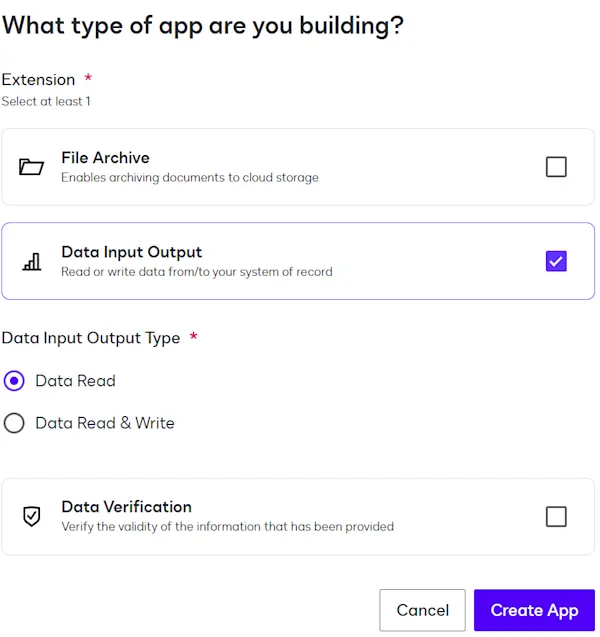
Create a read-only data IO extension app

To register an extension app that reads but does not write data in an app manifest file, implement only the DataIO.Version6.SearchRecords, DataIO.Version6.GetTypeNames, and DataIO.Version6.GetTypeDefinitions actions.

Note: You cannot implement data output as a standalone capability, because it uses the data input actions to find the records to update. If your extension must write data to your system of record, you must select Data Read & Write in the form-based UI, or implement all five data IO actions in the app manifest.

Action contracts

This action calls the external system of record to retrieve the names of the supported types. These types represent the data objects (or database table names) in your system of record. In Concerto nomenclature, these are referred to as concepts.

Note: The names of the types returned by this action will be used as input for the Get Type Definitions (DataIO.Version6.GetTypeDefinitions) action.

Get Type Names is the label for this action that appears when you register an extension app using a form. If you register your extension app using an app manifest file, the actions.template property value for this action is DataIO.Version6.GetTypeNames.

HTTP method

This action initiates a POST request to the external API service.

Request

{}

The input is an empty JSON object. There is no data specified, because this action returns all types supported by the external system of record.

Response

{
"typeNames": [
{
"typeName": "dog",
"label": "Dog",
"description": "A friendly and fluffy creature"
},
{
"typeName": "human",
"label": "Human"
}
]
}
PropertyTypeOccurrenceDescription
typeNamesObject[]RequiredA list of objects representing the types supported by the external system.
typeNames[].typeNamestringRequiredThe name of the type.
typeNames[].labelstringRequiredA display-friendly name of the type that will be rendered in the UI.
typeNames[].descriptionstringOptionalA description of the type.

Type definitions are based on the Concerto data modeling language. In Concerto nomenclature, types are referred to as concepts. Given a list of types, the external system must return a list of Concerto declarations representing the properties of each type. Your app proxy should initially fetch the schemas associated with these types and then convert them to Concerto’s metamodel JSON format

. This enables Docusign to interpret your chosen system’s types consistently.

You can use Concerto’s CLI or JavaScript API to convert your models.

Get Type Definitions is the label for this action that appears when you register an extension app using a form. If you register your extension app using an app manifest file, the actions.template property value for this action is DataIO.Version6.GetTypeDefinitions.

Note: When creating a RelationshipProperty, ensure that the type that is being referred to is identified.

The following examples reflect an external system of record with two tables: Dog and Human.

The Dog type is defined as:

PropertyTypeLabelConstraints
IdStringDog ID
  • Required
  • Read Only
  • MaxLength = 18
NameStringDog Name
  • Required
  • Supports all CRUD operations
  • MaxLength = 50
BreedBreed (enum)Dog Breed
  • Optional
  • Supports all CRUD operations
AgeIntegerDog Age
  • Optional
  • Supports all CRUD operations
  • MinValue = 0
  • MaxValue = 100
OwnerHumanOwners
  • Optional
  • Array
  • Doesn’t support any CRUD operations

The Breed enum has the following values:

ValueLabel
BeagleBeagle
GermanShepherdGerman Shepherd
OtherOther

The Human type is defined as:

PropertyTypeLabelConstraints
EmailStringHuman Email
  • Required
  • Supports Create, Read, Update
  • MaxLength = 50
NameStringHuman Name
  • Optional
  • Supports all CRUD operations

HTTP method

This action initiates a POST request to the external API service.

Request

{
"typeNames": ["dog", "human", "cat"]
}
PropertyTypeDescription
typeNamesstring[]A list of names representing types in the external system. The client is requesting the converted schemas for those types.

Response

{
"declarations": [
{
"$class": "concerto.metamodel@1.0.0.ConceptDeclaration",
"name": "dog",
"isAbstract": false,
"decorators": [
{
"$class": "concerto.metamodel@1.0.0.Decorator",
"name": "Term",
"arguments": [
{
"$class": "concerto.metamodel@1.0.0.DecoratorString",
"value": "Dog"
}
]
},
{
"$class": "concerto.metamodel@1.0.0.Decorator",
"name": "Crud",
"arguments": [
{
"$class": "concerto.metamodel@1.0.0.DecoratorString",
"value": "Createable,Readable,Updateable"
}
]
}
],
"identified": {
"$class": "concerto.metamodel@1.0.0.IdentifiedBy",
"name": "Id"
},
"properties": [
{
"$class": "concerto.metamodel@1.0.0.StringProperty",
"name": "Id",
"isOptional": false,
"isArray": false,
"decorators": [
{
"$class": "concerto.metamodel@1.0.0.Decorator",
"name": "Term",
"arguments": [
{
"$class": "concerto.metamodel@1.0.0.DecoratorString",
"value": "Dog ID"
}
]
},
{
"$class": "concerto.metamodel@1.0.0.Decorator",
"name": "Crud",
"arguments": [
{
"$class": "concerto.metamodel@1.0.0.DecoratorString",
"value": "Readable"
}
]
}
],
"lengthValidator": {
"$class": "concerto.metamodel@1.0.0.StringLengthValidator",
"maxLength": 18
}
},
{
"$class": "concerto.metamodel@1.0.0.StringProperty",
"name": "Name",
"isOptional": false,
"isArray": false,
"decorators": [
{
"$class": "concerto.metamodel@1.0.0.Decorator",
"name": "Term",
"arguments": [
{
"$class": "concerto.metamodel@1.0.0.DecoratorString",
"value": "Dog Name"
}
]
},
{
"$class": "concerto.metamodel@1.0.0.Decorator",
"name": "Crud",
"arguments": [
{
"$class": "concerto.metamodel@1.0.0.DecoratorString",
"value": "Createable,Readable,Updateable"
}
]
}
],
"lengthValidator": {
"$class": "concerto.metamodel@1.0.0.StringLengthValidator",
"maxLength": 50
}
},
{
"$class": "concerto.metamodel@1.0.0.ObjectProperty",
"name": "Breed",
"isOptional": true,
"isArray": false,
"decorators": [
{
"$class": "concerto.metamodel@1.0.0.Decorator",
"name": "Term",
"arguments": [
{
"$class": "concerto.metamodel@1.0.0.DecoratorString",
"value": "Dog Breed"
}
]
},
{
"$class": "concerto.metamodel@1.0.0.Decorator",
"name": "Crud",
"arguments": [
{
"$class": "concerto.metamodel@1.0.0.DecoratorString",
"value": "Createable,Readable,Updateable"
}
]
}
],
"type": {
"$class": "concerto.metamodel@1.0.0.TypeIdentifier",
"name": "DogBreed_Enum"
}
},
{
"$class": "concerto.metamodel@1.0.0.IntegerProperty",
"name": "Age",
"isOptional": true,
"isArray": false,
"decorators": [
{
"$class": "concerto.metamodel@1.0.0.Decorator",
"name": "Term",
"arguments": [
{
"$class": "concerto.metamodel@1.0.0.DecoratorString",
"value": "Dog Age"
}
]
},
{
"$class": "concerto.metamodel@1.0.0.Decorator",
"name": "Crud",
"arguments": [
{
"$class": "concerto.metamodel@1.0.0.DecoratorString",
"value": "Createable,Readable,Updateable"
}
]
}
],
"validator": {
"$class": "concerto.metamodel@1.0.0.IntegerDomainValidator",
"upper": 100,
"lower": 0
}
},
{
"$class": "concerto.metamodel@1.0.0.RelationshipProperty",
"name": "Owner",
"isOptional": true,
"isArray": true,
"decorators": [
{
"$class": "concerto.metamodel@1.0.0.Decorator",
"name": "Term",
"arguments": [
{
"$class": "concerto.metamodel@1.0.0.DecoratorString",
"value": "Owners"
}
]
}
],
"type": {
"$class": "concerto.metamodel@1.0.0.TypeIdentifier",
"name": "Human"
}
}
]
},
{
"$class": "concerto.metamodel@1.0.0.EnumDeclaration",
"name": "DogBreed_Enum",
"properties": [
{
"$class": "concerto.metamodel@1.0.0.EnumProperty",
"name": "Beagle",
"decorators": [
{
"$class": "concerto.metamodel@1.0.0.Decorator",
"name": "Term",
"arguments": [
{
"$class": "concerto.metamodel@1.0.0.DecoratorString",
"value": "Beagle"
}
]
}
]
},
{
"$class": "concerto.metamodel@1.0.0.EnumProperty",
"name": "GermanShepherd",
"decorators": [
{
"$class": "concerto.metamodel@1.0.0.Decorator",
"name": "Term",
"arguments": [
{
"$class": "concerto.metamodel@1.0.0.DecoratorString",
"value": "German Shepherd"
}
]
}
]
},
{
"$class": "concerto.metamodel@1.0.0.EnumProperty",
"name": "Other",
"decorators": [
{
"$class": "concerto.metamodel@1.0.0.Decorator",
"name": "Term",
"arguments": [
{
"$class": "concerto.metamodel@1.0.0.DecoratorString",
"value": "Other"
}
]
}
]
}
]
},
{
"$class": "concerto.metamodel@1.0.0.ConceptDeclaration",
"name": "human",
"isAbstract": false,
"decorators": [
{
"$class": "concerto.metamodel@1.0.0.Decorator",
"name": "Term",
"arguments": [
{
"$class": "concerto.metamodel@1.0.0.DecoratorString",
"value": "Human"
}
]
}
],
"identified": {
"$class": "concerto.metamodel@1.0.0.IdentifiedBy",
"name": "Email"
},
"properties": [
{
"$class": "concerto.metamodel@1.0.0.StringProperty",
"name": "Email",
"isOptional": false,
"isArray": false,
"decorators": [
{
"$class": "concerto.metamodel@1.0.0.Decorator",
"name": "Term",
"arguments": [
{
"$class": "concerto.metamodel@1.0.0.DecoratorString",
"value": "Human Email"
}
]
},
{
"$class": "concerto.metamodel@1.0.0.Decorator",
"name": "Crud",
"arguments": [
{
"$class": "concerto.metamodel@1.0.0.DecoratorString",
"value": "Createable,Readable,Updateable"
}
]
}
],
"lengthValidator": {
"$class": "concerto.metamodel@1.0.0.StringLengthValidator",
"maxLength": 50
}
},
{
"$class": "concerto.metamodel@1.0.0.StringProperty",
"name": "Name",
"isOptional": true,
"isArray": false,
"decorators": [
{
"$class": "concerto.metamodel@1.0.0.Decorator",
"name": "Term",
"arguments": [
{
"$class": "concerto.metamodel@1.0.0.DecoratorString",
"value": "Human Name"
}
]
},
{
"$class": "concerto.metamodel@1.0.0.Decorator",
"name": "Crud",
"arguments": [
{
"$class": "concerto.metamodel@1.0.0.DecoratorString",
"value": "Createable,Readable,Updateable"
}
]
}
]
}
]
}
],
"errors": [
{
"typeName": "cat",
"code": "SCHEMA_RETRIEVAL_FAILED",
"message": "Failed to fetch the schema of cat from the external system of record"
}
]
}
PropertyTypeOccurrenceDescription
declarationsDeclarationUnion[]RequiredA list of schemas present in the external system. Each schema must be in the format of a Concerto DeclarationUnion object.
This array contains schemas not only for the requested types, but also for any related types, subtypes, associated enums, and so on. In the example above, two definitions (dog and human) are fetched, along with the associated DogBreed enum.
For more information about related types, see Define related objects in a data model.
Note: Each concept and property must include a Crud decorator that indicates which CRUD operations can be applied. This is required for the Workflow Builder experience.
CRUD operations can be used in any combination; however, certain operations are required for concepts and properties to appear in each step of the Workflow Builder UI. The required CRUD operations of each step are listed below.
In a Workflow Builder data read scenario:
- Step 1: read (concepts)
- Step 2: read (properties)
- Step 3: read (properties)
In a Workflow Builder data write scenario:
- Step 1: create or update (concepts)
- Step 2: read (properties)
- Step 3: create or update (properties)
If no CRUD operations are intended for a property, there’s no need to include the CRUD decorator.
errorsGetTypeDefinitionError[]OptionalA list of errors associated with fetching or transforming the schemas.

GetTypeDefinitionError

PropertyTypeOccurrenceDescription
typeNamestringRequiredThe name of the type for which a declaration could not be returned.
codestringRequiredAn error code representing the issue. Must be one of the following values:
  • unknown
  • schemaRetrievalFailed
  • schemaTransformationFailed
messagestringRequiredAn error message providing more details about the issue.

This action creates an object in the external system of record. The type (model) is specified by typeName, and the properties are specified in the data object.

Create Record is the label for this action that appears when you register an extension app using a form. If you register your extension app using an app manifest file, the actions.template property value for this action is DataIO.Version6.CreateRecord.

HTTP method

This action initiates a POST request to the external API service.

Request

{
"typeName": "dog",
"idempotencyKey": "123-456-789",
"data": {
"Name": "Snoopy",
"Breed": "Beagle"
}
}
PropertyTypeDescription
typeNamestringThe type of the record to create.
recordId*stringAn optional identifier of the new record. The external system may or may not accept this identifier.
idempotencyKeystringA unique key that is passed to the API to ensure that the request is processed only once, even if it is submitted multiple times.
The idempotency key is unique for each call. If the same key is reused for identical requests, the server will recognize the repeated attempt and will not execute the operation.
The server should store the state of the request associated with the idempotency key. When a request with a previously used key is received, the server should return the stored response instead of reprocessing the request.
dataobjectA key-value object representing the data to write to the new record.
For information about the format for various data types, see Data type standards.

*Not always included in the JSON request. Your API proxy must handle the case in which this property is not present.

Response

{
"recordId": "abc-123-def-456"
}
PropertyTypeOccurrenceDescription
recordIdstringRequiredA unique identifier representing the record that was created in the external system.

This action updates an existing record. Only the attributes to be updated are included in the data object.

Patch Record is the label for this action that appears when you register an extension app using a form. If you register your extension app using an app manifest file, the actions.template property value for this action is DataIO.Version6.PatchRecord.

HTTP method

This action initiates a POST request to the external API service.

Request

{
"typeName": "dog",
"idempotencyKey": "123-456-789",
"recordId": "abc-123-def-456",
"data": {
"Name": "Marmaduke",
"Breed": "Great Dane"
}
}
PropertyTypeDescription
typeNamestringThe type of the record to update.
idempotencyKeystringA unique key that is passed to the API to ensure that the request is processed only once, even if it is submitted multiple times.
The idempotency key must be unique for each call. If the same key is reused for identical requests, the server will recognize the repeated attempt and will not execute the operation.
The server should store the state of the request associated with the idempotency key. When a request with a previously used key is received, the server should return the stored response instead of reprocessing the request.
recordIdstringThe identifier of the existing record.
dataobjectRepresents the attributes to update in the existing record.

This object includes only the attributes that should be updated. It does not include the existing attributes that will remain unchanged.
For information about the format for various data types, see Data type standards.

Response

{
"success": true
}
PropertyTypeOccurrenceDescription
successbooleanRequiredIndicates whether the record was successfully updated.

This action searches for one or more records in the external system of record. It uses a custom query filtering language. Your app proxy must convert the provided query into one supported by your external system of record. Then apply the query and return the results.

Workflows use the Search Records action in Read from steps and Writeback to steps. For a Read from step, the action returns records that can be used in subsequent workflow steps, such as a Collect Data with Web Forms step that displays values from the system of record in a web form. For a Writeback to step that updates a record, a Search Records action identifies the record to be updated. For each step type, the number of records that Workflow Builder supports in the Search Records response is as follows:

Step typeMaximum number of records in a Search Records responseWorkflow behavior if the maximum is exceeded
Read from5Workflow Builder uses only the first five records in the response in subsequent processing.
If the Search Records response contains fewer records than referenced in subsequent workflow processing, the missing record references will be populated with empty values. For example, if a web form includes fields for four emergency contacts, but the search returns only three records, then the web form fields for the fourth contact will be empty.
Writeback to1The workflow instance execution fails with this error:
{
  "message": "Found multiple records for the given search query",
  "statusCode": 400
}

Docusign recommends that extension app developers provide documentation guiding workflow process builders to use only search queries that retrieve the supported number of records.

Note: When configuring a Workflow Builder Read from step, process builders can use the preview feature to see which records the search will return. See Configure a Read from Salesforce Step for details about previewing query results.

Search Records is the label for this action that appears when you register an extension app using a form. If you register your extension app using an app manifest file, the actions.template property value for this action is DataIO.Version6.SearchRecords.

HTTP method

This action initiates a POST request to the external API service.

Example requests

This example request shows a query of dog objects where the breed attribute is Beagle.

{
"query": {
"$class": "com.docusign.connected.data.queries@1.0.0.Query",
"attributesToSelect": ["Id", "Name"],
"from": "dog",
"queryFilter": {
"$class": "com.docusign.connected.data.queries@1.0.0.QueryFilter",
"operation": {
"$class": "com.docusign.connected.data.queries@1.0.0.ComparisonOperation",
"leftOperand": {
"$class": "com.docusign.connected.data.queries@1.0.0.Operand",
"name": "Breed",
"type": "STRING",
"isLiteral": false
},
"operator": "EQUALS",
"rightOperand": {
"$class": "com.docusign.connected.data.queries@1.0.0.Operand",
"name": "Beagle",
"type": "STRING",
"isLiteral": true
}
}
}
},
"pagination": {
"limit": 3,
"skip": 0
}
}
PropertyTypeDescription
queryIQueryA query expression. See Custom query language reference for the detailed schema.
paginationobjectRepresents pagination parameters used to control the number of records returned in a response. For example, if limit is set to 10 and skip is set to 5, the response should include the sixth through fifteenth records.
pagination.limitnumberThe maximum number of records to be returned per page.
pagination.skipnumberThe number of records to bypass before taking the records to return.

Example responses

{
"records": [
{
"Id": "abc-123-def-456",
"Name": "Snoopy"
},
{
"Id": "aaa-000-aaa-111",
"Name": "Francis"
}
]
}
PropertyTypeOccurrenceDescription
recordsobject[]RequiredA list of objects representing each record. The properties are those specified by query.attributesToSelect in the request.
If no matching record is found, the response should be an empty records array, not an error.
For information about the format for various data types, see Data type standards.

Multi-level querying

Multi-level querying enables retrieving data beyond the top level of an object model by accessing deeply nested properties. Unlike basic queries that return only direct attributes, multi-level queries allow for structured traversal into objects, lists, and references to extract targeted information. This approach is essential when working with complex data models where objects contain deeply nested properties or maintain relationships with other entities.

For more information about relationships, see Define related objects in a data model.

To support multi-level querying, a structured format is required to define how data should be accessed at different depths. Queries must specify whether to return full objects, individual properties, or entire sets of related attributes. One effective method for structuring these queries is through a standardized format that outlines the selection path.

This dataset represents a structured object containing personal details, addresses, and associated property information, which will be used to demonstrate how multi-level queries can retrieve specific attributes, nested properties, and relational values.

Person Table

idnameagecountry
person_001John30Japan

Address Table

idstreetNamehouseNumberzip_codezip_extension
add_xyz12345John Drive145123455723
efg_alp94565DocuSign Tower St.567345122357

House Defects Table

idaddress_idtypedescriptionseverity
defect_001add_xyz12345VentilationFood in ductsMedium
defect_002add_xyz12345Dry wallMoldHigh
defect_003efg_alp94565WallToo blueLow

Causes Table

iddefect_idreasonrecommended
cause_001defect_001Blocked air filterReplace filter
cause_002defect_001Pest infestationCall exterminator
cause_003defect_002Leaky pipesRepair plumbing
namespace "example"
concept Person {
o String id
o String name
o Integer age
o String country
o Address[] addresses
}
concept Address {
o String id
o String streetName
o Integer houseNumber
o Zip zip
o HouseDefect[] houseDefects
}
concept Zip {
o Integer code
o Integer extension
}
concept HouseDefect {
o String id
o String type
o String description
o String severity
--> Cause[] causes //Relationship to Cause table
}
concept Cause {
o String id
o String reason
o String recommendedFix
---> HouseDefect defect //Relationship back to HouseDefect
}

This table details the supported query structures and provides concrete examples of how multi-level querying can be applied. Note that support for certain features may vary depending on the application, as some systems may not support all querying capabilities.

Example typeQueryExpected output
Query a Primitive Object (Existing Functionality)
{ 
attributesToSelect: ['zip'] from: 'Address'
}
{
 "zip": {
  "code": 12345,
  "extension": 5723
   }
},
{
 "zip": {
  "code": 34512,
  "extension": 2357
   }
}
Query a specific property inside an object
{   
attributesToSelect: [zip/code']
from: 'Address'
where: 'Address.id = "address_001"'
}
{
 "zip":  {
    "code": 12345
  }
}
Query an Embedded Array
{
attributesToSelect: ['addresses[]']
from: 'Person'
where: 'Person.id = "person_001"'
}
{
"addresses": [
   {
    "streetName": "John Drive",
    "houseNumber": 145,
    "zip": {
      "code": 12345,
      "extension": 5723
    }
   },
{
    "streetName": "DocuSign Tower St.",
    "houseNumber": 567,
    "zip": {
      "code": 34512,
      "extension": 2357
      }
    }
  ]
}
Query a specific property for each embedded object in an array
{  
attributesToSelect: ['addresses[]/streetName']
from: 'Person'
where: 'Person.id = "person_001"'
}
{
"addresses": [
  { "streetName": "John Drive" },
  { "streetName": "DocuSign Tower St." }
 ]
}
Query a relationship property (return the ID)
{  
attributesToSelect: ['defect(:HouseDefect)']
from: 'Cause'
where: 'Cause.id = "cause_001"'
}
{ 
  "id": "cause_001",
  "defect": "defect_001"
}
Query a relationship property and get a specific property
{
attributesToSelect: ['defect(:HouseDefect)/type']
from: 'Cause'
where: 'Cause.id = "cause_003"'
}
{
    "id": "cause_003",
    "defect": 
     { "type": "Dry Wall" }
}
Query a Relationship Property and Retrieve All Properties
{   attributesToSelect: ['defect(:HouseDect)/*']
from: 'Cause'
where: 'Cause.id = "cause_002"'
}
{
    "id": "cause_002",
    "defect": {
      "id": "defect_001",
      "type": "Ventilation"
     }
}
Query a Relationship Property for Each and Retrieve a Specific Property
{
attributesToSelect: ['causes(:Cause)[]/reason']
from: 'HouseDefect'
}
{
    "id": "defect_001",
    "causes": [
      { "reason": "Blocked air filter" },
     { "reason": "Pest infestation" }
    ]
},
{
    "id": "defect_002",
    "causes": [
      { "reason": "Leaky pipes" }
    ]
},
{
    "id": "defect_003",
    "causes": []
}
Query a Relationship Property for Each and Retrieve All Properties
{
attributesToSelect: ['causes(:Cause)[]/*']
from: 'HouseDefect'
}
{
    "id": "defect_001",
    "causes": [
      { "id": "cause_001",
      "reason": "Blocked air filter",
      "recommendedFix": "Replace filter"
      },
      { "id": "cause_002",
    "reason": "Pest infestation",
    "recommendedFix": "Call exterminator"
    }
   ]
},
{
    "id": "defect_002",
    "causes": [
     { "id": "cause_003",
      "reason": "Leaky pipes",
      "recommendedFix": "Repair plumbing"
    }
   ]
},
{
    "id": "defect_003",
    "causes": []
}

Error handling

If a data IO action encounters an error, it should return an HTTP error code 400, 404, or 500 along with a message describing the error.

Example error responses:

HttpErrorCode: 404
{
code: NOT_FOUND
message: No record was found for the provided recordId
}

Note: A 404 error should not be returned if a Search Records request results in no matching records. Instead, return an empty records array.

HttpErrorCode: 400
{
code: BAD_REQUEST
message: Cannot update age property of the record
}
HttpErrorCode: 500
{
code: INTERNAL_SERVER_ERROR
message: Unknown error when trying to update record
}

This error structure applies to all actions. Developers are responsible for providing a code and message for each error.

Next steps