
API proxy
An API proxy serves as an intermediary between a Docusign extension app and the external API service to which it sends requests. If requests are not in the format required by the API endpoints, or if the responses are not in the format that Docusign expects, you’ll need to build and host an API proxy that transforms the requests and responses to the correct format before passing them on to their destinations. If the API’s endpoint requests and responses conform to Docusign specifications, an API proxy is not needed.
When an API proxy is in use, an extension app sends its requests to proxy endpoints instead of directly to the external service endpoints, and the proxy routes them to the service. Conversely, the API service sends its responses to the proxy, which then routes them to the extension app.
API proxy settings in the extension app registration
Each endpoint that your extension app calls is represented in the extension app registration as an action or capability. For example, if the extension app calls endpoints to list drives in a cloud storage system, list directories, and write a file to the specified drive and directory, the extension app registration would include an action or capability for each of those operations. Each action or capability definition includes the endpoint URI for that request. When an API proxy is in use, the URI specifies the proxy endpoint.
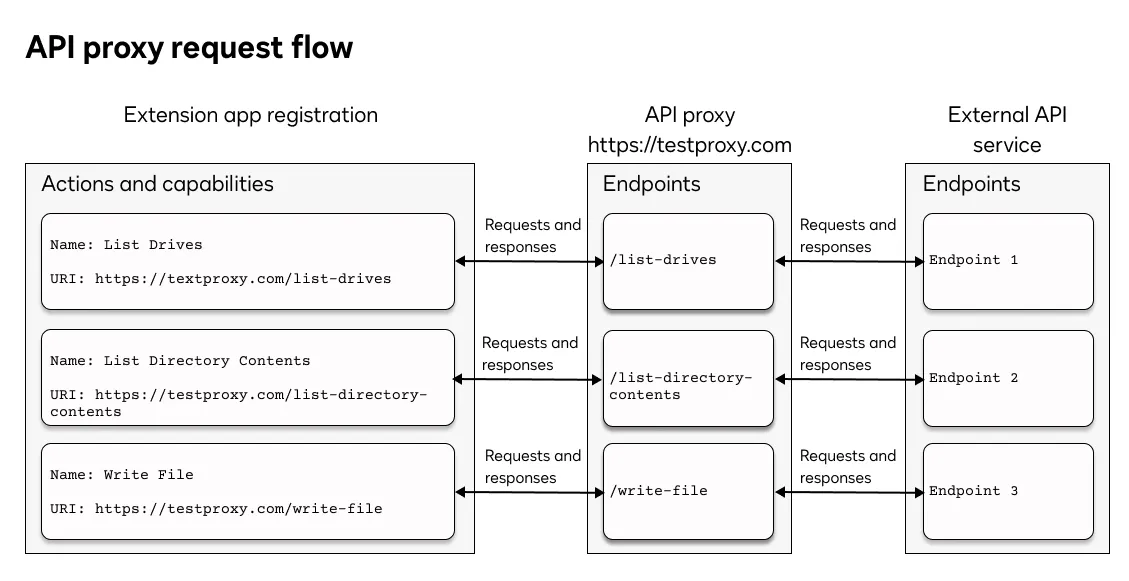
If you register an extension app using a form, you can supply the proxy endpoint URIs when you update the integration details. The other option is to supply the proxy endpoint URIs while editing the app manifest file.
When an API proxy is in use, endpoint requests from the extension app will include the access token that the external service or identity provider returned during authorization. The API proxy should validate the token before passing the request on to the external API endpoint.
Determine whether your extension app needs an API proxy
To determine whether your extension app needs an API proxy, evaluate the Docusign action contract for each action and capability included in your extension app registration:
- Compare the request parameters in the contract with the values that the external API endpoints require.
- Compare the response parameters that the external service returns with the expected response values in the contract.
If there is any mismatch between a Docusign contract definition and the external API request or response, you’ll need to set up an API proxy to handle the incompatibility.
You can access the action and capability contracts for each extension from the Extension contracts page.
Requirements
Here’s a list of requirements for API proxies.
Next steps
- Learn more about actions and capabilities.
- See Extension contracts to access the action and capability contracts for each extension.
- Get an overview of the process to build an extension app.