
Skip to navigation

Connected fields extension contract reference

View as Markdown

The connected fields extension enables you to verify user-entered values in eSignature envelopes against a system of record. The verification result and message from the external system, as well as suggested autofill values, are displayed in the signing UI.

You can include this extension when you register an extension app. If you register the extension app using a form, select the Connected Fields extension in the form-based UI, as shown in this figure:
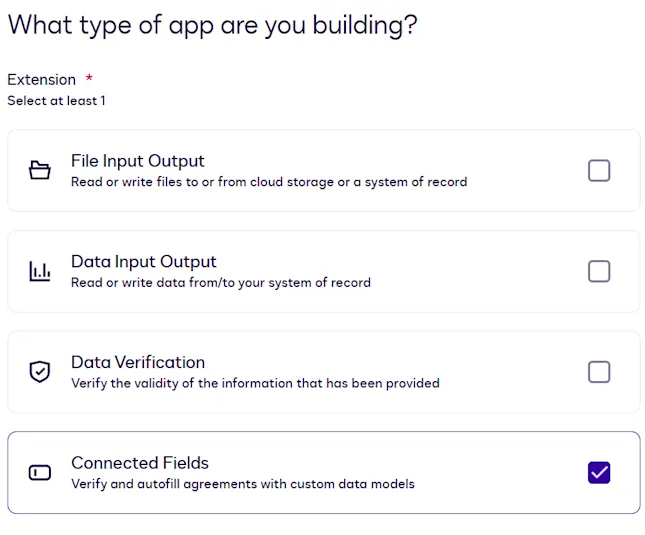
Registering a connected fields extension app

If you register the extension app using an app manifest file, set the extensions.template value in your app manifest to ConnectedFields.Version1.ConnectedFields.

This extension has three actions. The action names you specify when you register an extension app depend on whether you register the app using a form or using an app manifest file. The app manifest file values listed here appear in the actions.template property.

Form-based action nameApp manifest file value
Get Type NamesDataIO.Version6.GetTypeNames
Get Type DefinitionsDataIO.Version6.GetTypeDefinitions
VerifyConnectedFields.Version1.Verify

For details about what each action does and when it is invoked, see Connected fields actions. The connected fields extension uses the data IO extension’s Get Type Names and Get Type Definitions action contracts because the contract details are identical.

You provide the details required for action execution when you register an extension app. See Update extension and action settings for information about defining actions using the form-based registration process. See Action schema for information about action properties in the app manifest file.

Action contracts

This action calls the external system of record to retrieve the names of the supported types. These types represent the data objects (or database table names) in your system of record. In Concerto nomenclature, these are referred to as concepts.

Note: The names of the types returned by this action will be used as input for the Get Type Definitions (DataIO.Version6.GetTypeDefinitions) action.

Get Type Names is the label for this action that appears when you register an extension app using a form. If you register your extension app using an app manifest file, the actions.template property value for this action is DataIO.Version6.GetTypeNames. The connected fields extension uses the data IO extension’s Get Type Names action contract because the contract details are identical.

HTTP method

This action initiates a POST request to the external API service.

Request

{}

The input is an empty JSON object. No data is specified because the external system returns any types that are available for data verification, as indicated by the VerifiableType decorator.

Response

{
"typeNames": [
{
"typeName": "EmailAddress",
"label": "Email Address"
},
{
"typeName": "OwnerName",
"label": "Account Owner Name"
},
{
"typeName": "Account",
"label": "Account Info"
}
]
}
PropertyTypeOccurrenceDescription
typeNamesObject[]RequiredA list of objects representing the types in the external system that support verification.
typeNames[].typeNameS``tringRequiredThe name of the type.
typeNames[].labelS``tringRequiredA display-friendly name of the type that will appear in the eSignature Add Fields view.
typeNames[].descriptionS``tringOptionalA description of the type.

Type definitions are based on the Concerto data modeling language. In Concerto nomenclature, types are referred to as concepts. Given a list of types, the external system must return a list of Concerto declarations representing the properties of each type. Your app proxy should initially fetch the schemas associated with these types and then convert them to Concerto’s metamodel JSON format

. This enables Docusign to interpret your chosen system’s types consistently.

You can use Concerto’s CLI or JavaScript API to convert your models.

Get Type Definitions is the label for this action that appears when you register an extension app using a form. If you register your extension app using an app manifest file, the actions.template property value for this action is DataIO.Version6.GetTypeDefinitions. The connected fields extension uses the data IO extension’s Get Type Definitions action contract because the contract details are identical.

HTTP method

This action initiates a POST request to the external API service.

The following example request and response reflect an external system of record with an Account type. The Account type includes:

PropertyTypeLabelRequired for verification?
account_numStringAccount NumberYes
source_fundStringSource FundYes
destination_fundStringDestination FundYes
balanceDoubleAmount to TransferYes
transferDateDateTimeTransfer DateYes
prospectusBooleanSend Destination Fund ProspectusNo
typeOfAccountTypeOfAccount (enum)Type of AccountYes
emailEmailAddress (object)Owner EmailYes
ownernameOwnerName (object)Account Owner NameYes

The TypeOfAccount enum has the following values:

ValueLabel
brokerageBrokerage
cash_managementCash Management
iraIRA

The EmailAddress type is defined as:

PropertyTypeLabelRequired for verification?
emailStringOwner EmailYes

The OwnerName type is defined as:

PropertyTypeLabelRequired for verification?
ownernameStringAccount Owner NameYes

Request

{
"typeNames": [
"Account",
"EmailAddress",
"OwnerName"
]
}
PropertyTypeDescription
typeNamesString[]A list of names representing types in the external system. The client is requesting the converted schemas for those types.

Response

{
"declarations": [
{
"$class": "concerto.metamodel@1.0.0.ConceptDeclaration",
"name": "EmailAddress",
"isAbstract": false,
"properties": [
{
"$class": "concerto.metamodel@1.0.0.StringProperty",
"name": "email",
"isArray": false,
"isOptional": false,
"decorators": [
{
"$class": "concerto.metamodel@1.0.0.Decorator",
"name": "IsRequiredForVerifyingType"
},
{
"$class": "concerto.metamodel@1.0.0.Decorator",
"name": "Term",
"arguments": [
{
"$class": "concerto.metamodel@1.0.0.DecoratorString",
"value": "Email Address"
}
]
}
],
"lengthValidator": {
"$class": "concerto.metamodel@1.0.0.StringLengthValidator",
"maxLength": 256
}
}
],
"decorators": [
{
"$class": "concerto.metamodel@1.0.0.Decorator",
"name": "VerifiableType"
},
{
"$class": "concerto.metamodel@1.0.0.Decorator",
"name": "Term",
"arguments": [
{
"$class": "concerto.metamodel@1.0.0.DecoratorString",
"value": "Email Address"
}
]
}
]
},
{
"$class": "concerto.metamodel@1.0.0.ConceptDeclaration",
"name": "OwnerName",
"isAbstract": false,
"properties": [
{
"$class": "concerto.metamodel@1.0.0.StringProperty",
"name": "ownername",
"isArray": false,
"isOptional": false,
"decorators": [
{
"$class": "concerto.metamodel@1.0.0.Decorator",
"name": "IsRequiredForVerifyingType"
},
{
"$class": "concerto.metamodel@1.0.0.Decorator",
"name": "Term",
"arguments": [
{
"$class": "concerto.metamodel@1.0.0.DecoratorString",
"value": "Account Owner Name"
}
]
}
],
"lengthValidator": {
"$class": "concerto.metamodel@1.0.0.StringLengthValidator",
"maxLength": 256
}
}
],
"decorators": [
{
"$class": "concerto.metamodel@1.0.0.Decorator",
"name": "VerifiableType"
},
{
"$class": "concerto.metamodel@1.0.0.Decorator",
"name": "Term",
"arguments": [
{
"$class": "concerto.metamodel@1.0.0.DecoratorString",
"value": "Account Owner Name"
}
]
}
]
},
{
"$class": "concerto.metamodel@1.0.0.ConceptDeclaration",
"name": "Account",
"isAbstract": false,
"properties": [
{
"$class": "concerto.metamodel@1.0.0.StringProperty",
"name": "account_num",
"isArray": false,
"isOptional": false,
"decorators": [
{
"$class": "concerto.metamodel@1.0.0.Decorator",
"name": "IsRequiredForVerifyingType"
},
{
"$class": "concerto.metamodel@1.0.0.Decorator",
"name": "Term",
"arguments": [
{
"$class": "concerto.metamodel@1.0.0.DecoratorString",
"value": "Account Number"
}
]
}
]
},
{
"$class": "concerto.metamodel@1.0.0.ObjectProperty",
"name": "ownername",
"type": {
"$class": "concerto.metamodel@1.0.0.TypeIdentifier",
"name": "OwnerName"
},
"isArray": false,
"isOptional": false,
"decorators": [
{
"$class": "concerto.metamodel@1.0.0.Decorator",
"name": "IsRequiredForVerifyingType"
},
{
"$class": "concerto.metamodel@1.0.0.Decorator",
"name": "Term",
"arguments": [
{
"$class": "concerto.metamodel@1.0.0.DecoratorString",
"value": "Account Owner Name"
}
]
}
]
},
{
"$class": "concerto.metamodel@1.0.0.ObjectProperty",
"name": "email",
"type": {
"$class": "concerto.metamodel@1.0.0.TypeIdentifier",
"name": "EmailAddress"
},
"isArray": false,
"isOptional": false,
"decorators": [
{
"$class": "concerto.metamodel@1.0.0.Decorator",
"name": "IsRequiredForVerifyingType"
},
{
"$class": "concerto.metamodel@1.0.0.Decorator",
"name": "Term",
"arguments": [
{
"$class": "concerto.metamodel@1.0.0.DecoratorString",
"value": "Owner Email"
}
]
}
]
},
{
"$class": "concerto.metamodel@1.0.0.StringProperty",
"name": "source_fund",
"isArray": false,
"isOptional": false,
"decorators": [
{
"$class": "concerto.metamodel@1.0.0.Decorator",
"name": "IsRequiredForVerifyingType"
},
{
"$class": "concerto.metamodel@1.0.0.Decorator",
"name": "Term",
"arguments": [
{
"$class": "concerto.metamodel@1.0.0.DecoratorString",
"value": "Source Fund"
}
]
}
]
},
{
"$class": "concerto.metamodel@1.0.0.StringProperty",
"name": "destination_fund",
"isArray": false,
"isOptional": false,
"decorators": [
{
"$class": "concerto.metamodel@1.0.0.Decorator",
"name": "IsRequiredForVerifyingType"
},
{
"$class": "concerto.metamodel@1.0.0.Decorator",
"name": "Term",
"arguments": [
{
"$class": "concerto.metamodel@1.0.0.DecoratorString",
"value": "Destination Fund"
}
]
}
]
},
{
"$class": "concerto.metamodel@1.0.0.DoubleProperty",
"name": "balance",
"isArray": false,
"isOptional": false,
"decorators": [
{
"$class": "concerto.metamodel@1.0.0.Decorator",
"name": "IsRequiredForVerifyingType"
},
{
"$class": "concerto.metamodel@1.0.0.Decorator",
"name": "Term",
"arguments": [
{
"$class": "concerto.metamodel@1.0.0.DecoratorString",
"value": "Amount to Transfer"
}
]
}
]
},
{
"$class": "concerto.metamodel@1.0.0.DateTimeProperty",
"name": "transferDate",
"isArray": false,
"isOptional": false,
"decorators": [
{
"$class": "concerto.metamodel@1.0.0.Decorator",
"name": "IsRequiredForVerifyingType"
},
{
"$class": "concerto.metamodel@1.0.0.Decorator",
"name": "Term",
"arguments": [
{
"$class": "concerto.metamodel@1.0.0.DecoratorString",
"value": "Transfer Date"
}
]
}
]
},
{
"$class": "concerto.metamodel@1.0.0.BooleanProperty",
"name": "prospectus",
"isArray": false,
"isOptional": true,
"decorators": [
{
"$class": "concerto.metamodel@1.0.0.Decorator",
"name": "Term",
"arguments": [
{
"$class": "concerto.metamodel@1.0.0.DecoratorString",
"value": "Send Destination Fund Prospectus"
}
]
}
]
},
{
"$class": "concerto.metamodel@1.0.0.ObjectProperty",
"name": "typeOfAccount",
"type": {
"$class": "concerto.metamodel@1.0.0.TypeIdentifier",
"name": "TypeOfAccount"
},
"isArray": false,
"isOptional": false,
"decorators": [
{
"$class": "concerto.metamodel@1.0.0.Decorator",
"name": "IsRequiredForVerifyingType"
},
{
"$class": "concerto.metamodel@1.0.0.Decorator",
"name": "Term",
"arguments": [
{
"$class": "concerto.metamodel@1.0.0.DecoratorString",
"value": "Type of Account"
}
]
}
]
}
],
"decorators": [
{
"$class": "concerto.metamodel@1.0.0.Decorator",
"name": "VerifiableType"
},
{
"$class": "concerto.metamodel@1.0.0.Decorator",
"name": "Term",
"arguments": [
{
"$class": "concerto.metamodel@1.0.0.DecoratorString",
"value": "Account Info"
}
]
}
]
},
{
"$class": "concerto.metamodel@1.0.0.EnumDeclaration",
"name": "TypeOfAccount",
"properties": [
{
"$class": "concerto.metamodel@1.0.0.EnumProperty",
"name": "brokerage",
"decorators": [
{
"$class": "concerto.metamodel@1.0.0.Decorator",
"name": "Term",
"arguments": [
{
"$class": "concerto.metamodel@1.0.0.DecoratorString",
"value": "Brokerage"
}
]
}
]
},
{
"$class": "concerto.metamodel@1.0.0.EnumProperty",
"name": "cash_management",
"decorators": [
{
"$class": "concerto.metamodel@1.0.0.Decorator",
"name": "Term",
"arguments": [
{
"$class": "concerto.metamodel@1.0.0.DecoratorString",
"value": "Cash Management"
}
]
}
]
},
{
"$class": "concerto.metamodel@1.0.0.EnumProperty",
"name": "ira",
"decorators": [
{
"$class": "concerto.metamodel@1.0.0.Decorator",
"name": "Term",
"arguments": [
{
"$class": "concerto.metamodel@1.0.0.DecoratorString",
"value": "IRA"
}
]
}
]
}
],
"decorators": [
{
"$class": "concerto.metamodel@1.0.0.Decorator",
"name": "Term",
"arguments": [
{
"$class": "concerto.metamodel@1.0.0.DecoratorString",
"value": "Type of Account"
}
]
}
]
}
]
}
PropertyTypeOccurrenceDescription
declarationsDeclarationUnion[]RequiredA list of schemas present in the external system. Each schema must be in the format of a Concerto DeclarationUnion object.
This array contains schemas not only for the requested types, but also for any related types, subtypes, associated enums, and so on. In the example above, three definitions (brokerage, cash_management, and ira) are fetched, along with the associated TypeOfAccount enum.
See the next section for details about verification decorators.
Note: Do not include Crud decorators for concepts or properties. They are not applicable for the connected fields extension.
errorsGetTypeDefinitionError[]OptionalA list of errors associated with fetching or transforming the schemas.

Verification decorators

The Get Type Definitions response must include decorators that identify concepts that are available for verification. The decorators are:

  • VerifiableType: Apply this decorator to all concepts in the response whose properties should be available for verification. Docusign ignores any concepts in the response that are not marked with this decorator.

    If a concept includes this decorator, the eSignature Add Fields view will render all properties under the concept as connected fields that can be added to documents for custom data verification. While object properties are supported for verification, relationship properties are not.

    Note: Only concept declarations can include the VerifiableType decorator. Do not apply this decorator to enum declarations. To define an enum as verifiable, include the enum as an object property within a concept declaration that has the VerifiableType decorator. See the response above for an example, and note the definition of the typeOfAccount object property, which references an enum, within the Account concept declaration.

    In the current release, Docusign does not support marking individual properties as verifiable. If you do not want every property in a concept to be verifiable, then include only verifiable properties in the Get Type Definitions response. In addition, Docusign recommends that the response only include concepts that should be available for verification.

  • IsRequiredForVerifyingType: Apply this decorator to properties that, when rendered as envelope fields, must be populated before Docusign sends a verification request to the external system. This decorator can be applied to properties in concepts marked with the VerifiableType decorator.

    Note: To make a property optional, you must include an isOptional property set to true in the Concerto definition. This is because Docusign treats a property as required by default if the Concerto definition does not include an isOptional property set to true, even if the IsRequiredForVerifyingType decorator is omitted. However, for required properties, Docusign recommends using the IsRequiredForVerifyingType decorator to reduce ambiguity.

    In the Add Fields view, when an envelope or template preparer drags any required connected field to the document, all required connected fields under the same concept will also be inserted into the document as a group.

    Optional connected fields under the same concept can be added to the document as part of the same group. If an optional connected field is added to a document without also including required connected fields, verification will fail when envelope recipients populate the optional field.

    When creating envelopes programmatically via the Connected Fields API, only required connected fields can be included. The TabInfo:GetConnectedFieldsTabGroups response does not return optional connected fields.

If the Get Type Definitions response includes verification decorators as shown in the example above, the eSignature Add Fields view will display these connected fields:
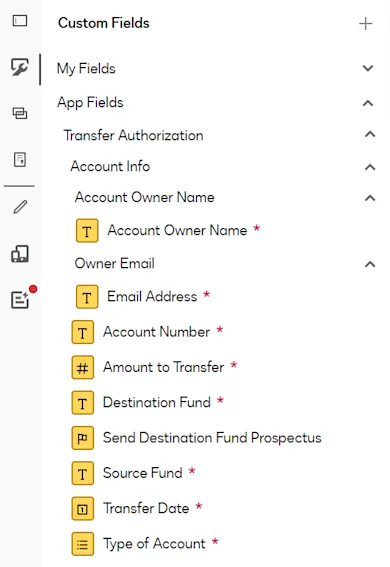
Connected fields list in Add Fields view

When an envelope or template preparer drags any of the required fields to the document, all of the other required fields will be inserted as well:
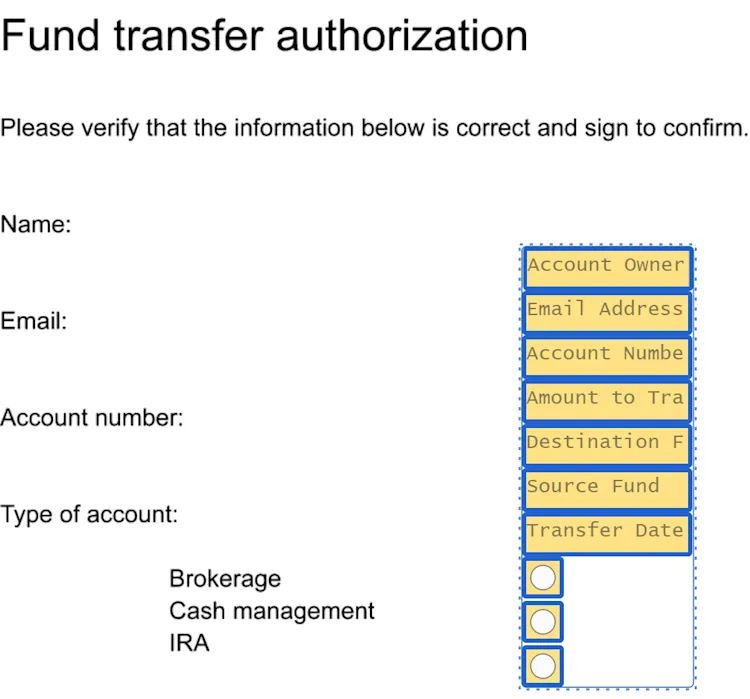
Add Fields view with connected fields

The preparer can rearrange the fields as needed for the document layout.

GetTypeDefinitionError

PropertyTypeOccurrenceDescription
typeNameStringRequiredThe name of the type for which a declaration could not be returned.
codeStringRequiredAn error code representing the issue. Must be one of the following values:
  • unknown
  • schemaRetrievalFailed
  • schemaTransformationFailed
messageStringRequiredAn error message providing more details about the issue.

The Verify action is executed when an eSignature envelope recipient has populated all required connected fields in an envelope, or when the recipient modifies any of those values. The request to the external system includes the user-entered values, and the external system can apply any required business logic to verify them. The response must include a verification result and a success or failure message. Optionally, the response can include suggested values to autofill in the signing UI.

Verify is the label for this action that appears when you register an extension app using a form. If you register your extension app using an app manifest file, the actions.template property value for this action is ConnectedFields.Version1.Verify.

HTTP method

This action initiates a POST request to the external API service.

Request

{
"typeName": "Account",
"idempotencyKey": "123-456-789",
"data": {
"account_num": "123456789",
"source_fund": "Money Market Fund",
"destination_fund": "Growth Stock Fund",
"balance": 10000.00,
"transfer_date": "2025-03-05T00:00:00.000Z",
"prospectus": true,
"typeOfAccount": "brokerage",
"email": "sally.signer@email.com",
"ownername": "Sally Signer"
}
}
PropertyTypeOccurrenceDescription
typeNameStringRequiredThe type that contains the values being verified.
idempotencyKeyStringRequiredA unique key that is passed to the API to ensure that the request is processed only once, even if it is submitted multiple times.
The idempotency key is unique for each call. If the same key is reused for identical requests, the server will recognize the repeated attempt and will not execute the operation.
The server should store the state of the request associated with the idempotency key. When a request with a previously used key is received, the server should return the stored response instead of reprocessing the request. See Retry logic for additional information.
dataObjectRequiredKey-value pairs of data to verify.
In each pair, the key is the name returned for the property in the Get Type Definitions response.

Response

This response indicates that verification succeeded and includes a verifyResponseMessage, which is displayed in the signing UI.

{
"verified": true,
"verifyResponseMessage": "Transfer verification completed.",
"verificationResultCode": "SUCCESS",
"verificationResultDescription": "Transaction confirmation: W63427."
}
PropertyTypeOccurrenceDescription
verifiedBooleanRequiredtrue if values in the verification request passed all the checks on the external system, otherwise false.
verifyResponseMessageStringRequiredA message to be displayed in the signing UI to inform the user whether verification succeeded or failed.
verifyFailureReasonStringRequired if verified is falseA message to be displayed in the signing UI if the user-supplied values did not pass verification. This text can provide guidance for correcting the issues.
verificationResultCodeStringOptionalA code representing the specific result of the verification process. This is not displayed in the signing UI.
verificationResultDescriptionStringOptionalA descriptive message providing more details about the verification result. This is not displayed in the signing UI.
suggestionsArrayOptionalAn array that can be used to supply autofill values in any of the connected fields in the signing UI.
This array must conform to the data model of the type being verified. The array must include:
  • Properties marked as required in the data model
  • Properties that have the IsRequiredForVerifyingType decorator
Optional properties for the type can be included as well. Any properties that do not belong to the type will be ignored.
Because the array must include all required properties for the record, the values for the user-supplied properties that passed verification should be returned in the array. Any values in the array that are different from the user-entered values will replace the user-entered values as autofill suggestions in the signing UI.
In the current release, returning multiple suggested values from the same field is not supported.
Note: The external system should not return sensitive user data for autofilling. For example, if a Social Security number is being verified, the external system should not return an autofill value if the user-entered value fails verification.
passthroughResponseDataObjectOptionalAny additional data or metadata to be passed through from the verification process. This might contain information relevant for further processing or troubleshooting. This is not displayed in the signing UI.

Note: Any response values that are not displayed in the signing UI can be retrieved by running a Verify action extension test on the Developer Console Testing page.

Error handling

If a connected fields action results in an error that prevents the request from being processed, the external system should return an HTTP error code 400, 404, or 500 along with a message describing the error.

Do not return one of these errors if the verification logic was executed and identified one or more user-entered values as invalid. In that case, return a Verify response with the verified property set to false, and supply appropriate values for the verifyResponseMessage and verifyFailureReason properties.

Example error responses:

HttpErrorCode: 404
{
code: NOT_FOUND
message: Type Address does not exist in the system.
}
HttpErrorCode: 400
{
code: BAD_REQUEST
message: Missing required property account_num.
}
HttpErrorCode: 500
{
code: INTERNAL_SERVER_ERROR
message: Unknown error when trying to verify values.
}

This error structure applies to all actions. Developers are responsible for providing a code and message for each error.

Retry logic

If Docusign receives a 500 Internal Server Error in response to an action request, it implements retries as follows:

  • Docusign resends the request up to three times.
  • For a Verify request retry, the idempotencyKey is the same as in the original request, so that the external system can identify it as a resubmitted request.
  • After the third retry fails, Docusign considers the request to have failed.
  • If Docusign does not receive a response to a request within 15 seconds, up to three retries are launched before the request is considered a failure.

Next steps

  • Get an overview of the connected fields extension and how it can be used.
  • Find out more about the data model.
  • Explore the options for testing a connected fields extension app.