
How extension apps work
An extension app incorporates external platform functionality by defining API call actions. An action is a reference to an external platform endpoint that will be triggered during your agreement process.
Actions are enabled and applied to your workflows in groupings, called extensions. An extension is a set of actions that work together to enable a type of functionality for your workflow. For example, an extension to archive files may require actions to list and to upload files; these actions are enabled together as part of an extension. References to commonly-used actions can be shared between multiple extensions.
The type of extension defines which actions must be implemented to support it. For example, the file output to cloud storage extension contract requires an action to write files, so all file output extensions must define this type of action. In addition to required actions, an extension can also define optional capabilities. Capabilities are additional actions that are not required, but can add more functionality to an extension app. For example, the List Drives capability returns a list of cloud storage drives so that the workflow preparer can select one.
Places in Docusign workflows where an action or capability can be triggered are called extension points. For example, an action to write data to a system of record has an extension point for when a webform is completed. When this happens, the extension point is triggered and the associated action will write the data back to the system of record.
The following diagram shows a typical extension app execution flow in the context of verifying bank account data:
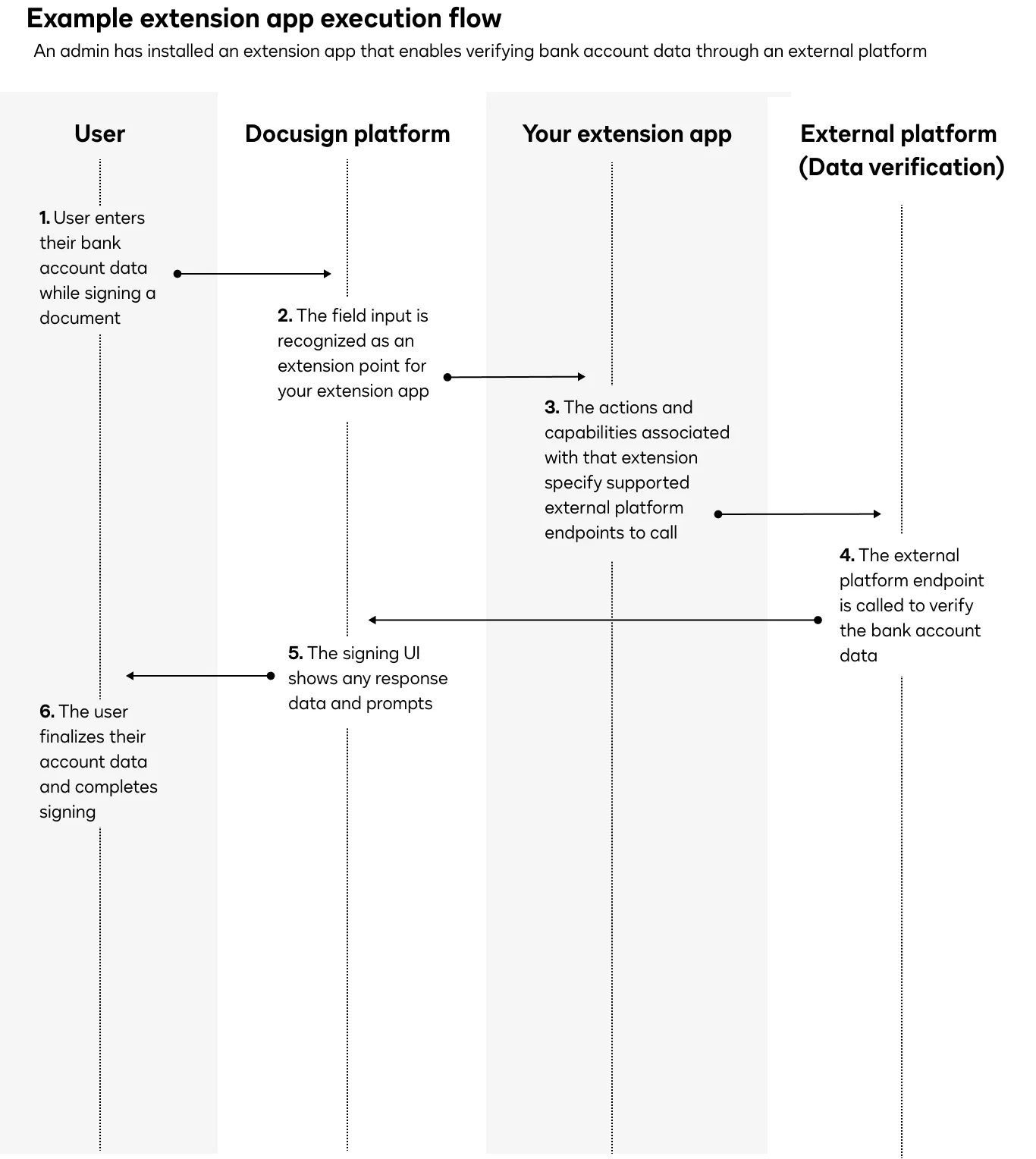
When an action or capability is triggered, it calls an external platform endpoint and returns the response data to Docusign. Depending on which extension point triggered the action, the response data or action prompts may be surfaced to the user through the Docusign UI.
For example, if an extension action calls a data verification endpoint to verify bank account data within an eSignature agreement and errors are found, the Docusign UI will prompt the end user to correct their information.
Next steps
- See What’s inside an extension app for details on how to register an extension app in the Docusign Developer Console.
- See Extension app use cases for examples of how extension apps can extend Docusign functionality.
- Watch a video on How to integrate external features using extension apps for guidance on connecting external services to an extension app.