
Recipients
Recipients
A recipient object refers to a person who receives a Docusign envelope. Each envelope object must have one or more recipients, and each recipient may have one or more Tabs (also known as fields or tags) defined for them. Each recipient is assigned a specific type, which defines their role in the signing process (see EnvelopeRecipients for details on each type). Any of these recipients can be a remote recipient (who receives the envelope via email), or an embedded recipient (who views, approves, or signs the envelope’s documents directly through your app or website).
For examples of how to work with recipients using the API, see how to assign roles to a recipient and How to request a signature by email.
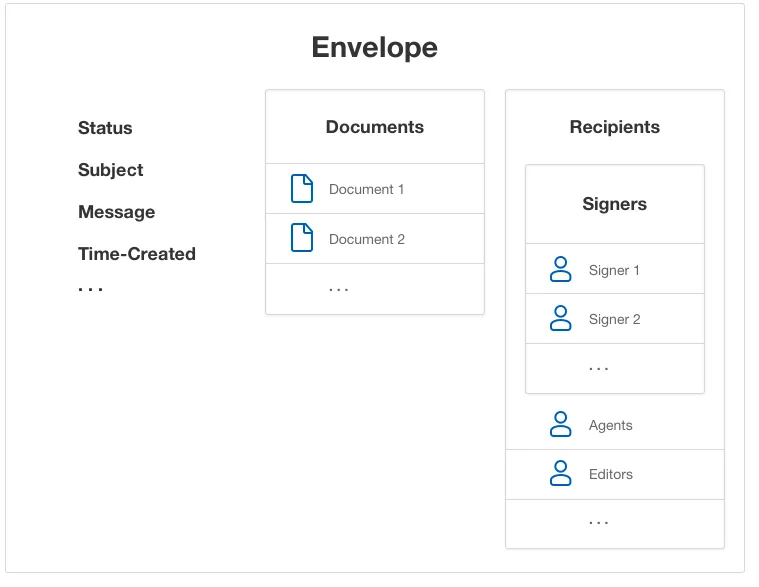
The following diagram shows the structure of a recipient object, and how it relates to envelopes and documents.
Recipient types
Each recipient of a Docusign envelope is assigned a specific type that defines their responsibilities in the signing process. Each recipient type and the responsibilities associated with that type are described by the following table. The Name in the UI column contains the label used for the recipient type in the eSignature web app.
For details on recipient objects and types, see EnvelopeRecipients.
Not all recipients are available to all account types. Review your account plan to determine which recipient types are available to you. All recipient types are available in the developer environment.
Next steps
Read about important recipient features:
- Recipient authentication
- Scheduled sending
- Delayed routing
- Pause and unpause a signature workflow
- Specify conditional recipients
Working with recipients? Learn how to:
-
Retrieve and interpret recipient status codes
-
Handle error codes
-
Assign roles to a recipient and How to request a signature by email