
Purging documents
By default, Docusign stores your envelopes and their documents indefinitely. Your data policies, however, may require you to purge (permanently delete) some of your documents, metadata, and personally identifiable information (PII) from completed envelopes. You can purge documents from any completed, declined, or voided envelope that was sent or received by your account, either by using eSignature Admin in your developer account settings, or programmatically by calling the Envelopes:update API endpoint (or equivalent SDK method).
When you purge documents, you can choose between three levels of purging:
-
Documents only: The documents are removed from the system, but all attachments and tabs that were associated with the documents are retained.
-
Documents and metadata: Documents, attachments, and tabs are removed. Recipient information remains with the envelope.
- **Note: Only available for Sent Envelopes Document Retention Policy
-
Documents and metadata with recipient address redaction: If GDPR compliance is enabled for your account, recipient addresses can also be redacted. For example,
accounts@example.comwould be redacted asredacted_{{envelopeId}}@example.com.
After you’ve chosen to purge documents from an envelope, they are immediately moved into a purge queue. In general, after 14 days in the queue, the documents (and metadata, if you so choose) in the envelope will be purged from Docusign systems (subject to limited exceptions, including such as during high-volume purge processing). As a default configuration, senders and recipients within your Docusign account receive two separate email notifications, generally 14 and 7 days before the documents are purged, giving users who participated in the envelope the opportunity to save or download documents prior to such documents being purged.
Note: All sent, signed, and voided envelopes that belong to closed accounts that have no active memberships will be automatically purged two years from the date that the account was closed.
Purge documents using eSignature Admin
To purge documents using the eSignature Admin UI, log in to your Docusign developer account and use the following steps.
-
Select Admin from the top nav.
-
In eSignature Admin, select Document Retention in the left nav.
-
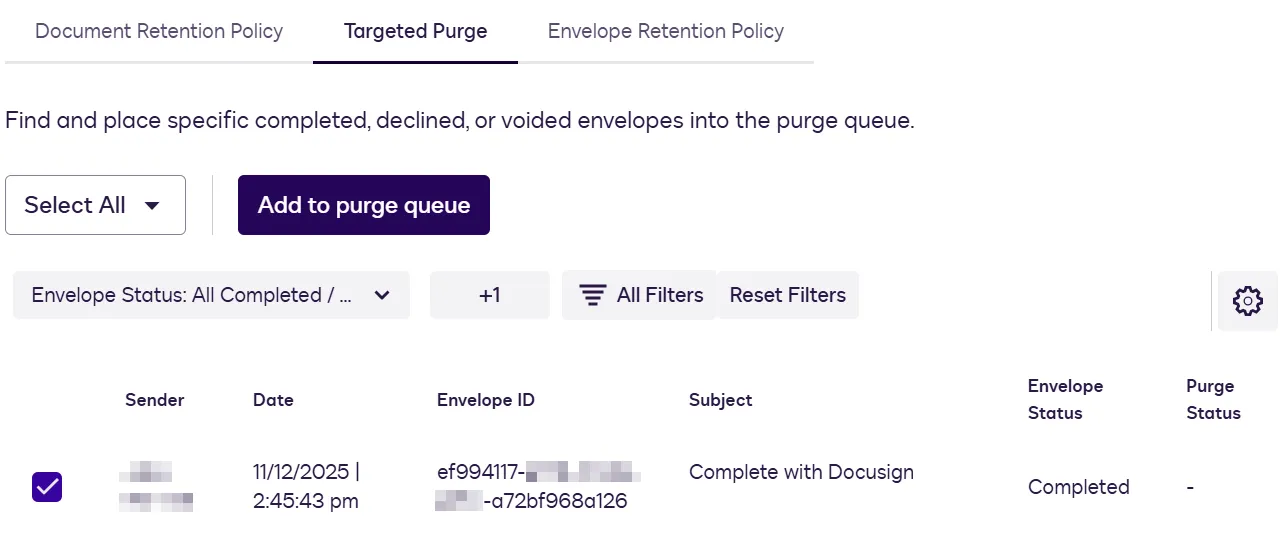
Select Targeted Purge, which can remove any envelopes in your account, define a filter to view your envelopes, and then select one or more envelopes that have documents to be purged.
-
When you’ve selected all the envelopes that contain the documents you want to purge, select Add to purge queue.
-
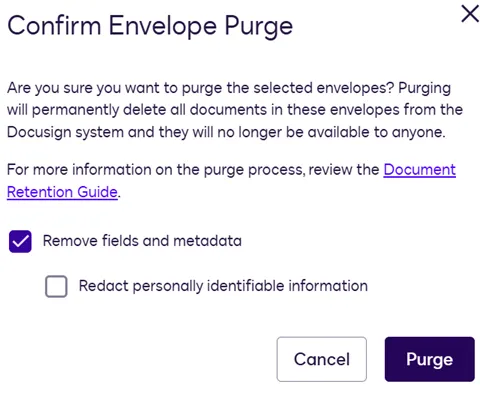
In the Confirm Envelope Purge dialog box, choose the level of purge to perform.
-
Select Purge to send the envelope’s documents to the purge queue. The documents and metadata will thereafter be purged from Docusign systems (subject to applicable purge queue period, as discussed above).
Purge documents using the API
You can also purge documents programmatically using the Envelopes:update method (or SDK equivalent).
To add an envelope’s documents to the purge queue, make a PUT call to the /restapi/v2.1/accounts/<accountId>/envelopes/<envelopeId> endpoint with a request body that specifies the envelopeId of the envelope containing the documents and a purgeState value that determines which purge level will be used. The possible purgeState values are:
-
documents_queued: Only the documents will be purged. -
documents_and_metadata_queued: Documents and metadata will be purged.- Note: This can only be set for a sent envelope
-
documents_and_metadata_and_redact_queued: Documents and metadata will be purged. Email addresses will be redacted. -
documents_dequeued: The envelope documents will be removed from the purge queue.
The following example shows the syntax for a sample call to purge documents using this endpoint on the developer environment.
PUT https://demo.docusign.net/restapi/v2.1/accounts/{accountId}/envelopes/{envelopeId}
Body:
Support for purging sent vs received envelopes
Different retention actions are supported for purging envelopes sent by your account, compared to envelopes received by your account.
- For sent agreements, all three retention actions are supported: Purge Documents, Remove Fields and Metadata, and Redact Personally Identifiable Information (PII).
- For received agreements, only two retention actions are supported: Purge Documents and Redact PII only.
Limitations
- If you choose to purge an envelope’s documents, all documents associated with that envelope will be purged. You cannot choose to purge or preserve individual documents from an envelope.
- Documents from Received Envelopes that are authoritative copies cannot be purged via a Received Envelopes Document Retention Policy.
- The user requesting the purge must have permission to purge documents and must be the sender or acting on behalf of the sender.
- If your account has either a Sent Envelopes or Received Envelopes document retention policy, envelope documents are automatically placed in the purge queue, and notification emails are sent at the end of the retention period. Setting a document retention policy is the same as setting a schedule for purging documents.
- You can only purge an envelope’s documents within your Docusign account. Recipients who are not part of your account or do not have aDocusign account will not receive email notifications when your account conducts a document purge.
Next steps
- For example SDK code to purge documents, see Common API Tasks: Purging envelopes from your Docusign account.
- For background information about document retention and purging, see Document Retention and Targeted Envelope Purge.
- For additional details about purging documents in eSignature Admin, see Purging Envelopes.