
Envelopes
Envelopes
An Envelope object is the overall container for a Docusign transaction. It contains:
- One or more documents that will be signed electronically
- Information about the sender
- Information about the Recipients, including all other objects (such as Tabs) that are associated with those recipients
- Status information that tracks delivery and signature progress
An envelope is identified by its ID, which is a GUID. You can reference this ID in API calls that update or retrieve information about an envelope.
For an example on how to send an envelope for signature, see How to request a signature by email
The Envelope diagram below shows the data structure of an envelope object, illustrating how it contains documents and recipients of various types, as well as the tabs associated with those recipients.
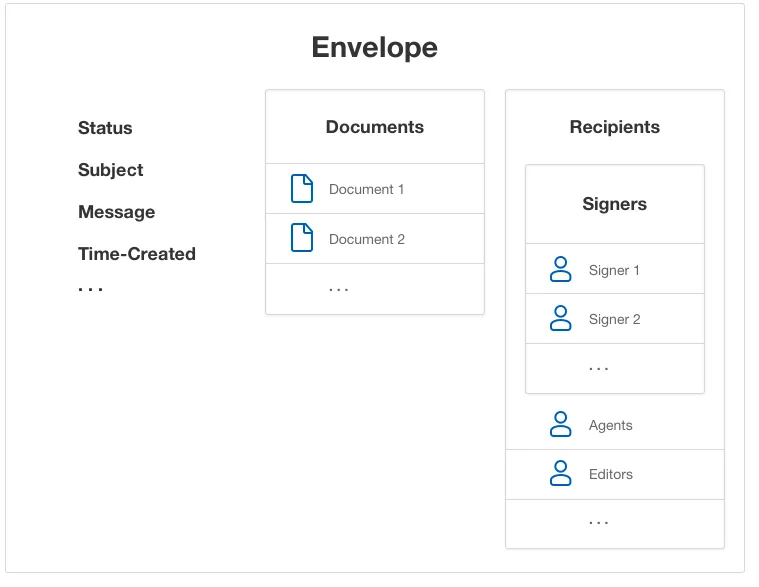
Note: Most eSignature integrations create and send a lot of envelopes. You can use templates to save your envelope data and easily create new copies. See Templates for details.
When you send an envelope, either by email or SMS, the Docusign platform notifies the recipients. This notification can be sent to recipients in a specific order or to all recipients at once.
Note: In addition to sending envelopes to your recipients (which we call remote signing), you can also have recipients sign directly through your app’s UI using a process called embedded signing. For details on how this differs from remote signing, see Embedded signing and sending.
A Developer account is needed to create and send envelopes, but recipients (signers) do not need an account and signing is always free.
Next steps
Read about important envelope features:
Working with envelopes? Learn:
- How to request a signature by email
- How to bulk send envelopes
- How to request a signature by email using a template
For demos of envelope sending options and walkthroughs of the sequences of API calls that implement these options, see these scenarios in the MyAPICalls sample app: