
Java SDK setup and configuration
Learn about Quickstart and how you can use it to quickly set up and run eSignature REST API code examples.
Adding the SDK to your project
The Java SDK is provided by Docusign as a Maven package named docusign-esign-java. By default, you will always be shown the latest release candidate (RC) version of the SDK first.
There are several ways to add the package to your Java project using Maven. The two most popular methods are: via the Eclipse user interface or via the command line.
Adding the Java SDK to your project using the Eclipse UI
- Open Eclipse and the workspace you wish to use.
- In your project, double-click the pom.xml file.
- Edit your pom.xml file to include the
<dependencies></dependencies>tag, just inside the closing</project>tag. When you’re finished, it should look like this:
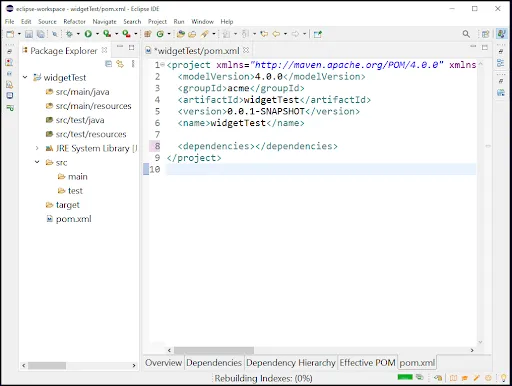
- Next, copy and paste the Apache Maven XML that references your desired Java eSignature SDK version, as listed on Maven Central. The figure below shows the result:
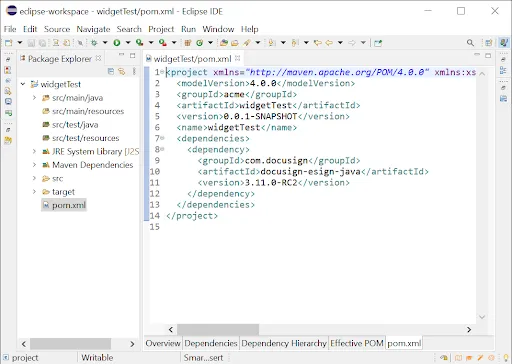
- Save the changes to your pom.xml file.
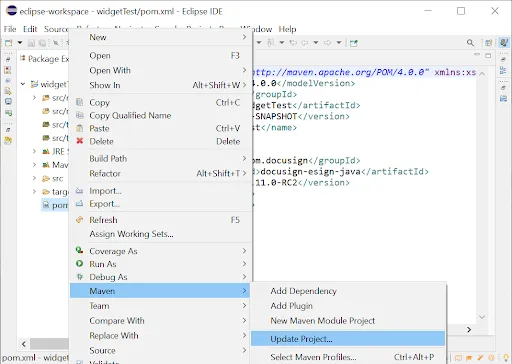
- Right-click pom.xml and select Maven > Update Project to download and compile the Docusign Java eSignature SDK and its dependencies:
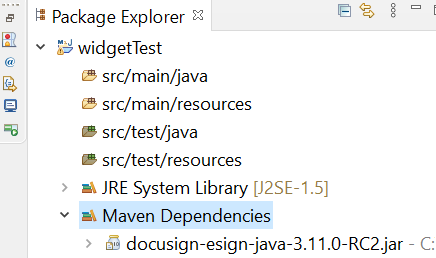
You have now successfully downloaded, configured, and installed the Docusign Java eSignature SDK for your project. To confirm the package is available in your project, go to the Package Explorer panel and expand Maven Dependencies. You should see docusign-esign-java-{version number}.jar:
Adding the Java SDK to your project using the command line
- Edit your pom.xml file to include the
<dependencies></dependencies>tag, just inside the closing</project>tag. - Next, copy and paste the Apache Maven XML that references your desired Java eSignature SDK version, as listed on Maven Central:
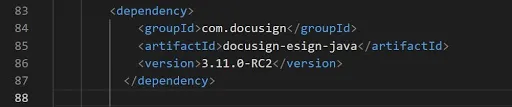
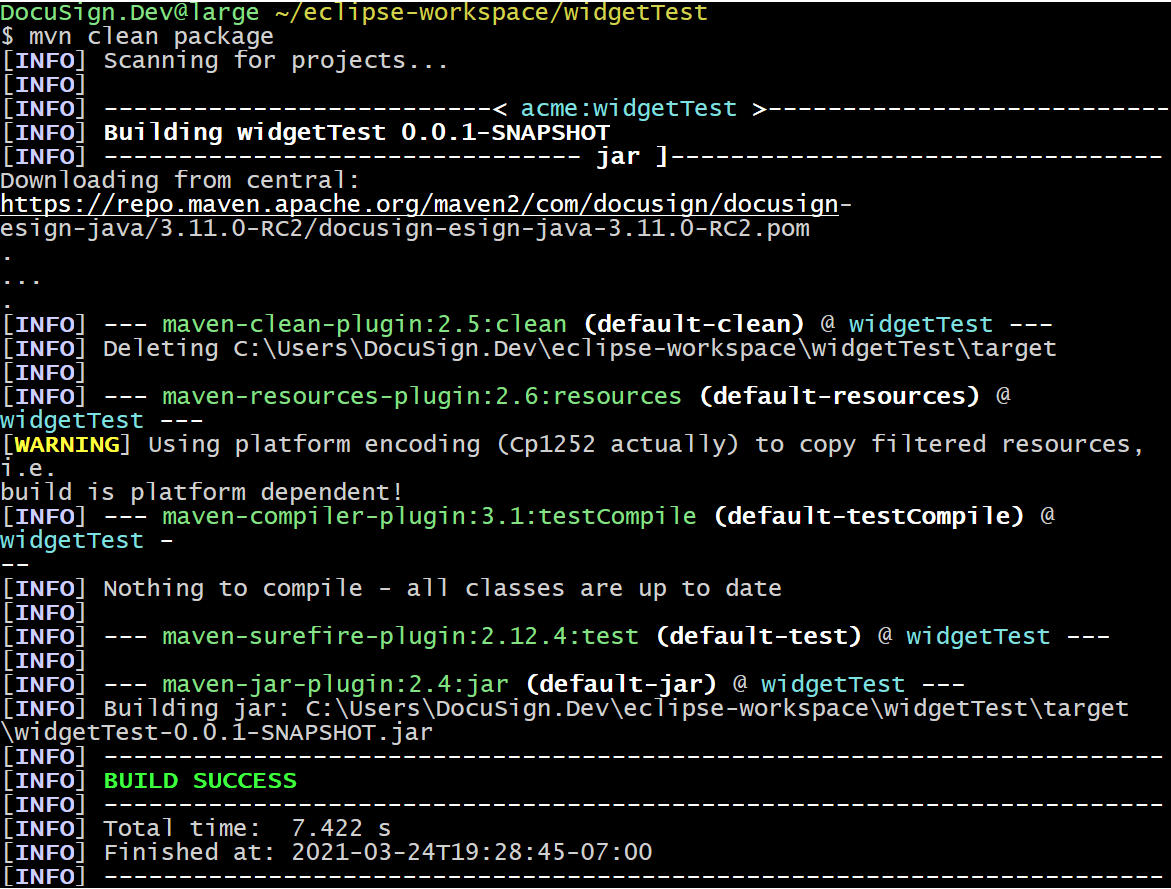
- To install the Java eSignature SDK version and its dependencies, in your console, navigate to your project directory, and run:
mvn clean package
Including the SDK library
Once the Maven package has been added to the project, you need to find the public classes required to complete various eSignature tasks. To do that, add the main namespaces as import statements in your Java code.
Here are some commonly used import statements for required namespaces when using the Docusign eSignature SDK.
com.docusign.esign.api namespace
This namespace is used for endpoint categories. Each class under this namespace corresponds to one of the categories listed in the left menu of the Docusign eSignature REST API Reference. You will need to use this namespace to make calls to the public methods that initiate REST API calls to the Docusign eSignature REST API.
For example, to use the Envelopes API, you would specify:
Note: Hereafter in the Java SDK documentation, the term “API object” will refer to eSignature REST API Reference objects.
An API category contains all of the methods for each API resource in that category. For example, the Java SDK EnvelopesApiclass includes the createEnvelope method. This method corresponds to the API Envelopes resource create method.
The SDK’s method names roughly correspond to the API Resource:method names. The API Reference page for each endpoint lists the corresponding SDK method associated with that endpoint.
To find the Java SDK method that corresponds to an API Resource:method page, use the API Reference page’s SDK Method box. The Java method name will be the camelCase version of the API SDK method name. For example, the API SDK Method Envelopes::createEnvelope is the Java SDK method createEnvelope.
com.docusign.esign.model namespace
This namespace includes the data structures used for sending and receiving data from the eSignature API endpoints. By using these classes instead of generic JSON objects, Java developers can more easily harness the Docusign eSignature API and spend less time configuring the attributes and type requirements for any API object. To make use of a given API model, specify its name at the end of a model import statement.
For example, if you wish to send an envelope with recipient phone authentication, you would import the following models:
There’s a one-to-one correspondence between the objects described in the API Reference and the classes in the com.docusign.esign.model namespace. The API object names Docusign eSignature REST API Reference use camelCase (the first letter is lowercase) while the corresponding Java SDK model classes use PascalCase (the first letter is uppercase). For example, the API object paymentgatewayaccount corresponds to the Java model class PaymentGatewayAccount.
Object attribute names in the API use camelCase. The corresponding class fields of the Java SDK are also camelCase.
Some API endpoints also use HTTP query parameters. Within the API, such query parameters use “snake_case.” For example, the Envelopes:create API method includes an optional query parameter change_routing_order. Within the SDK, the API’s query parameters are added as an elective options parameter after the request object.
Example: The EnvelopesApi.createEnvelope method signature is:
The EnvelopesApi.CreateEnvelopeOptions class is used to set the API method’s query parameters. The class is defined as:
The class fields in camelCase correspond to the API endpoint’s query parameters.
com.docusign.esign.client namespace
This namespace contains the classes needed to manage the overall API experience. These include the classes needed to instantiate a client element to make API calls and the classes used for authentication and exception handling. You will need to include this namespace to be able to use the Docusign eSignature API correctly.
Using the SDK
To make eSignature REST API calls with the SDK, you need:
- A valid OAuth access token.
- The base path for the API call.
- For most API calls, you’ll also need the relevant
accountId. Note that it is common for a user to be a member of multiple accounts.
Multithreaded Environments
The Java SDK supports use in multithreaded environments. Docusign recommends creating an instance of the ApiClient object per thread in multithreaded environments to avoid potential issues such as race conditions (as in racing to overwrite one another) or the requirement of a shared caching system, where you need to be concerned with validating states for data integrity, spending extra computation cycles in the process. Creating an ApiClient instance per thread also helps ensure the Isolation principle in the ACID methodology.
The following code demonstrates how to use the Java SDK in a multithreaded environment. The DSThread class extends the built-in Thread method. It provides a signer name and email address for the envelopes being sent via API. The DS API Envelope object, named DSEnvelope, contains a createEnvelope class that has all of the Docusign API logic used to generate an OAuth token and send an envelope. To make everything work, an app.java file calls the DSThread class and can create any number of envelopes specified. This DSThread class then creates a copy of the DS API object for each envelope being sent:
App.java
DSThread.java
DSEnvelope.java