
Authoritative copies
Authoritative copies
An authoritative copy is the single, distinct, absolute original version of a document that is unique, identifiable, and unalterable without detection. You can specify whether all of the documents in an envelope are authoritative copies or just specific documents.
Whether a document is considered an authoritative copy depends on the values of three properties in the envelope and document objects.
Note that, to make every document in an envelope authoritative, it is enough to make the envelope’s authoritativeCopyDefault property true, leaving the other properties unset. Conversely, to make no documents authoritative, it is enough to set the envelope’s authoritativeCopyDefault property to false.
After an agreement, authoritative copies are watermarked, then should be vaulted and stored in an external system. The following diagram and table describes how these settings affect whether a document is an authoritative copy and subsequently vaulted.
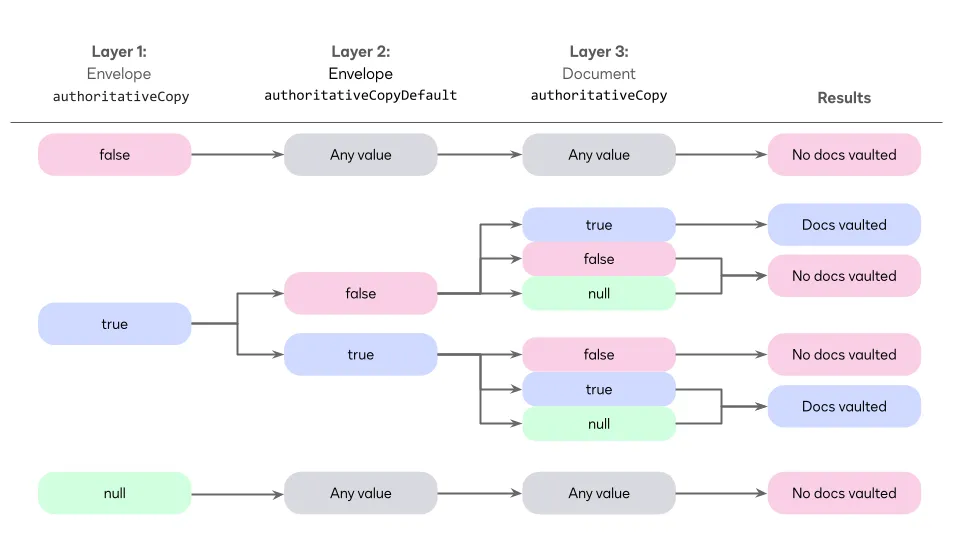
In the table above, null means that no value was set; any means that the value can be null, true, or false.
Authoritative copies can be purged once they have been exported.
See Working with authoritative copies using Docusign APIs for examples on how to construct envelopes flagged for authoritative copy, check its status, update it, frequently asked questions, and more.