
Skip to navigation

How to get envelope information

View as Markdown

This topic demonstrates how to get the full set of data associated with an envelope that was sent by your app. Using the code presented here, you can see whether documents have been signed and which, if any, outstanding items remain to be completed. This example will return information about the envelope, particularly its status (any, created, deleted, sent, delivered, signed, completed, declined, timedout, voided), the time and date of the most recent action on the envelope, and any additional metadata associated with that envelope.

Run this code example from our Quickstart or launcher projects: Bash, C#, Java, Node.js, PHP, PowerShell, Python, or Ruby.

Required data

Running the code in this how-to requires this data:

Data elementDescription
{API_ACCOUNT_ID}A GUID value that identifies your account. This value is automatically generated by Docusign for any account you create. Copy the value from the API Account ID field on the Apps and Keys page.
{BASE_PATH}A string value that forms the root of the URL required to make API calls. The base path value in the example code is set to target the developer environment at
https://<domain>/restapi
Where <domain> is demo.docusign.net for the developer environment and is the result of the GetUserInfo call in production.
{ENVELOPE_ID}A GUID value that identifies a Docusign envelope. This value is automatically generated by Docusign when the envelope is created.

Step 1. Obtain your OAuth token

To make the API call shown in this how-to, you need a valid OAuth access token. Docusign supports access tokens for three different recommended OAuth grant types: Public Authorization Code Grant, Confidential Authorization Code Grant, and JSON Web Token (JWT) Grant. Choose the OAuth grant type appropriate for your scenario.

See Confidential Authorization Code Grant for guidance on your options to get an Confidential Authorization Code Grant OAuth token.
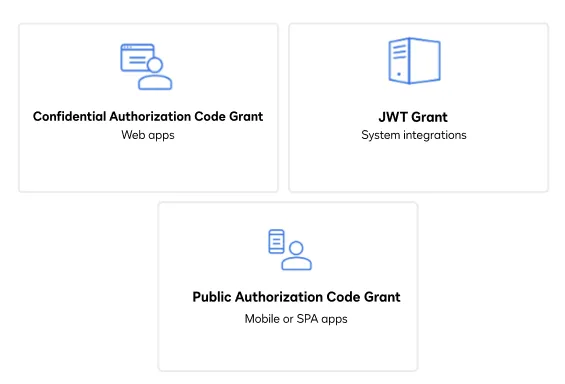
Three icons that represent the three methods a user can use to obtain an OAuth token: JSON Web Token (JWT), Public Authorization Code Grant (ACG), and Confidential Authorization Code grant

Step 2. Get envelope data

Get the envelope data using the following steps:

  1. Instantiate the Docusign API client.
  2. Set the following default request header to add your access token. "Authorization" : "Bearer {ACCESS TOKEN}"
  3. Initialize the Envelopes API.
  4. Call the GetEnvelope method with the ID of the envelope you want to retrieve. The returned data will include the envelope status, the dates when the status was changed, and all other metadata associated with the envelope. Depending on the complexity of your envelope, the amount of data returned could be vast and include attributes such as agents, editors, inPersonSigners, intermediaries, and more.

View the source code for this how-to on GitHub: Bash, C#, Java, Node.js, PHP, PowerShell, Python, or Ruby.

curl --header "Authorization: Bearer ${ACCESS_TOKEN}" \
--header "Content-Type: application/json" \
--request GET ${base_path}/v2.1/accounts/${account_id}/envelopes/${envelope_id}

Expected response

If you run this code example from our Quickstart or launcher projects, you should see a JSON response similar to the code shown.

Sample response
{
"status": "completed",
"documentsUri": "/envelopes/bc4799a2-xxxx-xxxx-xxxx-20d1921aeb87/documents",
"recipientsUri": "/envelopes/bc4799a2-xxxx-xxxx-xxxx-20d1921aeb87/recipients",
"attachmentsUri": "/envelopes/bc4799a2-xxxx-xxxx-xxxx-20d1921aeb87/attachments",
"envelopeUri": "/envelopes/bc4799a2-xxxx-xxxx-xxxx-20d1921aeb87",
"emailSubject": "Please sign this document set",
"envelopeId": "bc4799a2-xxxx-xxxx-xxxx-20d1921aeb87",
"signingLocation": "online",
"customFieldsUri": "/envelopes/bc4799a2-xxxx-xxxx-xxxx-20d1921aeb87/custom_fields",
"notificationUri": "/envelopes/bc4799a2-xxxx-xxxx-xxxx-20d1921aeb87/notification",
"enableWetSign": "true",
"allowMarkup": "false",
"allowReassign": "true",
"createdDateTime": "2020-08-13T22:01:19.9600000Z",
"lastModifiedDateTime": "2020-08-13T22:01:19.9600000Z",
"deliveredDateTime": "2020-08-13T22:03:05.8370000Z",
"initialSentDateTime": "2020-08-13T22:01:21.1300000Z",
"sentDateTime": "2020-08-13T22:03:05.8370000Z",
"completedDateTime": "2020-08-13T22:03:05.8370000Z",
"statusChangedDateTime": "2020-08-13T22:03:05.8370000Z",
"documentsCombinedUri": "/envelopes/bc4799a2-xxxx-xxxx-xxxx-20d1921aeb87/documents/combined",
"certificateUri": "/envelopes/bc4799a2-xxxx-xxxx-xxxx-20d1921aeb87/documents/certificate",
"templatesUri": "/envelopes/bc4799a2-xxxx-xxxx-xxxx-20d1921aeb87/templates",
"expireEnabled": "true",
"expireDateTime": "2020-12-11T22:01:21.1300000Z",
"expireAfter": "114",
"sender":
{
"userName": "Admin One",
"userId": "c1c4ca80-xxxx-xxxx-xxxx-32a3a9b13925",
"accountId": "a56df5fc-xxxx-xxxx-xxxx-f64dc8ab421e",
"email": "admin1@anyemail.com"
},
"purgeState": "unpurged",
"envelopeIdStamping": "true",
"is21CFRPart11": "false",
"signerCanSignOnMobile": "true",
"autoNavigation": "true",
"isSignatureProviderEnvelope": "false",
"hasFormDataChanged": "false",
"allowComments": "true",
"hasComments": "false",
"allowViewHistory": "true",
"envelopeMetadata":
{
"allowAdvancedCorrect": "true",
"enableSignWithNotary": "true",
"allowCorrect": "true"
},
"anySigner": null,
"envelopeLocation": "current_site",
"isDynamicEnvelope": "false"
}

Next steps