
Schema
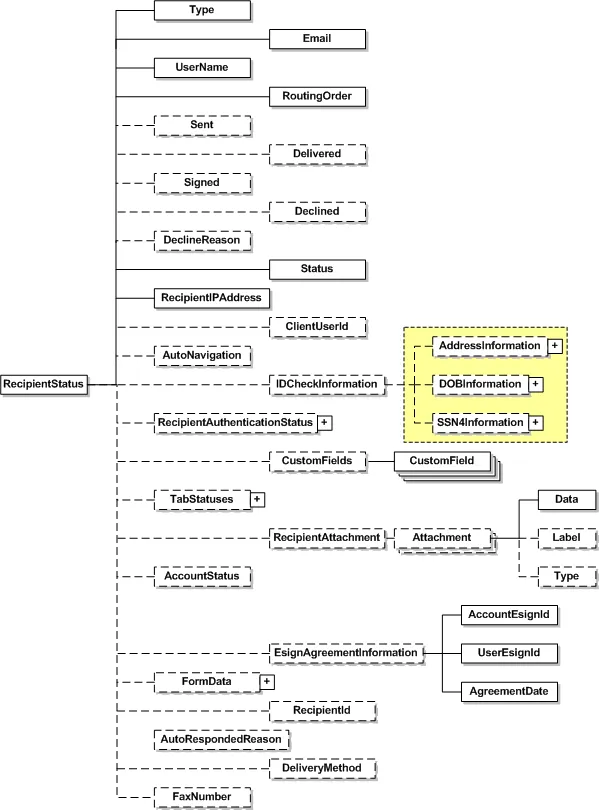
| Name | Schema Type | Description |
|---|---|---|
| Type | RecipientTypeCode | This element controlled by enumerator tells the role of the recipient. It could be Signer, Agent, Editor, Intermediary, CarbonCopy, CertifiedDelivery or InPersonSigner. For InPersonSigner: The Email element should be that of the “Signing Host” (the person who will receive the email and assist the signer with the in-person signing process. The UserName element should be that of the “Signing Host” (the Email and UserName combination must match an active Docusign user). |
| The recipient’s email address. | ||
| UserName | UserName | User name of recipient. |
| RoutingOrder | PositiveShort | Routing order of the recipient in the envelope. |
| Sent | dateTime | Date and time when the envelope was sent. |
| Delivered | dateTime | Date and time when the envelope was viewed by the recipient. |
| Signed | dateTime | Date and time when the envelope was signed by the recipient. |
| Declined | dateTime | Date and time when the envelope was declined by the recipient. |
| DeclineReason | String | The reason given by the recipient while declining the envelope. |
| Status | RecipientStatusCode | Specifies the status of the recipient at the time of request. It could be Created, Sent, Delivered, Signed, Declined, Completed, FaxPending or AutoResponded. See Recipient Status Code Descriptions for information about the codes. |
| AutoRespondedReason | String | Only active if the Status is AutoResponded. Contains the SMTP message text returned from a recipient’s automatic response. |
| RecipientIPAddress | String | The IP address of the recipient’s most recent access of this envelope. |
| ClientUserId | LongString | Tells if the recipient is captive or not. If the ClientUserId is not null then the recipient is captive. |
| CustomField | LongString | Each custom field defined for the envelope is returned. In addition to the name and value of the field, it will include information as to whether the field was required to be provided. Also it mentions if it is shown in the Docusign user interface. |
| AutoNavigation | Boolean | If returns true then autonavigation feature is enabled for the recipient. |
| IDCheckInformation | IDCheckInformationInput | Returns the following information about the recipient; Address (i.e. Street1, Street2, City, State, Zip and ZipPlus4), DOB and last four digits of SSN. |
| RecipientAuthenticationStatus | AuthenticationStatus | Returns the details about recipient authentication. It includes information regarding the IdCheck, Access Code and IDLookUp results. Tells if the status of the above check is passed or failed and also does a timestamp. See the AuthenticationStatus section for more information. |
| TabStatuses | TabStatus | Returns the status of the tabs. See the TabStatus section for more information. |
| RecipientAttachment | Attachment | This complex element contains data in base64Binary. It also contains label and type for the attachment. |
| AccountStatus | String | Only returned when calling RequestStatusEx and RequestStatusesEx. Returns the status of the recipient’s account. |
| EsignAgreementInformation | EsignAgreementInformation | Only returned when calling RequestStatusEx and RequestStatusesEx. Only returned if the recipient agreed. Returns the agreement information of the recipient. Returned items: - AccountEsignID – account agreement ID. - AgreementDate – date accepted. - UserEsignID – user agreement ID. |
| FormData | FormData | Reserved for future use. Will only be returned with the GetStatusInDocusignConnectFormat API. This will return all the Docusign Secure Fields for the recipient. |
| RecipientId | String | Only returned when calling RequestStatusEx and RequestStatusesEx. Returns the Docusign recipient Id mapped to the recipient. |
| DeliveryMethod | DeliveryMethod | This shows the delivery method used for the recipient. The two enumerations are Email or Fax. |
| FaxNumber | String | The fax number for the recipient. This is only active if the DeliveryMethod is Fax. |
Recipient Status Code Descriptions
The table below provides descriptions of the Recipient Status Codes.
| Code | Description |
|---|---|
| Created | The recipient is in a draft state. This is only associated with draft envelopes (envelopes with a Created status). |
| Sent | The recipient has been sent an email notification that it is their turn to sign and envelope. |
| Delivered | The recipient has viewed the document(s) in an envelope through the Docusign signing web site. This is not an email delivery of the documents in an envelope. |
| Signed | The recipient has completed (signed) all required tags in an envelope. This is a temporary state during processing, after which the recipient is automatically moved to Completed. |
| Declined | The recipient declined to sign the document(s) in the envelope. |
| Completed | The recipient has completed their actions (signing or other required actions if not a signer) for an envelope. |
| FaxPending | The recipient has finished signing and the system is waiting a fax attachment by the recipient before completing their signing step. |
| AutoResponded | The recipient’s email system auto-responded (bounced-back) to the email from Docusign. This status is used in the web console to inform senders about the bounced-back email. This is only used if “Send-on-behalf-of” is turned off for the account. |