
This method returns all of the documents combined into a single, contiguous PDF. It includes the ability to set display options for the PDFs.
Schema
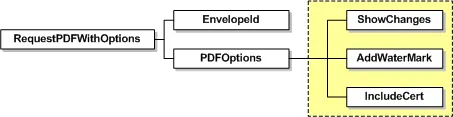
| Name | Schema Type | Description |
|---|---|---|
| EnvelopeId | DSXId | The envelope ID for the PDF document being requested. |
| PDFOptions | Optional display elements for the PDF: - ShowChanges – If the account has the Highlight Data Changes feature enabled and this option is set to true, any changed fields for the returned PDF are highlighted in yellow and optional signatures or initials outlined in red. - AddWaterMark – If the account has the watermark feature enabled and the envelope is not complete, the watermark for the account is added to the PDF document. When this is set to false, the watermark is removed from the PDF. - IncludeCert – When set to true, this option removes the envelope signing certificate from the download. - CertificateLanguage – Sets the language for the Certificate of Completion in the response. The supported languages, with the language value shown in parenthesis, are: Chinese Simplified (zh_CN), Chinese Traditional (zh_TW), Dutch (nl), English US (en), French (fr), German (de), Italian (it), Japanese (ja), Korean (ko), Portuguese (pt), Portuguese (Brazil) (pt_BR), Russian (ru), Spanish (es). |
Sample Request XML
SOAPAction: "http://www.docusign.net/API/3.0/RequestPDFWithOptions"<?xml version="1.0" encoding="utf-8"?><soap:Envelope xmlns:xsi="http://www.w3.org/2001/XMLSchema-instance" xmlns:xsd="http://www.w3.org/2001/XMLSchema" xmlns:soap="http://schemas.xmlsoap.org/soap/envelope/"><soap: Body><RequestPDFWithOptions xmlns="http://www.docusign.net/API/3.0"><EnvelopeID>string</EnvelopeID><PDFOptions><ShowChanges>boolean</ShowChanges><AddWaterMark>boolean</AddWaterMark><IncludeCert>boolean</IncludeCert><CertificateLanguage>string</CertificateLanguage></PDFOptions></RequestPDFWithOptions></soap:Body></soap:Envelope>