
GetFolderItems requests all the envelopes in a specified folder for the requester or a Folder Owner.
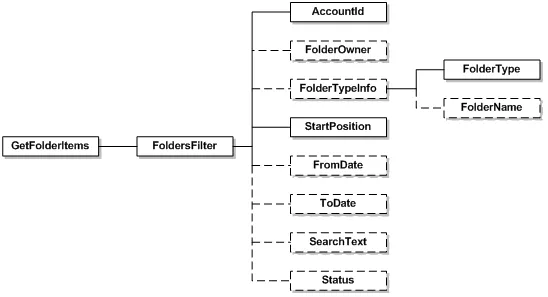
Schema
// Create the folder filter to specify the scope of your search// Here, we are limiting the item search to the inbox// You can also limit by owner, date, status and positionDocuSignWeb.FolderFilter filter = new DocuSignWeb.FolderFilter();filter.AccountId = _accountId;filter.FolderTypeInfo = new DocuSignWeb.FolderTypeInfo();filter.FolderTypeInfo.FolderType = DocuSignWeb.FolderType.Inbox;// Now, call the method with the filter we createdDocuSignWeb.FolderResults results = _apiClient.GetFolderItems(filter);// If there are results, print out the detailsif (results.ResultSetSize > 0){// Loop through and print out some information about the resultsConsole.WriteLine("Envelopes in the inbox are:");foreach (DocuSignWeb.FolderItem item in results.FolderItems) {Console.WriteLine("\tEnvelope {0} has status of: {1}",item.EnvelopeId, item.Status);}}
| Name | Schema Type | Description |
|---|---|---|
| AccountId | DSXId | The account ID about which the call is requesting folder information.This is used in conjunction with the user passed in the API request. |
| FolderOwner | String | Optional field. The name of the user that currently owns the requested folders. |
| FolderTypeInfo | FolderTypeInfo | Optional FolderTypeInfo object. The type of folder and in some cases the name of the folder. Values can be RecycleBin, Draft, Inbox, SentItems or Normal. If no value is entered, the default search is Inbox.\n\n See FolderTypeInfo for more information. |
| StartPosition | Integer | The position of the folder items to return. This is used for repeated calls, when the number of envelopes returned is too much for one return (calls return 100 envelopes at a time). The default value is 0. |
| FromDate | dateTime | Optional field. Only return items on or after this date. If no value is provided, the default search is the previous 30 days. |
| ToDate | dateTime | Optional field. Only return items up to this date. If no value is provided, the default search is to the current date. |
| SearchText | String | Optional field. The search text used to search the items of the envelope. The search looks at recipient names and emails, envelope custom fields, sender name, and subject. |
| Status | String | Optional field. The current status of the envelope. If no value is provided, the default search is all/any status. |
FolderResults
This is the response for a GetFolderItems request and provides the list of envelopes in the requested folder(s) for the requestor.
| Name | Schema Type | Description |
|---|---|---|
| ResultSetSize | Integer | The total number of envelopes in the folder for the dates requested. |
| StartPosition | Integer | The starting position of the folder items returned (only 100 results are returned at a time). |
| EndPosition | Integer | The end position of the folder items returned. |
| FolderItems | FolderItem | Provides information about the envelopes in the specified folder. See FolderItem below. |
| FolderTypeInfo | FolderTypeInfo | The type of folder and in some cases the name of the folder. Values can be RecycleBin, Draft, Inbox, SentItems or Normal.\n\nSee FolderTypeInfo for more information. |
FolderItem
FolderItem provides the information about each envelope in a folder.
| Name | Schema Type | Description |
|---|---|---|
| Owner | String | The name of the user that currently owns the envelope. |
| EnvelopeID | LocalId | The unique ID for the envelope. |
| Status | String | The current status of the envelope. |
| SenderName | String | The name of the sender of the envelope. |
| SenderEmail | String | The email for the sender of the envelope. |
| SenderCompany | String | The company name of the sender of the envelope. |
| RecipientStatuses | RecipientStatus | A complex element that contains the status of each of the envelope recipients. |
| CustomFields | CustomField | A complex element that contains a list of names and values for any custom fields. |
| Created | dateTime | Date and time when the envelope was created. |
| Sent | dateTime | Date and time when the envelope was sent. |
| Completed | dateTime | Date and time when the envelope was completed. |
| Subject | String | The envelope subject, as provided by the envelope creator. |