Skip to navigation

GetAccountSettingsList

View as Markdown

GetAccountSettingsList is used to retrieve the settings available to the account.

Schema

SaveTemplate
// This is simple -- just input your account ID
DocuSignWeb.AccountSetting[] settings =
_apiClient.GetAccountSettingsList(_accountId);
// Display some information about the settings
Console.WriteLine("We have {0} account settings:", settings.Length);
foreach (DocuSignWeb.AccountSetting setting in settings)
{
Console.WriteLine("\t{0}: {1}", setting.Name, setting.Value);
}
NameSchema TypeDescription
AccountIDDSXIdAccountId of the account settings to be returned.

Sample Request XML

SOAPAction: "http://www.docusign.net/API/3.0/GetAccountSettingsList"
<?xml version="1.0" encoding="utf-8"?>
<soap:Envelope xmlns:xsi="http://www.w3.org/2001/XMLSchema-instance" xmlns:xsd="http://www.w3.org/2001/XMLSchema" xmlns:soap="http://schemas.xmlsoap.org/soap/envelope/">
<soap: Body>
<GetAccountSettingsList
xmlns="http://www.docusign.net/API/3.0">
<AccountId>string</AccountId>
</GetAccountSettingsList>
</soap:Body>
</soap:Envelope>

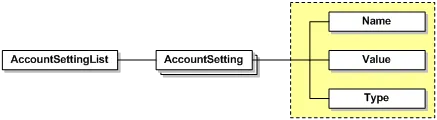
AccountSettingsList

Schema

SaveTemplate
NameSchema TypeDescription
AccountSettingAccountSettingName: string: the name of the account setting.Value: string: the value of the account setting.Type: string: the type of the account setting (ie. Integer, Boolean, String)

Usage rules for GetAccountSettingsList and AccountSettingsList

  • The length of AccountId, must not exceed 100 characters.
  • The AccountSetting is unbounded. Current “Name” values are: UserOverrideEnabled, ReminderEnabled, ReminderFrequency, ReminderDelay, ExpireEnabled, ExpireAfter, and ExpireWarnBuffer.