
Skip to navigation

EnvelopeStatus

View as Markdown

EnvelopeStatus

This page describes functionality for the older eSignature SOAP API. See Envelopes: listStatus for more information on this topic in the more actively-supported eSignature REST API documentation.

Shown below is the schema for envelope status which is the response schema to the RequestStatus.

Schema
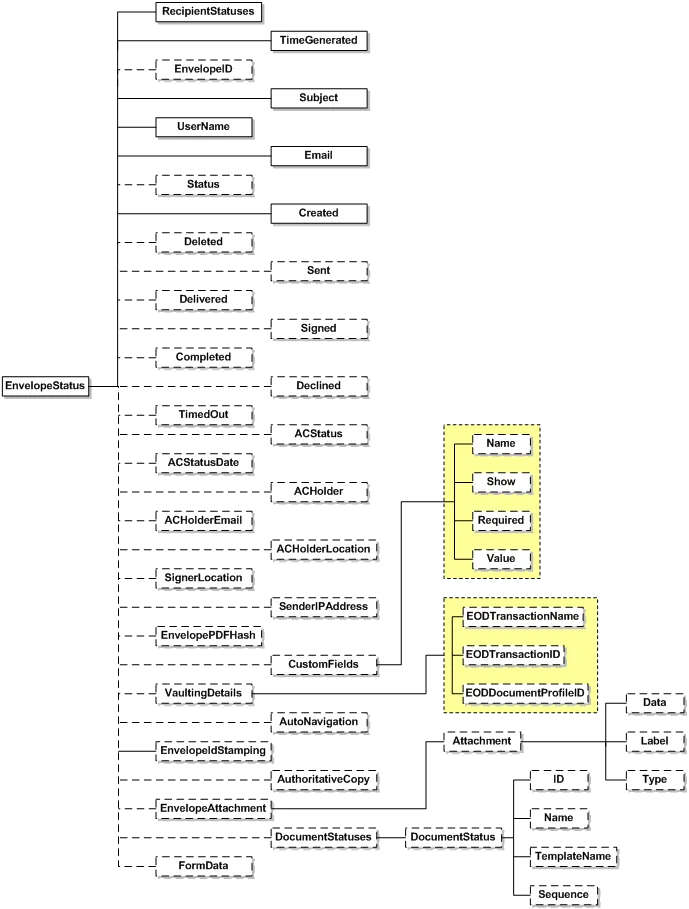
EnvelopeStatus schema

The RequestStatus response contains a snapshot of the status of the envelope at the time the call was issued. It contains the following attributes and elements:

NameSchema TypeDescription
RecipientStatusesRecipientStatusIncludes the status of each of the envelope recipients. See the RecipientStatus section for more information.
TimeGenerateddateTimeSpecifies the time of the status change.
EnvelopeIDDSXIdThe Envelope ID of the envelope who’s status is provided.
SubjectStringThe envelope subject, as provided by the envelope creator.
UserNameUserNameContains the user name of the person who created the envelope
EmailEmailContains the email of the person who created the envelope
StatusEnvelopeStatusCodeStatus of the envelope at that specific time. Enumeration values could be Created, Deleted, Sent, Delivered, Signed, Completed, Declined, Voided, TimedOut, AuthoritativeCopy, TransferCompleted, Template, and Correct. See Envelope Status Code Descriptions for information about the codes. The element has been included to enable document author to extend his/her document with elements not specified by the schema.
CreateddateTimeDate and time when the envelope was created.
DeleteddateTimeDate and time when the envelope was deleted.
SentdateTimeDate and time when the envelope was sent.
DelivereddateTimeLast time the envelope was viewed by a signer.
SigneddateTimeLast time a signer signed the document.
CompleteddateTimeDate and time when the envelope is completed.
DeclineddateTimeDate and time when the envelope was declined by the recipient.
TimedOutdateTimeDate and time with the envelope is timed out
ACStatusStringReturns any one of the following Authoritative copy status; Unknown, Original, Transferred, AuthoritativeCopy, AuthoritativeCopyExportPending, AuthoritativeCopyExported, DepositPending, Deposited, DepositedEO, orDepositFailed.
ACStatusDatedateTimeThe time at with authoritative copy was created
ACHolderStringContains the user name of the authoritative copy holder.
ACHolderEmailLongStringContains the email of the authoritative copy holder.
ACHolderLocationStringContains the location of the authoritative copy holder.
SigningLocationSigningLocationCodeSpecifies the physical location of the signer. Enumeration values are InPerson and Online
SenderIPaddressStringIP address of the user who sent the envelope
CustomFieldCustomFieldEach custom field defined for the envelope is returned. In addition to the name and value of the field, it will include information as to whether the field was required to be provided. Also it mentions if it is shown in the Docusign user interface.
VaultingDetailsVaultingDetailsThis complex type contains information about EOD Transaction name, transaction ID and document profile ID.
EnvelopeIdStampingBooleanSpecifies if the envelope stamping feature is enabled or not.
AuthoritativeCopyBooleanReturn value true if the authoritative copy is created else returns false.
EnvelopeAttachmentAttachmentIt would be possible to return attachments with envelope. This complex element contains data in base64Binary. It also contains label and type for the attachment.
DocumentStatusesDocumentStatusOnly returned when calling RequestStatusEx and RequestStatusesEx. DocumentStatus includes:
- ID – this is the ID from the source system. - Name – name of the document. - TemplateName – template the document originated from if the envelope was created using CreateEnvelopeFromTemplates. - Sequence – order in which the document appears in the envelope.
FormDataFormDataReserved for future use. Will only be returned with the GetStatusInDocusignConnectFormat API. This will return all the Docusign Secure Fields and Docusign PowerForms fields as XML.

Envelope Status Code Descriptions

The table below provides descriptions of the Envelope Status Codes.

| Code | Description | | --- | --- | | Created | The envelope is in a draft state and has not been sent out for signing. | | Deleted | This is a legacy status and is no longer used. | | Sent | An email notification with a link to the envelope has been sent to at least one recipient. The envelope remains in this state until all recipients have viewed it at a minimum. | | Delivered | All recipients have viewed the document(s) in an envelope through the Docusign signing web site. This is not an email delivery of the documents in an envelope. | | Signed | The envelope has been signed by all the recipients. This is a temporary state during processing, after which the envelope is automatically moved to Completed status. | | Completed | The envelope has been completed by all the recipients. | | Declined | The envelope has been declined for signing by one of the recipients. | | Voided | The envelope has been voided by the sender. | | TimedOut | This is a legacy status and is no longer used. | | AuthoritativeCopy | The envelope is in an Authoritative state. Only “Copy” views of the documents will be shown. | | TransferCompleted | The envelope has been transferred out of Docusign to another authority. | | Template | The envelope is a Template | | Correct | The envelope has been opened by the sender for correction. The signing is stopped for envelopes with this status. |