
Schema
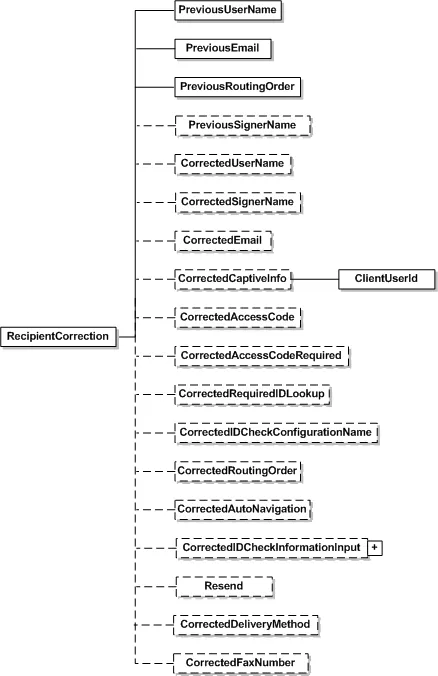
| name / Schema Type | Description |
|---|---|
| PreviousUserName UserName | User name of the recipient specified in the envelope which needs correction. |
| PreviousEmail | Email of the recipient specified in the envelope which needs correction. |
| PreviousRoutingOrder PositiveShort | Routing order of the recipient specified in the envelope which needs correction. |
| PreviousSignerName String | Signer name specified in the envelope, which needs correcting. |
| CorrectedSignerName String | Correct signer name in the envelope. |
| CorrectedUserName UserName | Corrected user name of the recipient. |
| CorrectedEmail | Corrected Email of the recipient. |
| CorrectedCaptiveInfo CorrectedCaptiveInfo | CaptiveInfo is made up of two optional elements that 1) determine if a recipient is embedded or remote, and 2) express a redirect URL used for starting a recipient’s signing session. - ClientUserId – This is a sender created value that can be a maximum of 100 characters. If there is a value for this (it is not null) then the recipient is considered to be embedded. Note that if a ClientUserId is used and the account settings SignerMustHaveAccount or SignerMustLoginToSign are true, an error is generated on sending. - EmbeddedRecipientStartURL – This is a sender provided valid URL string for redirecting the recipient. When using this option, the embedded recipient still receives an email from Docusign, just as a remote recipient would, but when the document link in the email is clicked the recipient is redirected, through Docusign, to this URL to complete their actions. When routing to the URL, it is up to the sender’s system (the server responding to the URL) to then request a recipient token to launch a signing session. If the value SIGN_AT_DOCUSIGN is used for this node, the recipient will be directed to an embedded signing or viewing process directly at Docusign. The signing or viewing action is initiated by the Docusign system and the transaction activity and Certificate of Completion records will reflect this. In all other ways the process is identical to an embedded signing or viewing operation that would be launched by any partner. It is important to remember that in a typical embedded workflow the authentication of an embedded recipient is the responsibility of the sending application and Docusign expects that senders will follow their own process for establishing the recipient’s identity. In this workflow the recipient goes through the sending application before the embedded signing or viewing process in initiated. However, when the sending application sets EmbeddedRecipientStartURL=SIGN_AT_DOCUSIGN, the recipient goes directly to the embedded signing or viewing process bypassing the sending application and any authentication steps the sending application would use. In this case, Docusign recommends that one of the normal Docusign authentication features (Access Code, Phone Authentication, SMS Authentication, etc.) be used to verify the identity of the recipient. If a ClientUserId is NOT provided and an EmbeddedRecipientStartURL is provided, Docusign will ignore the redirect URL and launch the standard signing process for the email recipient. Information can be appended to the EmbeddedRecipientStartURL using merge fields. The available merge fields items are: EnvelopeId, RecipientId, RecipientName, RecipientEmail, and CustomFields. The CustomFields must be part of the Recipient or Envelope. The merge fields are enclosed in double brackets. Example: http://senderHost/[[mergeField1]]/beginSigningSession?[[mergeField2]]&[[mergeField3]] |
| CorrectedAccessCode String | Corrected access for the recipients |
| CorrectedAccessCodeRequired Boolean | If set to true, then access code check will be required for the recipient. |
| CorrectedRequireIDLookup Boolean | If set to true, then ID check will be required for the recipient. |
| CorrectedIDCheckConfigurationName String | Corrected ID check configuration by name. |
| CorrectedRoutingOrder PositiveShort | Corrected routing order of the recipient. |
| CorrectedAutoNavigation Boolean | Corrected setting for the auto navigation feature. If Boolean is set to true auto navigation feature will be enabled for the recipient |
| CorrectedIDCheckInformationInput CorrectedIDCheckInformationInput | Specified the corrected IDCheck information. For details please refer IDCheckInformationInput under CreateAndSend method |
| Resend Boolean | Specifies if the email notifying correction needs to be sent to the recipient. |
| CorrectedDeliveryMethod Delivery Method | This sets the corrected delivery method used for the recipient. The two enumerations are Email or Fax. |
| CorrectedFaxNumber String | The corrected fax number for the recipient. |