
This element specifies information of the tabs affixed on the documents.
Schema
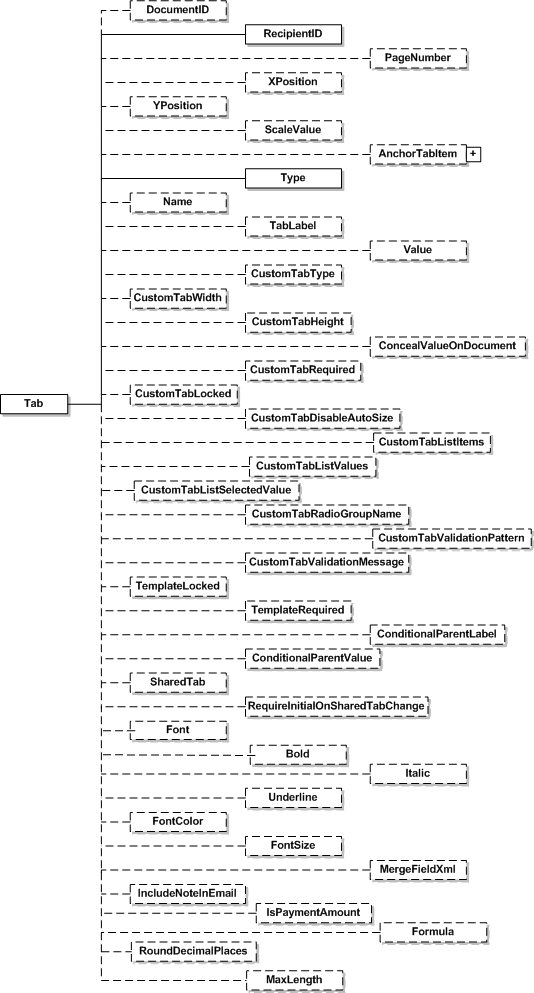
| Name | Schema Type | Description |
|---|---|---|
| DocumentID | LocalId | This will be the document on which the tab is affixed. Must refer to an existing Document’s ID attribute. |
| RecipientID | LocalId | This specifies the recipient whose signature is needed on the document. Must refer to an existing recipient’s ID attribute. |
| PageNumber | nonNegativeInteger | This specifies the page number where the tab will be affixed. |
| XPosition | nonNegativeInteger | This indicates the horizontal offset of the tab on the page, in a coordinate space that has left top corner of the document as origin. Docusign uses 72 DPI when determining position. |
| YPosition | nonNegativeInteger | This indicates the vertical offset of the tab on the page, in a coordinate space that has left top corner of the document as origin. Docusign uses 72 DPI when determining position. |
| ScaleValue | Decimal | Represents a decimal value of 0.5 to 1.0 position of the webcontrol scaling slider. A value of 1.0 represents full size and 0.5 is 50% size. |
| AnchorTabItem | AnchorTab | This indicates Anchor tab in the document. See the Anchor Tab section for more information. |
| Type | TabTypeCode | TabTypeCode is a simple type enumerating one of the following possible values: InitialHere, SignHere, FullName, FirstName, LastName, EmailAddress, Company, Title, DateSigned, InitialHereOptional, EnvelopeID, Custom, SignerAttachment, SignHereOptional, Approve, Decline, or SignerAttachmentOptional. |
| Name | Name | This is the name of the custom tab. Note that, for a Type value of “Custom” and CustomTabType value of “List” the name is a “;” separated list of drop down list items. |
| TabLabel | TabLabel | This is the name of the custom tab. This can be a maximum of 500 characters. Making custom tab’s TabLabel the same will cause the all like fields to update when the user enters data. When using this option, the TabLabel must not contain any spaces. Note that, for a Type of “Custom” and a CustomTabType of “Radio” make the TabLabels the same for any radio buttons you want to group together. The Name value will be what is returned for the radio selected in a group. |
| Value | Value | This element specifies the value of the custom tab. For Type of “Custom” and CustomTabType of “List” the Value is the default selected item in the drop down list. For Type of “Custom” and CustomTabType of “Radio” or “Checkbox” place a “X” in this field to check the item by default. |
| CustomTabType | CustomTabType | It tells what is represented by the tabs that have a TabTypeCode of Custom. Available custom tab types are: Text, Checkbox, Radio, List, Date, Number, SSN, ZIP5, ZIP5DASH4, Email, Note and Formula. List will be presented to the signer as a drop down list on the signing document. The values for a List are set in the Name field as “;” separated items. Checkbox cannot be set as a required field. Number, Date, SSN, ZIP5, ZIP5DASH4, and Email fields will be validated for format before the signer can complete the signing. Text, List, Date, Number, SSN, ZIP5, ZIP5DASH4, and Email characters will be limited by the size of the field set with CustomTabWidth and CustomTabHeight. |
| CustomTabWidth | Integer | Width of the custom tab. |
| CustomTabHeight | Integer | Height of the custom tab. |
| CustomTabRequired | Boolean | Signer is required to fill out the custom tab if true. If the CustomTabType is Checkbox, this must be set to false. |
| ConcealValueOnDocument | Boolean | Optional element. If true the field appears normally while the recipient is adding or modifying the information in the field, but the data is not visible (the characters are hidden by asterisks) to any other signer or the sender. When an envelope is completed the information is available to the sender through the Form Data link in the Docusign Console. This setting applies only to text boxes and does not affect list boxes, radio buttons, or check boxes. |
| CustomTabLocked | Boolean | Signer cannot change the data of the custom tab if true. If the CustomTabType is Checkbox, this must be set to false. |
| CustomTabDisableAutoSize | Boolean | Disables the auto sizing of single line text boxes in the signing screen when the signer enters data. If disabled users will only be able enter as much data as the text box can hold. By default this is false. This property only affects single line text boxes. |
| CustomTabListItems | String | Semicolon separated items used in the dropdown list for a CustomTabType of “List”. These values may also be specified in the Name node; however, this node will take precedence. This can be a maximum of 2000 characters. |
| CustomTabListValues | String | For Form Field List Box type this is the semi-colon delimited list of values to go with the displayed list items set in CustomTabListItems or Name. These values are the hidden values of the drop down list display items. This can be a maximum of 2000 characters. |
| CustomTabListSelectedValue | String | Set this to the default selected item based on the CustomTabListValues. If Value is specified that will take precedence. |
| CustomTabRadioGroupName | String | This is the group name for a set of radio buttons. The CustomTabType must be “Radio”. This may also be specified in the TabLabel node; however, this node will take precedence. |
| CustomTabValidationPattern | String | For all custom tab types except radio buttons, checkboxes, and list items you may supply a regular expression that will be validated when data is entered in the field. This is optional and if not provided the default Docusign validation rules will apply. Javascript RegEx object is used for regular expression validation. Regular expressions must be supported by this object to resolve. |
| CustomTabValidationMessage | String | Message to be displayed to the signer if the validation rule from CustomTabValidationPattern fails. This is optional and if not provided the default Docusign message will be displayed. This can be a maximum of 250 characters. |
| TemplateLocked | Boolean | Optional element. Used only when working with template tabs. If true, the attributes of the tab cannot be changed by the sender. |
| TemplateRequired | Boolean | Optional element. Used only when working with template tabs. If true, the tab cannot be removed by the sender. |
| ConditionalParentLabel | String | Optional element. For conditional fields this is the TabLabel of the parent tab that controls this tab’s visibility. |
| ConditionalParentValue | String | Optional element. For conditional fields this is the Value of the parent tab that controls this tab’s visibility. If the parent tab is a Checkbox, Radio button, Optional Signature, or Optional Initial use “on” as the value to show that the parent tab is active. |
| SharedTab | Boolean | Optional element for field markup. When set to true, enables field markup for the field. |
| RequireInitialOnSharedTabChange | Boolean | Optional element for field markup. When set to true it requires the signer to initial when they modify a shared field. |
| Font | Font | The font type used for the information in the tab. Possible values are: Arial, ArialNarrow, Calibri, CourierNew, Garamond, Georgia, Helvetica, LucidaConsole, Tahoma, TimesNewRoman, Trebuchet, Verdana, OcrA, MSGothic, and MSMincho. Note: The MSGothic, and MSMincho font types are supported in requests, but in responses these font types are returned as Arial. |
| Bold | Boolean | If true, the information in the tab is bold. |
| Italic | Boolean | If true, the information in the tab is italic. |
| Underline | Boolean | If true, the information in the tab is underlined. |
| FontColor | FontColor | The font color used for the information in the tab. Possible values are: Black, BrightBlue, BrightRed, DarkGreen, DarkRed, Gold, Green, NavyBlue, Purple, or White. |
| FontSize | FontSize | The font size used for the information in the tab. Possible values are: Size7, Size8, Size9, Size10, Size11, Size12, Size14, Size16, Size18, Size20, Size22, Size24, Size26, Size28, Size36, Size48, or Size72. |
| MergeFieldXml | String | Reserved for future use. |
| IncludeNoteInEmail | Boolean | If true, the text in the CustomTabType “Note” tab is included in the email message (EmailBlurb) for the recipient. |
| IsPaymentAmount | Boolean | When true, sets this as a payment tab. Can only be used with CustomTabType: Text, Number, List or Formula. The value of the tab must be a number. |
| Formula | String | The Formula string contains the TabLabel for the reference tabs used in the formula and calculation operators. Each TabLabel must be contained in brackets. This can be a maximum of 2000 characters. Example: Three tabs (TabLabels: Line1, Line2, and Tax) need to be added together. The formula string would be: [Line1]+[Line2]+[Tax] |
| RoundDecimalPlaces | Integer | Sets the number of digits after the decimal point in a CustomTabType Formula tab. Can only have the values of 0 or 2. |
| MaxLength | Integer | Sets the maximum number of characters a signer can enter in the tag. This is only active if CustomTabType is set to Text, Date, Number, SSN, ZIP5, ZIP5DASH4, or Email |
| SenderRequired | Boolean | When true for a tab in a template, the sender must populate the tab before an envelope can be sent using the template. The value is only checked if the CustomTabType is List or Text. Note: This option does not function with the CreateEnvelopeFromTemplates method. If you want to send from a template that has this option enabled, you must use the CreateEnvelopeFromTemplatesAndForms method. |
| RequireAll | Boolean | Optional element associated with SharedTab element (field markup). When true and SharedTab is true, information must be entered in this field to complete the envelope. |
| TabOrder | nonNegativeInteger | A positive integer that sets the order the tab is navigated to during signing. Tabs on a page are navigated to in ascending Tab order value, starting with the lowest number and moving to the highest. If two or more tabs have the same Tab order number, the normal auto-navigation setting behavior for the envelope is used. |