Skip to navigation

RequestSenderToken

View as Markdown

RequestSenderToken

This method is used to get a onetime use login token that allows the user to be placed into the Docusign sending wizard. Upon sending completion the user is returned to the return URL provided by the API application.

See the Rules and Exceptions for this method.

// Create and send envelope as shown in linked code
DocuSignWeb.EnvelopeStatus status = <create and send envelope > ;
// Request the token for the sender
String result = _apiClient.RequestSenderToken(status.EnvelopeID, _accountId, <
baseURL >
);
// Display token
Console.WriteLine("Sender token is {0}", result);

Schema

Request sender token
NameSchema TypeDescription
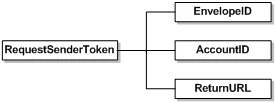
EnvelopeIDStringOptional envelope ID. If provided the user will be placed into the envelope in process. If left blank the user will be placed into a new envelope for sending.
AccountIDStringDocusign account ID to map the envelope to.
ReturnURLStringURL to send the user to upon completion of the sending process. The URL will have an event passed to it as a query parameter. The parameter will be named event. See the next section for a description of the valid events. The Docusign Envelope Dd will also be returned in the envelopeId parameter. Important: You must include HTTPS:// in the URL or the redirect might be blocked by some browsers.

In-session sending events

Events returned on the ReturnURL as a query string parameter. The event is sent in the parameter named event. The ReturnURL is called with the event on any completion state of the envelope send. Valid events can be found in the schema type InSessionSendEvent in the eSignature SOAP API XSD.

EventDescription
SendUser sends the envelope.
SaveUser saves a draft of the envelope.
CancelUser cancels the sending transaction. No envelope ID returned.
ErrorError performing the send.
SessionEndSending session ended before the user completed.