
PurgeDocuments
PurgeDocuments
This method can be used to purge completed documents from the Docusign system. When the PurgeDocuments method is used, the envelope documents are placed in a purge queue for deletion in 14 days. A warning email notification is sent to the sender and recipients associated with the envelope notifying them that the envelope document will be deleted in 14 days and providing a link to the documents. Another email is sent 7 days later with the same message. At the end of the 14-day period, the envelope documents are deleted from the system. The envelope information for the document will remain, but the documents are removed.
Note: If you set up a Document Retention policy for your account, by specifying the number of days to retain documents in the Account Preferences Features section, at the end of the retention period the documents are placed on that 14-day purge queue and the warning emails are sent. So in effect, setting Document Retention policy is the same as setting a schedule for calling PurgeDocuments.
Schema

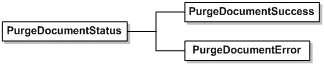
This method returns PurgeDocumentStatus upon execution completion.
PurgeDocumentsStatus
Schema
Rules and Exceptions for PurgeDocuments
-
Envelope_Does_Not_Exist – invalid envelope ID passed. This exception will be thrown.
-
User_Lacks_Permissions - The user making the API calls must have permissions to export Authoritative Copy Documents. This exception will be thrown.
-
If PurgeDocumentSuccess returns false one of the following error conditions occurred:
-
Only the sender may remove the envelope documents.
- Envelope is an authoritative copy, documents cannot be removed.
- Envelope is not complete, documents cannot be removed.