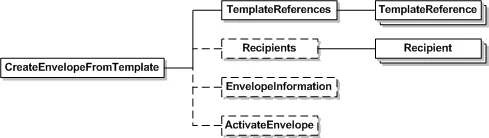
CreateEnvelopeFromTemplates
Note: CreateEnvelopeFromTemplates is an older method for creating templates and is not as robust as the CreateEnvelopeFromTemplatesAndForms method. Docusign recommends using the CreateEnvelopeFromTemplatesAndForms method to access the full system functionality when sending from templates. CreateEnvelopeFromTemplates does not reference the reminder and expiration notification settings from server templates. Reminder and Expiration Notification elements will need to be specified in the call or UseAccountDefaults will need to be used. CreateEnvelopeFromTemplates also does not fully support Signing Groups. The CreateEnvelopeFromTemplatesAndForms method does reference notifications from server templates and supports Signing Groups.
CreateEnvelopeFromTemplates uses templates as the basis for the definition of a signing ceremony. In contrast to the CreateAndSendEnvelope method, where the relationship of Tabs-to-Documents and Tabs-to-Recipients is passed in the request, CreateEnvelopeFromTemplates derives its Tab assignments from the pre-configured Template; and provides Recipient information to fulfill the Roles that are specified in the Template.
When provided one or more templates, along with their supplemental Document, Recipient and Envelope information, Docusign will merge the various Template references into a single Envelope and send to the Recipients.
When a template is added or applied to an envelope and the template has a locked email subject and message (MessageLock is true), that subject and message is used for the envelope and cannot be changed even if another locked template is subsequently added or applied to the envelope. If an email subject or message is entered before adding or applying a locked template, the email subject and message will be overwritten with the email subject and message from the locked template.