
Skip to navigation

RequestPDFWithCert

View as Markdown

This method returns all of the documents combined into a single, contiguous PDF. Additionally it returns the Signing Certificate PDF document, which details the specific attributes of the participants and landmark events of the signing transaction. It also returns the Electronic Record and Signature Disclosure, per account settings, associated with the envelope.

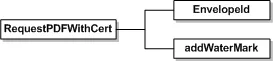
Schema
// Create and send envelope as shown in linked code
DocuSignWeb.EnvelopeStatus status = <create and send envelope>;
// Call to request the PDF with the envelope ID
// Here, we chose to suppress the watermark
DocuSignWeb.EnvelopePDF pdf =
_apiClient.RequestPDFWithCert(status.EnvelopeID, false);
// Display the size of the PDF
Console.WriteLine("Pdf has {0} bytes", pdf.PDFBytes.Length);
NameSchema TypeDescription
EnvelopeIDDSXIdThis is the envelope ID of the envelope, as returned by the CreateEnvelope/CreateAndSendEnvelope.
addWaterMarkBooleanIf your account has the watermark feature enabled and when true, the watermark for the account is shown on documents for envelopes that are not completed.

Sample Request XML

SOAPAction: "http://www.docusign.net/API/3.0/RequestPDFWithCert"
<?xml version="1.0" encoding="utf-8"?>
<soap:Envelope xmlns:xsi="http://www.w3.org/2001/XMLSchema-instance" xmlns:xsd="http://www.w3.org/2001/XMLSchema" xmlns:soap="http://schemas.xmlsoap.org/soap/envelope/">
<soap: Body>
<RequestPDFWithCert xmlns="http://www.docusign.net/API/3.0">
<EnvelopeID>string</EnvelopeID>
<addWaterMark>boolean</addWaterMark>
</RequestPDFWithCert>
</soap:Body>
</soap:Envelope>