
Skip to navigation

UploadTemplate

View as Markdown

This method returns SaveTemplateResult. Note: this method currently only supports Docusign Professional Template XML.

Schema
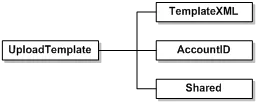
UploadTemplate
// Read the template that you want to upload
String templateXML = System.IO.File.ReadAllText("path to template");
// Upload the specified template to the account
DocuSignWeb.SaveTemplateResult result = _apiClient.UploadTemplate(templateXML,
_accountId, false);
// Confirm that the template saved successfully
Console.WriteLine("The template was successfully uploaded? {0}", result.Success);
NameSchema TypeDescription
TemplateXMLStringXML data to be transformed into a Docusign server side template.NOTE: only Docusign Professional template XML is supported.
AccountIDDSXIdAccount ID to add the template to. If blank, the API user’s default account will be used.
SharedBooleanIf true, the template is shared with the Everyone group in the account. If false, the template is only shared with the Administrator group.

Rules and exceptions for UploadTemplate

  • Account_Lacks_Permissions – account does not have permissions to use this API.
  • User_Lacks_Permissions – user does not have permissions to use this API.