
OAuth 2.0 requirements and migration
Starting in 2021, Docusign began the end-of-life process for all API authentication flows other than the recommended OAuth 2.0 flows and App Password authentication (for SOAP apps). After this date, all API calls using legacy basic user/password authentication in the eSignature REST APIs will be blocked. SOAP applications may continue using these headers, but must do so with an Application Password to meet the migration requirements. To maintain service continuity, all integrations must be migrated to OAuth 2.0.
Updated phase of legacy authentication retirement
- We have set the final date for end-of-life of legacy authentication at September 30, 2026.
- We will end all technical support for legacy authentication at that time and block integrations that use legacy authentication. SOAP applications may continue using these headers, but must do so with an Application Password to meet the migration requirements.
- Customers should migrate as soon as possible to prevent potential service interruptions.
- We will honor existing extension requests. It is highly encouraged that the original timeline is respected.
- To request an additional extension, customers should reach out to their account representative or open a support ticket .
We encourage all customers using legacy authentication to contact Docusign Support in the event technical migration assistance is needed.
Recommendations
If your app doesn’t use OAuth 2.0 to authenticate, you must update it to use OAuth 2.0 authentication (for REST) or App Password authentication (for SOAP).
-
Aren’t sure whether you need to update your apps?
- If your app uses the
X-Docusign-AuthenticationorWS-Security UsernameTokenheader, it is using legacy authentication and must be updated. - If your app makes calls to the
account.docusign.comoraccount-d.docusign.comendpoints to authenticate, it uses OAuth 2.0 and does not need to be updated. - See Identify apps that use legacy authentication for information about tools that can help you identify which apps you need to update.
- If your app uses the
-
There is no direct replacement for legacy authentication in the REST API. Instead, to update your integration to use one of the supported OAuth grant flows, you must assess which OAuth grant is right for you and then implement it following the recommended best practices for that grant.
-
Use the documented best practices for implementation to plan and implement the grant:
Get user information
When using OAuth 2.0, your app will need to get data about your user before you make other API calls.
If your application needs the authenticated user’s name, email, account ID, base URI, or related information, then it must also be updated to use the /oauth/userinfo API method instead of the obsolete login_information API call.
Identify apps that use legacy authentication
Docusign displays a warning in these locations for apps that have recently made legacy authentication calls:
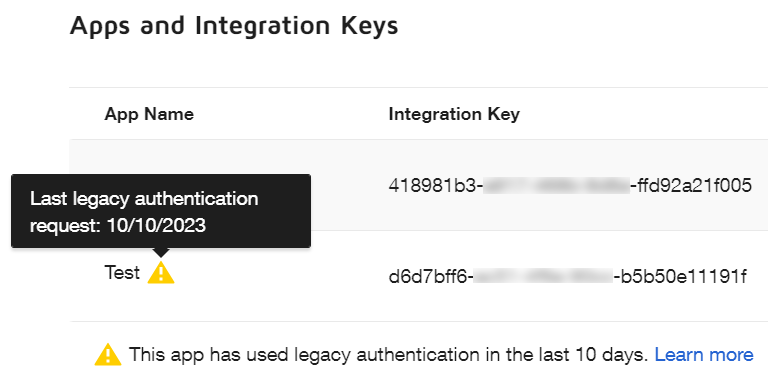
Apps and Keys page legacy authentication warning
On the Apps and Keys page, a warning icon appears next to the name of any app that has made legacy authentication calls in the last 10 days. When the cursor hovers over the icon, a tooltip displays the date of the most recent legacy authentication call.
API Usage Center legacy authentication warning
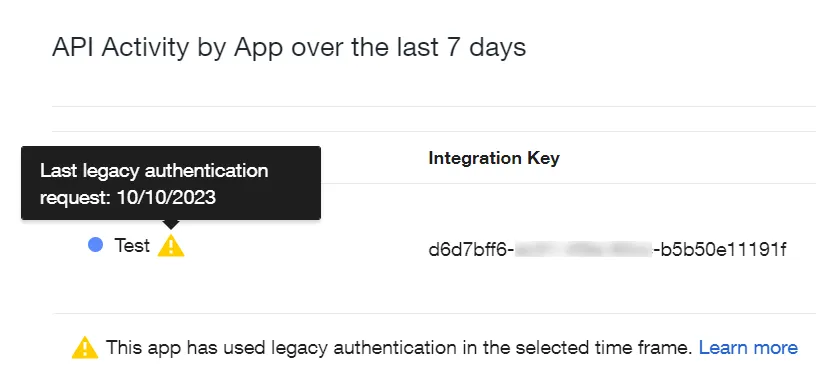
The API Usage Center API Activity by App component displays a warning icon next to the name of any app that has made legacy authentication calls during the time frame selected in the date filter at the top of the page. The selected date range (for example, last 7 days) appears in the heading of the API Activity by App component. When the cursor hovers over the icon, a tooltip displays the date of the most recent legacy authentication call.
Because the API Usage Center enables you to select a shorter date range than the 10-day range that the Apps and Keys page uses, its legacy authentication warnings are more up-to-date.
Locate legacy authentication calls in the identified apps
Once you’ve identified apps that are making legacy authentication calls, notify your engineering team so that they can locate and replace the legacy calls. If you need additional assistance, contact Docusign Support.
Video resources
To see video walkthroughs of how to migrate to OAuth 2.0 authentication, select your language below:
C#
Java
Node.js
PHP
Python
Ruby
Benefits of migrating from legacy authentication
Legacy authentication, while easy to implement, is much less secure than OAuth 2.0. After you migrate to OAuth 2.0, your apps will no longer be subject to these limitations:
- Managing user credentials without OAuth incurs liability and privacy law compliance risk.
- Integrations using legacy OAuth may break when users change their passwords.
- Legacy authentication is not compatible with single sign-on (SSO).
- Because Docusign no longer supports legacy authentication, we do not provide documentation, best practices, or troubleshooting information for it.
For SOAP integrations, switching to use App Password authentication does not require code changes, unless you have hard-coded header values in your requests.
Next steps
- See an overview of the OAuth grants you can use to authenticate with Docusign.
- Learn more about how to Choose an OAuth type to replace legacy authentication.
- Learn more about App Password authentication for SOAP apps.