
Managing HMAC for multiple accounts
As a partner or integrator with one main account who must manage multiple client connect accounts, you can configure your client accounts to be integrator managed, enabling you to use your HMAC keys for your clients’ event messages. This lets you configure and use your HMAC security settings for each client Connect account without having to set up each one manually.
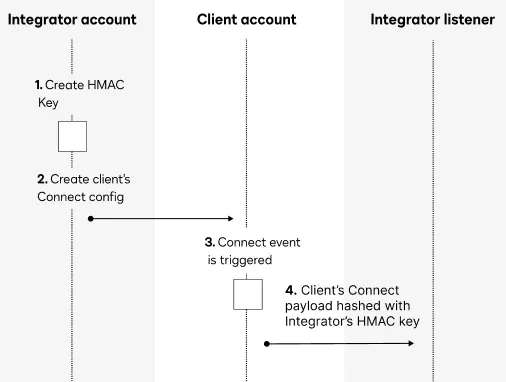
This diagram shows the flow for how integrator-managed HMAC for Connect handles events.
To set up a client Connect configuration that uses your main account’s existing HMAC settings:
-
Set up the HMAC for Connect credentials in your main account. See How to set up HMAC security with your app for a full walkthrough.
-
Using an integration key from your main account, use the ConnectConfigurations:create API request to create a new Connect configuration in the client’s account on their behalf.
-
Set the
includeHMACandintegratorManagedfields in the request body to true. This indicates that HMAC is required, and that the main account’s HMAC for Connect configuration values will be used. -
The access token used for the API call will identify the main account whose HMAC for Connect settings will be used.
Note: Envelope- and account-level Connect configurations can be set to be integrator-managed, but they can only currently be configured using the API.
-
-
When an Connect event notification is generated by an action taken in the customer’s account, the main account’s HMAC credentials will be used.
The following sample payload shows how the integratorManaged parameter looks: