
How to obtain admin consent for external applications
Integration developers can obtain consent from another organization’s users (every user who is a member of that organization’s reserved domains) by having an admin of that organization grant consent on their users’ behalf.
Step 1. Construct the Docusign authorization URI
To prompt an organization admin to grant consent to your integration, you must construct an authorization URI and send the admin’s browser to it. Your authorization URI can enable the organization admin to grant consent on behalf of the users in every organization that the admin administers.
Although the admin consent flow for external apps calls into the Docusign authentication service, it is used for the express intent of granting consent rather than getting an access token.
To secure admin consent in this step, the application seeking admin consent must direct the organization admin to an authorization service URI with a scope header value of openid and an additional admin_consent_scope parameter that holds the list of scopes that are requested for each user in the organization.
- For the developer environment, the base URI for the authorization request is
https://account-d.docusign.com - For the production platform, the base URI is
https://account.docusign.com/oauth/auth
The authorization request includes several parameters used in conjunction with the base URI that configure specific authentication options. The following parameters are required:
Step 2. Obtain consent
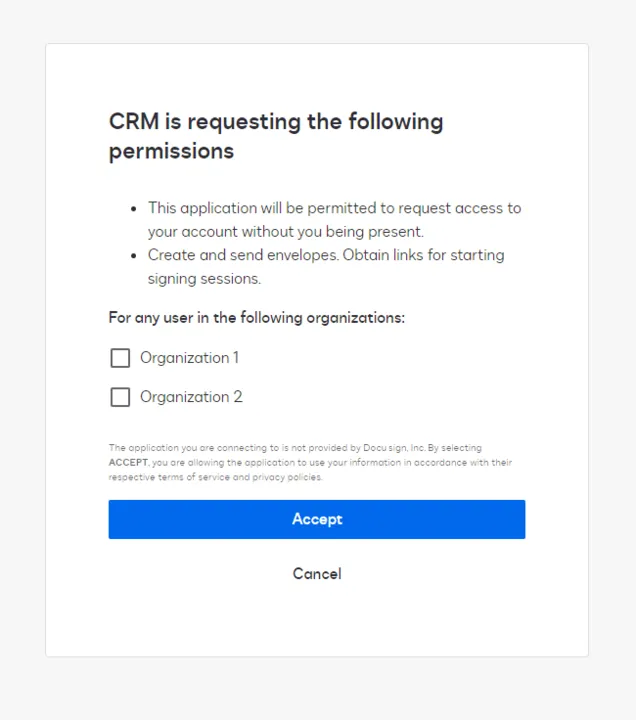
Next, the organization admin uses the URI constructed in Step 1 to log in to Docusign. If successful, they are prompted to grant consent for the requested scopes on behalf of the users in their organization(s).
Users in each selected organization can have consent granted on their behalf by the admin when the Accept button is clicked.
After obtaining consent, you can use a supported OAuth authentication flow to get an access token and make API calls. When you obtain an access token, if the openid scope was requested, your response will also contain an ID token. This token contains information about the identity of the admin that consented and is the only mechanism you can use to retrieve the list of consented organization IDs (which are listed in the coid property).
The ID token has no system function and is not used to authenticate API requests; its only purpose is to hold information on the consenting admin and organizations.
Each ID token contains the following fields:
Next steps
- Every Docusign workflow requires that your user grant explicit consent for your application to act on their behalf. See Obtaining and revoking consent for details and a description of each way to get consent from your users.
- Learn more about authentication.
- See the list of scopes.