
How to start the signing process for an unsigned envelope without connectivity (offline)
This topic demonstrates how to start the signing process for an unsigned cached envelope. This call can be made when the user’s mobile device is offline.
Important: This example requires that the user has a locally stored envelope. The account used for authentication must also either:
- be set as the host for an In Person Signer or
- have assigned tabs in the envelope.
Required data
Running the code in this how-to requires this data:
Step 1. Log in to Docusign
To make the API call shown in this how-to, you must be logged in to Docusign.
See How to log in to Docusign from your app for details.
Step 2. Start offline signing process
Use the method shown to start the offline signing process. Make sure to substitute {ENVELOPE_ID} with the envelope ID of an unsigned envelope that has already been cached on your device.
Expected response
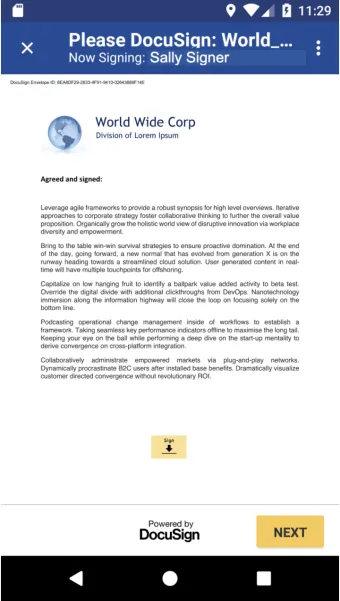
If your call is successful, you will see the Android SDK’s native offline signing screen. The offline user can sign the document, and once the device has restored connectivity, the signed envelope is ready for sync.
Next steps
- Learn more about our Android SDK.
- See all available Android SDK How-to guides.
- Try out Android SDK through our sample app.
- See Preparing envelopes for mobile offline signing.
- See how to Go-Live with a completed app and find the base path for API calls in the production environment.