
Authentication: OAuth2.0 web server flow
Developing with the CLM API is only available for CLM customers with a production account. To purchase a plan to gain access to the CLM API, contact Docusign Sales.
Docusign CLM supports the OAuth 2.0 web server flow.
OAuth 2.0 Overview
In this authentication scheme, the application invokes Docusign CLM OAuth by redirecting the user to the authorization endpoint, passing their client id on the query string. It is up to the calling application to decide when to redirect the user. Common scenarios include presenting the user with an “authorization” button or automatically redirecting the user when the application detects that it does not have a refresh token stored for the end user.
The OAuth 2.0 process flows as follows:
- The app detects that an authorization token is needed and redirects the user to the authorization endpoint.
- Since the authorization endpoint is a secure page in Docusign CLM, standard Docusign CLM authentication is invoked, which will either be the Docusign CLM login page or SAML SSO.
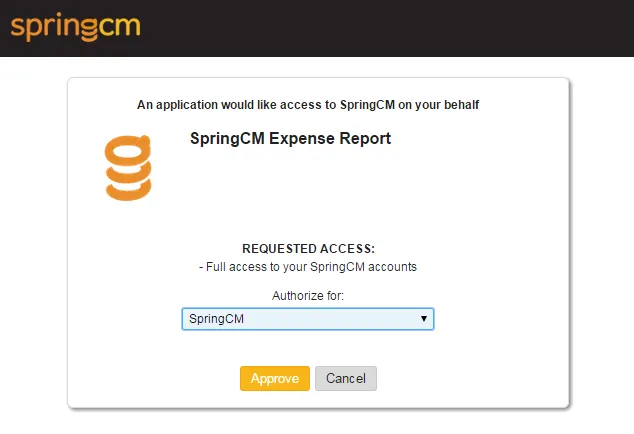
- After the user authenticates, they are presented with the OAuth authorization page. In the case that the user has multiple Docusign CLM accounts, they are prompted for which one they would like to use with the application.
- After the user authorizes the application the browser is redirected to the redirection endpoint (callback url) that is associated with the client id that is was passed to the authorization endpoint. The redirection endpoint is an endpoint configured in the application that is programmed to receive a one time use authorization code that is passed on the query string.
- The authorization code represents the user/account that was authorized for use with the application and is posted to the token endpoint to exchange it for a refresh token and access token that can then used with the REST API.
OAuth 2.0 Configuration Steps
The following steps describe how to configure Docusign CLM OAuth:
- The client application redirects the user’s browser to the Docusign CLM authorization endpoint, passing the applications client id on the querystring. The authorization endpoints are as follows:
Production Authorization Endpoint
UAT Authorization Endpoint
- Since the authorization endpoint is a secure page, the user is prompted for their Docusign CLM credentials.
- After being authenticated, the user is presented with the authorization page for the application. If the user is a member of more than one Docusign CLM account, they will be presented with a drop down list where they must choose which account they are authorizing access to for use with the application. The screen will look similar to the following:
- When the user authorizes access to their account, the browser is redirected to the redirect endpoint that is associated with the client id and will pass an authorization code on the query string.
Callback URL Format
- The authorization code passed on the query string is a one time use token and has an expiration of 1 minute. It can be exchanged for an access token and refresh token in the context of the authorizing user by making a post to the token endpoint. In addition to the authorization code, the client id that was used in Step 1 must also be passed along with its corresponding client secret and grant type of “authorization_code”. The token endpoint and sample request/response JSON is shown below:
Production Token Endpoint
UAT Token Endpoint
Exchanging an authorization code for refresh and access tokens - Sample Request
Exchanging an authorization code for refresh and access tokens - Sample Response
- The access token can now be used to access the API. It must be passed in the Authorization header for all calls to the Object, Task and Content API. When passing it must be prefixed with “bearer” as shown below:Authorization: bearer [your access token]
- Access tokens are short lived and are currently valid for one hour. The expiration date time for the token is returned in the authorization call. Refresh tokens are long lived and currently expire after 3 months of non-use. The refresh token can be used to retrieve a new access token for the authorizing user without prompting them for credentials. The same client Id and client secret used to retrieve the refresh token must be posted along with the refresh token itself to retrieve a new access token. The access token service endpoint and sample JSON for retrieving a new access token from a refresh token are shown below. Note that these are also passed back in the response in Step 5 :
Exchanging a refresh token for an access token - Sample Request
Exchanging a refresh token for an access token - Sample Response
Note: Best practice is to code for access token expiration by either tracking the token expiration time or trapping a 401 error response and requesting a fresh token.