
Authentication: API User Authentication Flow
Developing with the CLM API is only available for CLM customers with a production account. To purchase a plan to gain access to the CLM API, contact Docusign Sales.
API User Authentication flow is intended to be used by back end batch operations for which there is not an end user that authenticates to the API. With API user authentication, a client id is mapped to an API user and then is used in place of a Docusign CLM refresh token to obtain a Docusign CLM API access token. To use this form of authentication the following setup is required:
-
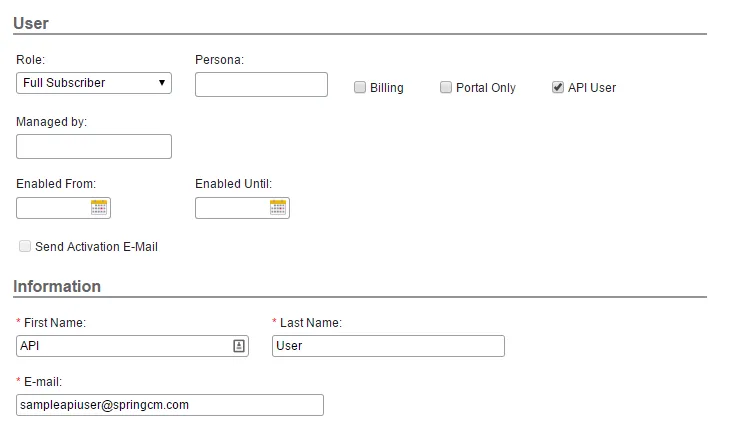
An API User is created in the Docusign CLM address book and given the desired role and security groups needed for the API calls. Note that once a user is made an API user, it cannot be undone, so actual users of the Docusign CLM application should never be created as an API user.
-
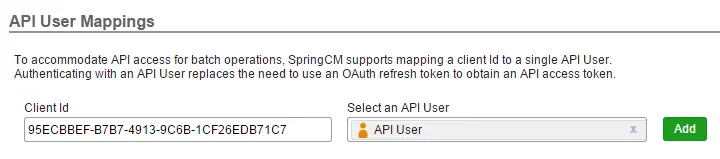
The API user is mapped to a client id in Docusign CLM Preferences. To create the mapping, navigate to Preferences->REST API in the Docusign CLM user interface. In the API User Mappings section your client id can be mapped to the API user created in Step 1. Note that a single Client Id can be mapped to one and only one API User.
After the mapping is created, API user authentication can be used by posting the mapped client id along with the corresponding client secret to the API User Authentication Endpoint. The access token endpoint for the API User Authentication Flow and sample JSON request/response are shown below:
Production API User Authentication Endpoint
UAT API User Authentication Endpoint
The access token can now be used to access the API. It must be passed in the Authorization header for all calls to the Object, Task and Content API. When passing it must be prefixed with “bearer” as shown below:
Authorization: bearer [your access token]