
Work with the Agreement Manager API schema
The central component of the Agreement Manager API schema is the agreement object, which represents an agreement that Agreement Manager has processed. The API returns general agreement information in response to the Agreements:getAgreement and Agreements:getAgreementsList requests.
Key agreement properties and objects
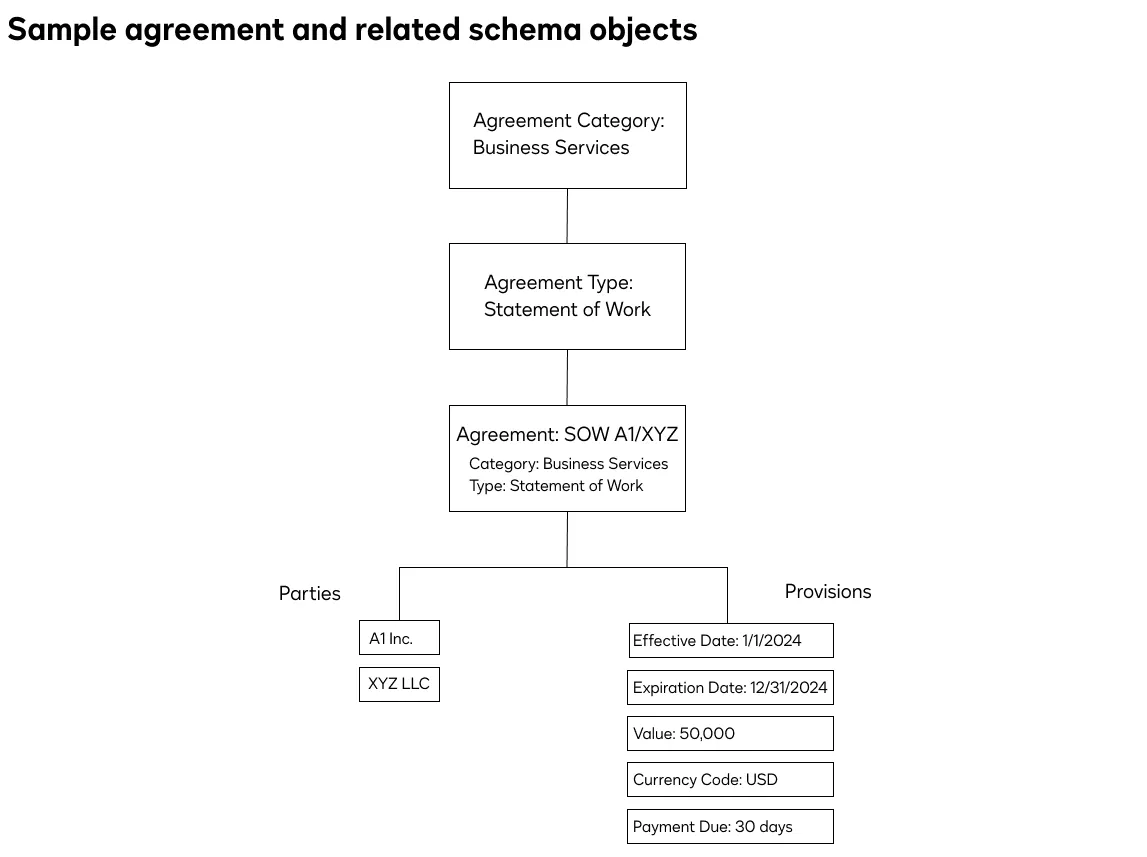
Several key properties and objects are associated with each agreement object. Their relationships are illustrated below, and the next sections provide details. For a complete list of agreement properties and objects, see the API Reference.
Category
An agreement’s category property reflects a broad classification to which the agreement belongs. Each agreement has one category. The sample agreement shown in the diagram belongs to the business services category. Each agreement category has an associated set of agreement types.
Type
An agreement’s type property contains a more specific classification. Each agreement has one type. The diagram shows an agreement whose type is “Statement of Work”. The Agreement Manager platform supports a set of standard agreement types, as well as custom agreement types.
Parties
An agreement’s parties object consists of an array of individuals or entities who participated in the agreement. For example, a lease agreement’s parties might consist of a lessor and a lessee. There is no limit on the number of parties to an agreement.
Provisions
An agreement’s provisions object contains a list of properties that define the agreement parameters. For example, a statement of work’s provisions include properties such as an execution date, a total value, and one or more payment due dates. Each agreement has multiple provisions.
Each agreement type that Agreement Manager supports has a distinct set of provisions that are available with agreements of that type.
A sample Agreements:getAgreement response that includes the above components is shown here:
Sources for Agreement Manager API schema values
Agreement Manager populates schema values from two sources. The initial source is the data extraction that the Agreement Manager AI performs to identify agreement parameters, including the agreement type, parties, and provisions. For example, the Agreement Manager AI can use agreement attributes to determine that a value is a renewal type, store it in the appropriate schema field, and return it in the provisions object’s renewal_type property in the response to a Agreement Manager API Agreements:getAgreement request.
Another possible source of Agreement Manager schema values is user input. The Agreement Manager UI enables users to review an agreement’s AI-extracted values and add, modify, or delete them. This updates the schema values for the agreement, and any subsequent Agreement Manager API GET requests will return the user-updated values instead of the original AI-extracted values. In a future release, the Agreement Manager API will support the updating of AI-extracted agreement values via API requests.
Standard agreement types
Below are lists of standard agreement types that the Agreement Manager API supports in the current release. Select a tab to see the agreement types under that category. The agreement type names and category names are listed as they appear in responses to API requests.
BusinessServices
Miscellaneous
HumanResources
- Certificate of Insurance
- Consulting Agreement
- Credit Card Agreement
- Engagement Letter
- Franchise Agreement
- Investment Account Agreement
- Joint Venture Agreement
- Letter of Intent
- Loan agreement
- Marketing agreement
- Master Service Agreement
- Memorandum of Understanding
- Non-disclosure Agreement
- Order Form
- Partnership Agreement
- Proposal agreement
- Purchase Agreement
- Purchase Order
- Quote agreement
- Service Level Agreement
- Services Agreement
- Statement of Work
- Stock Purchase Agreement
- Subscription agreement
- Supply / Distribution agreement
- Wealth Management Agreement
Custom agreement types
In addition to a set of standard agreement types, the Agreement Manager platform supports the creation of custom agreement types. In the current release, custom agreement types can only include provisions from the standard list of Agreement Manager provisions. Custom provisions will be supported in a future release. See Create New Agreement Types for details about creating custom agreement types.
Next steps
- Review the How-to guides to see sample code that you can use with your integration.
- See the API Reference for details about request and response format.