
Delete personal data for your users
When a user leaves your organization or account, you can delete their personal identifiable information (PII) such as email address, home address, and name using the management API. The API provides two endpoints for deleting personal data:
POST https://api.docusign.net/management/v2/data_redaction/organizations/{organizationId}/userUsed by organization admins to delete a user’s personal data from the specified list of their organization’s accounts and its domains.POST https://api.docusign.net/management/v2/data_redaction/accounts/{accountId}/userUsed by eSignature account admins to delete personal data for members of their accounts.
See How to delete user data from one or more accounts as an organization admin and How to delete user data from an account as an account admin for a code example demonstrating how to delete data from a closed user account membership.
You can only delete the personal data from your user accounts beginning 24 hours after the date and time when their membership was closed.
Note: You must request the user_data_redact scope during Authenticate to call either endpoint.
Delete personal data as an organization administrator
To delete personal data from a user as an organization admin:
- You must be an organization admin (or delegated admin) with permission to manage the given account or manage domain users for the user’s email domain.
- The user account membership whose data will be deleted must have been closed for at least 24 hours.
- You must have requested the
user_data_redactscope during Authenticate .
You must also provide the following parameters to the POST https://api.docusign.net/management/v2/data_redaction/organizations/{organizationId}/user endpoint:
-
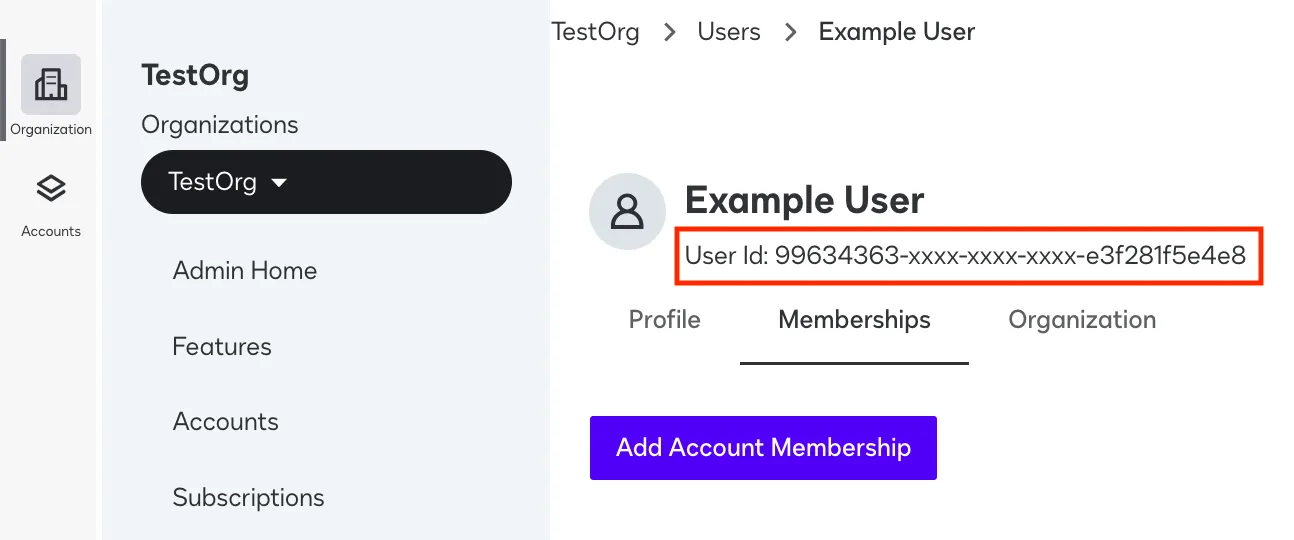
The user ID of the user whose PII will be removed You can find this information in the organization admin UI by selecting Users, then Status and selecting the default Status filter and choosing Closed. On the chosen user’s row, select View. The User ID will be displayed under the user’s name in the resulting user details screen.
-
A set of account IDs within which the user has membership You can get the set of accounts that a user has membership in by calling the MultiProductUserManagement:getUserDSProfile endpoint. The user’s data will be deleted from the specified accounts.
-
Your organization ID You can find this ID by selecting Features in the left nav, then the Organization Details tab.
The associated example API call shows the syntax for calling this endpoint to remove the personal data of a user from one account.
See DataDeletion: redactIndividualUserData for details on this endpoint, or How to delete user data from one or more accounts as an organization admin for a code example demonstrating how to use it in a workflow.
Delete personal data as a eSignature account administrator
To delete personal data from a user as an eSignature account admin:
- You must be an account admin (or delegated admin) with permission to manage the given account.
- The user account membership whose data will be deleted must have been closed for at least 24 hours.
- You must have requested the
user_data_redactscope during Authenticate.
You must also provide the following parameters to the POST https://api.docusign.net/management/v2/data_redaction/accounts/{accountId}/user endpoint:
-
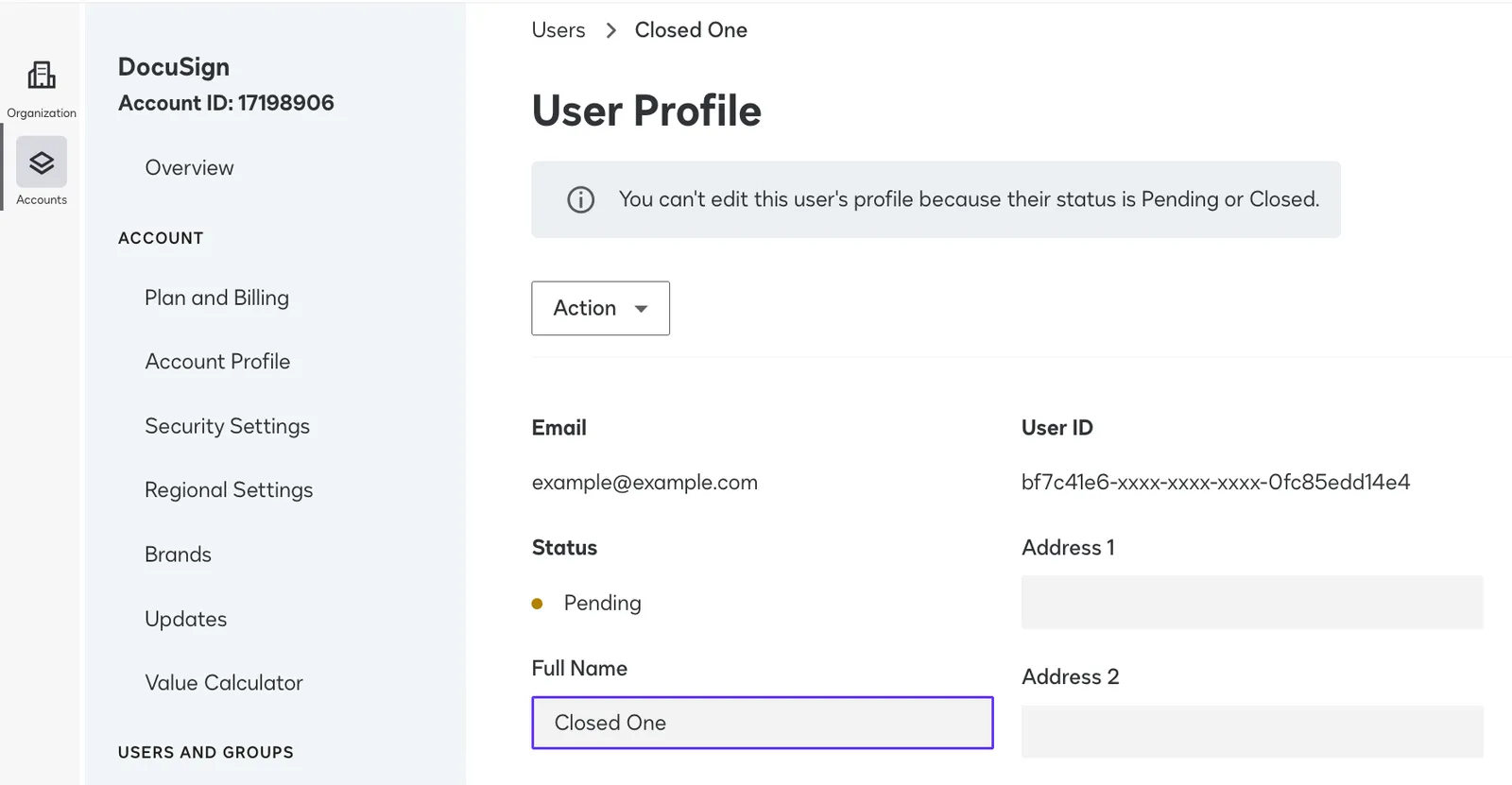
The user ID of the user whose PII will be removed You can find this information in the eSignature Admin UI by selecting Users, then the default Status filter and choosing Closed. On the chosen user’s row, select Actions and View. The User ID will be displayed under the user’s name in the resulting user details screen.
-
Your account ID You can find this ID (also called the API account ID) on the Apps and Keys page.
The associated example API call shows the syntax for calling this endpoint to remove the personal data of a user from one account.
See DataDeletion: redactIndividualMembershipData for details on this endpoint, or How to delete user data from an account as an account admin for a code example demonstrating how to use it in a workflow.
Next steps
- See How to delete user data from one or more accounts as an organization admin and How to delete user data from an account as an account admin for a code example demonstrating how to delete data from a closed user account membership.
- See DataDeletion: redactIndividualUserData or DataDeletion: redactIndividualMembershipData for an API reference on both user data removal endpoints.
- See Admin API data model for details, diagramming, and exact definitions for important Admin API terms, including organizations, users, accounts, and domains.
- See Docusign Admin concepts for an overview of Docusign admin and its functionality.