
Design Standards Requirements
This topic describes the requirements and standards for each TSP iframe element.
General requirements on modals
If you selected the modal display, the TSP iframe opens inside a Docusign-hosted responsive modal in the context of the signing experience.
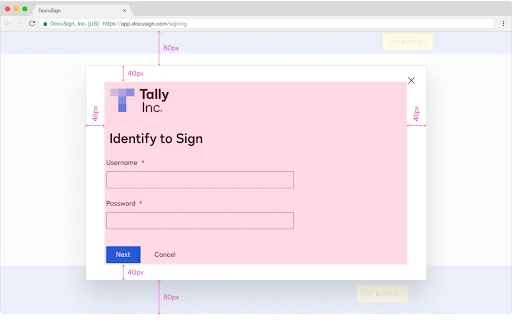
Modals have a close button, a top and bottom padding of 40 pixels and a left and right padding of 48 pixels. Their size adjusts to the height and width of the web browser. If the iframe content exceeds the modal’s height, users must scroll the page vertically to access the content that is not visible. Also, check that the iframe content fits the modal’s width. If not, users have to horizontally scroll the page to access the whole content. The height of the modal expands vertically to fit the content until it comes within 80 px of the top and bottom of the page. Modals have a maximum width of 800 pixels.
The Docusign teams recommend setting the background color of the modals to white.
General requirements on overlays
If you selected the overlay display, the TSP iframe opens inside a Docusign-hosted responsive overlay in the context of the signing experience.
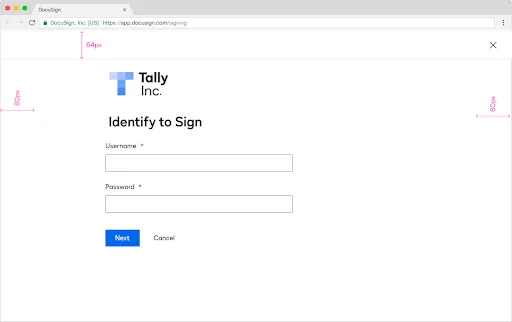
Overlays have a close button, a top padding of 64 pixels and a left and right padding of 80 pixels. The Docusign teams recommend setting the background color of the modals to white.
General requirements on tabs
If you choose the tab display, the content of the iframe opens in a new browser’s tab. If selecting this display, TSPs must ensure seamless navigation for the signer. They also must provide clear navigation buttons that allow the signer to easily transition back to the original workflow from the opened tab.