> You are reading the Docusign Developer Documentation. For clean Markdown of any page, append .md to the page URL.
>
> Documentation indexes by section:
> - APIs and SDKs: https://docusign.docs.buildwithfern.com/docs/llms.txt
> - Platform 101: https://docusign.docs.buildwithfern.com/platform/llms.txt
> - Extension Apps: https://docusign.docs.buildwithfern.com/extension-apps/llms.txt
> - Docusign CLI: https://docusign.docs.buildwithfern.com/docusign-cli/llms.txt
>
> Authentication (OAuth, JWT Grant, M2M): https://docusign.docs.buildwithfern.com/platform/auth
> Webhooks and Connect: https://docusign.docs.buildwithfern.com/platform/webhooks
>
> OpenAPI specifications: https://docusign.docs.buildwithfern.com/openapi.json
> MCP server: https://docusign.docs.buildwithfern.com/_mcp/server
# Digital Referral: Trial sign-ups for integrated partner apps
> Digital Referral enables ISV integration partners to prompt their users to sign up for a Docusign trial account by opening a pop-up browser window from their partner app.
*Digital Referral* enables ISV integration partners to prompt their users to sign up for a Docusign trial account by opening a pop-up browser window from their partner app. This pop-up can communicate with the parent browser window after trial activation and authentication so that the parent can take appropriate action, such as refreshing the page, if necessary.
## Requirements
Digital referral is available to all registered ISV Docusign partners. To use Digital Referral:
1. **Ensure you have a referral agreement with Docusign**. All new eSignature integrations must implement Digital Referral as a prerequisite to receive a free partner production account for integration key (IK) management. This requirement is checked during our app review process. For preexisting integration partners, please reach out to your Partnership representative to update your IK to include Digital Referral.
2. Add an additional [redirect URI](/platform/configure-app#redirect-uri) to your IK configuration. This URI will be used for the `loginRedirectUri` parameter described below.
**Note**: This feature is in early access. Future releases may change file paths, file, or function names.
## Dependencies
As a partner, your app needs to reference a hosted JavaScript file. To reference this file, copy and paste the following snippet into the HTML body section of your page:
``
## Methods
### DSDigitalSignup.startSignup
Launches a pop-up browser window showing the free trial creation form.
| Parameters | Type | Details |
| ------------------ | -------- | --------------------------------------------------------------------------------------------------------------------------------------------------------------------------------------------------------- |
| `firstName` | `string` | Optional. First name of the partner application user. |
| `lastName` | `string` | Optional. Last name of the partner application user. |
| `email` | `string` | Optional. Email address of the partner application user. |
| `phone` | `string` | Optional. Phone number of the partner application user. |
| `partnerIK` | `string` | Required. Client ID of the partner application. |
| `loginRedirectUri` | `string` | Required. A URI that performs the partner application authentication with Docusign. After a successful trial creation, the user will be redirected to this URI. This URI must be registered with your IK. |
| `locale` | `string` | Optional. Language code and country code of desired trial experience such as `en-us`, `en-au`, `en-ca`, `fr-fr`, `fr-ca`, `ja-jp`, `es-es`, `pt-br`, or `de-de`. |
### DSDigitalSignup.registerSignupActivationCallback
Sets a supplied custom function to be called after a trial account has been successfully created. Place this function call in the page of the partner application that can trigger the pop-up window to the trial creation page. Note that `DSDigitalSignup.notifySignupActivation` requires that `DSDigitalSignup.registerSignupActivationCallback` be called first.
| Parameters | Type | Details |
| ------------------------------ | ---------- | -------------------------------------------------------------------------------------------------------------------------------------------------------------------------------------------------------------------------- |
| `handleTrialActivation(event)` | `function` | This custom parameter function is called when a trial user has been successfully created. The event parameter of this function is a `MessageEvent` for the parent function and is not used by this custom function itself. |
**Sample usage:**
```text
DSDigitalSignup.registerSignupActivationCallback(function (event) {
// Custom partner functionality to handle free trial activation notification.
// ex: window.location.reload();
});
```
### DSDigitalSignup.registerSignupPopupCloseCallback
Sets up a supplied custom function to be called after the pop-up window used for user sign-up closes. Place this function call in the page of the partner application that can trigger the pop-up window to the user sign-up page.
| Parameters | Type | Details |
| ------------------------- | ---------- | ------------------------------------------------------------------------------------------------------------------------------------------------------------------------------------------------------------------------------------------- |
| `handlePopupClose(event)` | `function` | This custom parameter function is called when the pop-up window used for user sign-up closes. The event parameter of this function is a `MessageEvent` for the parent function and is not needed to be used by this custom function itself. |
**Sample usage:**
```text
DSDigitalSignup.registerSignupPopupCloseCallback(function (event) {
// Custom partner functionality to reset the front-end busy state.
// ex: window.location.reload();
});
```
### DSDigitalSignup.notifySignupActivation
Calls the custom function that was registered using `DSDigitalSignup.registerSignupActivationCallback`. Call this function from the `loginRedirectUri` page after the partner application authentication has completed. This causes the pop-up window to notify the parent window which then proceeds to call the registered custom function on the parent window.
| Parameters | Type | Details |
| ----------------- | ------ | ---------------------------------------------------------------------------------------------------------------------------------------------------------------------------- |
| `autoCloseWindow` | `bool` | Optional. Set to true (default) to automatically close the pop-up window after the `loginRedirectUri` (from the function `DSDigitalSignup.startSignup`) has finished loading |
**Sample usage:**
`DSDigitalSignup.notifySignupActivation(true);`
### DSDigitalSignup.viewPlans
Opens a new browser window that shows the available plans for purchase by the logged-in user.
**Sample usage:**
```text
// Show the available plans in German (de-de)
DSDigitalSignup.viewPlans('de-de');
```
| Parameters | Type | Details |
| ---------- | -------- | ------------------------------------------------------------------------------------------------------------------------------------------------------------------------------ |
| `locale` | `string` | Optional. Language code and country code of desired experience such as `en-us`, `en-au`, `en-ca`, `fr-fr`, `fr-ca`, `ja-jp`, `es-es`, `pt-br`, or `de-de`. Default is `en-us`. |
## Debugging
You can use Debug Mode to assist with troubleshooting and development. This mode enables detailed logging of library operations to the browser's console.
To activate Debug Mode, append the query parameter `?debug=true` to the URL of the page where the library is being loaded.
When Debug Mode is active, diagnostic messages will be output to the browser's console (also called the Developer Tools Console).
Debug Mode is deactivated automatically when the `?debug=true` parameter is removed from the URL, or when the session ends. No persistent configuration changes are made by this parameter.
#### Example
If the original URL is: `https://www.example.com/mypage`
The modified URL to activate Debug Mode will be: `https://www.example.com/mypage?debug=true`
If the URL already contains other query parameters (e.g., `?param1=value1`), append the debug parameter using an ampersand (&):
```text
https://www.example.com/mypage?param1=value1&debug=true
```
## Walkthrough
The following steps provide a detailed walkthrough for how to implement the Digital Referral trial sign-up window in your partner application:
1. On the partner application page that will trigger the pop-up window for trial creation, define a `DSDigitalSignup.registerSignupActivationCallback` call:
```text
DSDigitalSignup.registerSignupActivationCallback(function (event) {
// Custom partner functionality to handle free trial activation notification.
// ex: window.location.reload();
});
```
2. To launch the trial pop-up window, you must assign the `DSDigitalSignup.startSignup` function (with your own provided parameters) to a button in your app:
``
Both the `partnerIK` and `loginRedirectUri` parameters are required. They identify the referral source and authorize access to Digital Referral. The other parameters prepopulate the trial signup form.
The trial popup will look similar to this:
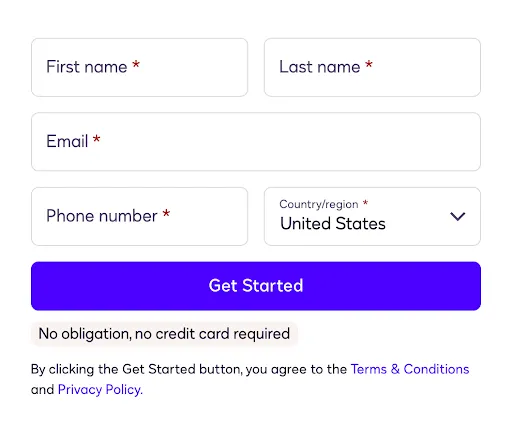
The subsequent pages of the trial popup will guide the user to enter a one-time code that Docusign will send to their email address, and then to set up a password. The new trial account will now be activated and the new user is authenticated with Docusign. Then the browser will be redirected to the URI provided by the `loginRedirectUri` parameter. This URI must be specified in the list of **Redirect URIs** for the integration key being used.
This URI should perform the Docusign authentication with the partner app (OAuth consent) and be in the same domain as the parent partner app page. At this point the user will be presented with the **User Consent** permissions window:
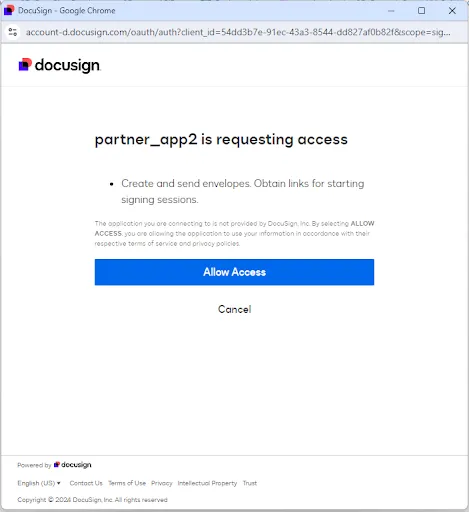
3. In addition to performing the partner app authentication with Docusign, the `loginRedirectUri` should then render a page with the following snippet (with partner parameter supplied):
`DSDigitalSignup.notifySignupActivation(true);`
This snippet will notify the parent partner page. The parent page will then trigger the call to the function supplied in `DSDigitalSignup.registerSignupActivationCallback`. The `autoCloseWindow` parameter (which can be true or false) will cause the pop-up window to close after the firing of the function.
4. For users that have been authenticated with Docusign, a button wired to the following function will take them to a Docusign web page showing them the list of plans they are able to upgrade to and purchase:
``