> You are reading the Docusign Developer Documentation. For clean Markdown of any page, append .md to the page URL.
>
> Documentation indexes by section:
> - APIs and SDKs: https://docusign.docs.buildwithfern.com/docs/llms.txt
> - Platform 101: https://docusign.docs.buildwithfern.com/platform/llms.txt
> - Extension Apps: https://docusign.docs.buildwithfern.com/extension-apps/llms.txt
> - Docusign CLI: https://docusign.docs.buildwithfern.com/docusign-cli/llms.txt
>
> Authentication (OAuth, JWT Grant, M2M): https://docusign.docs.buildwithfern.com/platform/auth
> Webhooks and Connect: https://docusign.docs.buildwithfern.com/platform/webhooks
>
> OpenAPI specifications: https://docusign.docs.buildwithfern.com/openapi.json
> MCP server: https://docusign.docs.buildwithfern.com/_mcp/server
# Define related objects in a data model
> Learn how to define related objects in the data model for a data IO extension app.
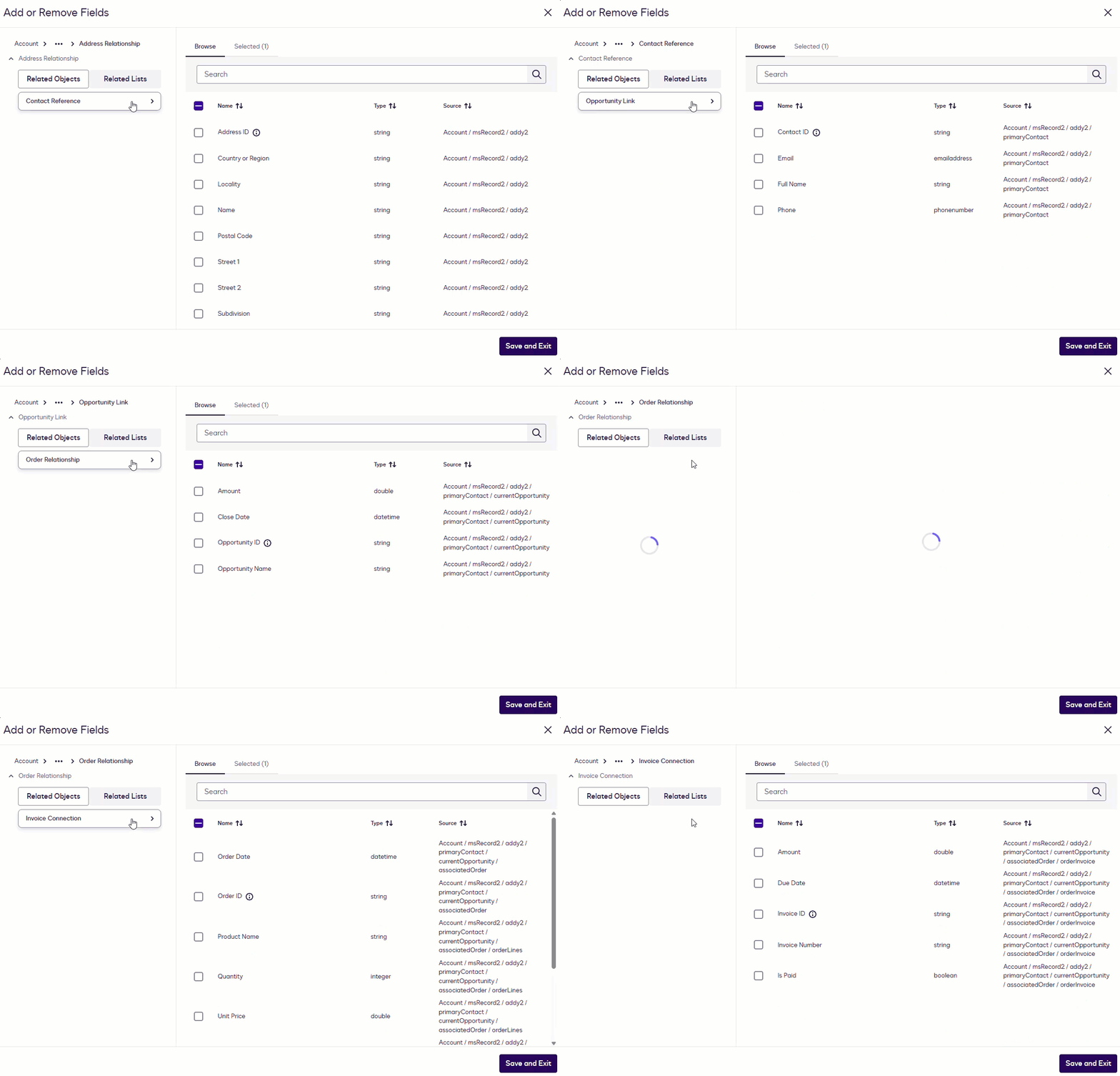
Related objects, also known as foreign-key relationships or references, are connections between objects in a data source. Including related objects in your data model enables workflow process builders to traverse objects when configuring workflows (shown in the animation below), select properties across them, and query multiple objects for data read and write steps. This topic explains the requirements to define these relationships in the data model that your [data IO](/extension-apps/extension-apps-101/supported-extensions/data-io) extension app returns to Docusign.
## Display related objects in workflow configuration screens
If you want Docusign to display related objects in workflow configuration screens, your extension app must include foreign-key relationships in the [Get Type Definitions](/extension-apps/extension-app-reference/extension-contracts/data-io#dataio-version6-get-type-definitions) response. Docusign sends a **Get Type Definitions** request to [retrieve object and property details](/extension-apps/extension-apps-101/supported-extensions/data-io#get-type-names-and-definitions) from an external data source. If the response defines object relationships, process builders will be able to navigate among objects and select their properties when defining data read and write steps.
Below is an example from a **Get Type Definitions** response that specifies a relationship between the `Account` object's `msrecord2` property and the `MasterRecordId` object.
```text
{
"$class": "concerto.metamodel@1.0.0.ConceptDeclaration",
"name": "Account",
"isAbstract": false,
"properties": [
{
"$class": "concerto.metamodel@1.0.0.StringProperty",
"name": "Id",
"isArray": false,
"isOptional": false,
"decorators": [
{
"$class": "concerto.metamodel@1.0.0.Decorator",
"name": "Term",
"arguments": [
{
"$class": "concerto.metamodel@1.0.0.DecoratorString",
"value": "Account ID"
}
]
},
{
"$class": "concerto.metamodel@1.0.0.Decorator",
"name": "Crud",
"arguments": [
{
"$class": "concerto.metamodel@1.0.0.DecoratorString",
"value": "Readable"
}
]
}
],
"lengthValidator": {
"$class": "concerto.metamodel@1.0.0.StringLengthValidator",
"minLength": 0,
"maxLength": 18
}
},
{
"$class": "concerto.metamodel@1.0.0.RelationshipProperty",
"name": "msRecord2",
"type": {
"$class": "concerto.metamodel@1.0.0.TypeIdentifier",
"name": "MasterRecordId"
},
"isArray": false,
"isOptional": true,
"decorators": [
{
"$class": "concerto.metamodel@1.0.0.Decorator",
"name": "Term",
"arguments": [
{
"$class": "concerto.metamodel@1.0.0.DecoratorString",
"value": "Master Record Relationship"
}
]
},
{
"$class": "concerto.metamodel@1.0.0.Decorator",
"name": "Crud",
"arguments": [
{
"$class": "concerto.metamodel@1.0.0.DecoratorString",
"value": "Createable,Readable,Updateable"
}
]
}
]
}
],
"identified": {
"$class": "concerto.metamodel@1.0.0.IdentifiedBy",
"name": "Id"
},
"decorators": [
{
"$class": "concerto.metamodel@1.0.0.Decorator",
"name": "Term",
"arguments": [
{
"$class": "concerto.metamodel@1.0.0.DecoratorString",
"value": "Account"
}
]
},
{
"$class": "concerto.metamodel@1.0.0.Decorator",
"name": "Crud",
"arguments": [
{
"$class": "concerto.metamodel@1.0.0.DecoratorString",
"value": "Createable,Readable,Updateable"
}
]
}
]
}
```
Below are descriptions of key relationship elements:
| Element | Example | Notes |
| --------------------------------------------------- | --------------------------------------------------------- | --------------------------------------------------------------------------------------------------------------- |
| Relationship type identifier | `$class": "concerto.metamodel@1.0.0.RelationshipProperty` | |
| Relationship property name | `"name": "msRecord2"` | This name will appear on the workflow configuration screens for data read and write steps. |
| Name of the object to which the property is related | | A definition for this object and its properties must also be returned in the **Get Type Definitions** response. |
| Label for the relationship | | This label will appear on the workflow configuration screens for data read and write steps. |
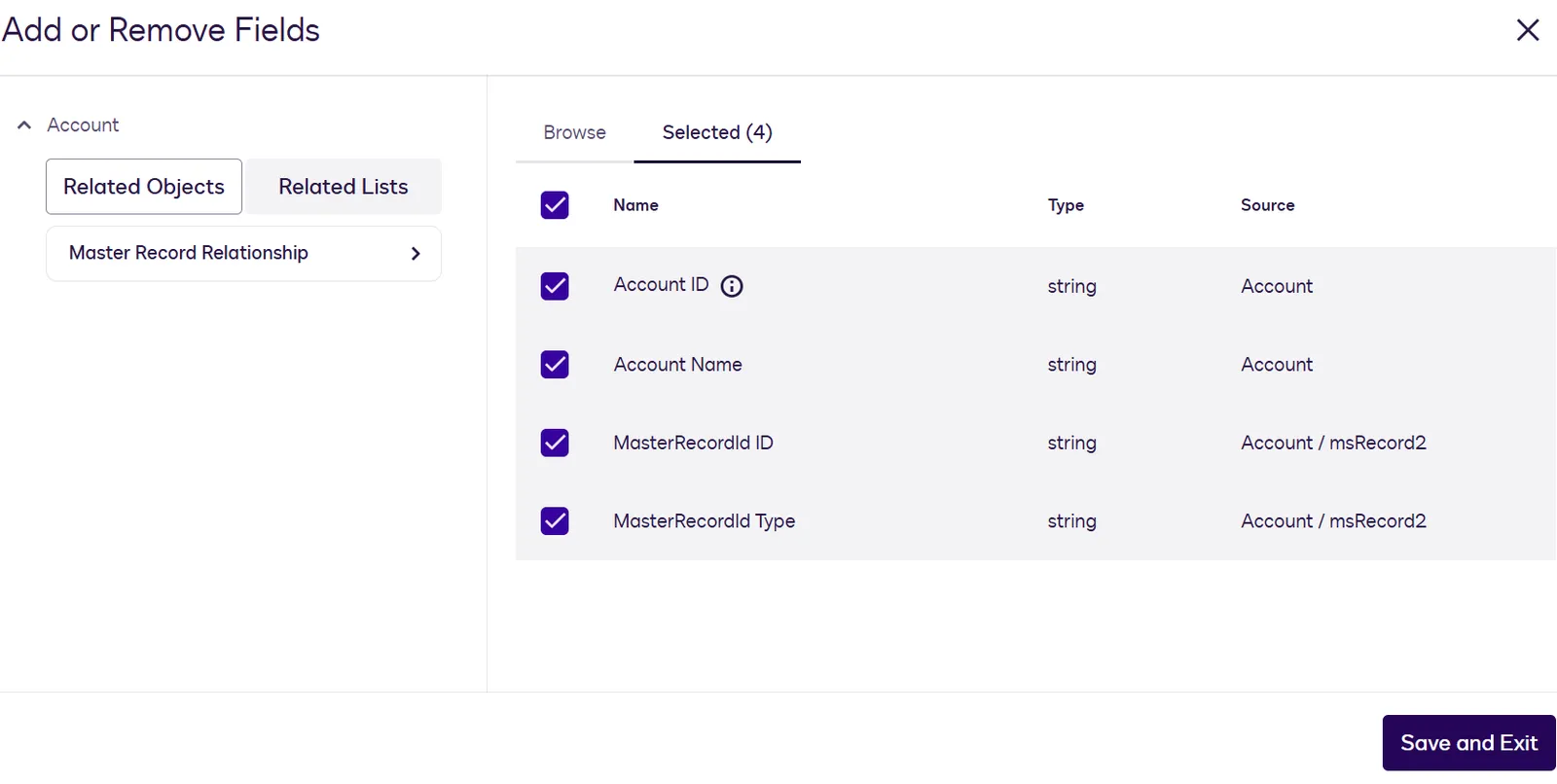
Based on the example relationship property definition, the workflow step configuration screen displays **Master Record** as a related object under the **Account** object, as shown below. A process builder can navigate from the **Account** object to the **Master Record** object and select properties in both objects.
## Example data model with related objects
This example from a data model defined in a `model.cto` file shows a portion of an `Account` object definition. It includes an `msRecord2` property that is defined as a relationship, indicated by the `-->` notation.
See the [model.cto](https://github.com/docusign/extension-app-data-io-reference-implementation/blob/main/src/dataModel/model.cto) file in the data IO reference implementation for additional relationship examples.
> **Note**
>
> [Run the reference implementation](https://github.com/docusign/extension-app-data-io-reference-implementation#data-io-extension-app-reference-implementation) to see how the relationships in the data model are returned in the **Get Type Definition** response. You can also use the reference implementation to test with a workflow to see how related objects appear on step configuration screens.
**`model.cto example`**
```text title="model.cto example"
@Term("Account")
@Crud("Createable,Readable,Updateable")
concept Account identified by Id {
@Term("Account ID")
@Crud("Readable")
o String Id length=[0, 18]
@Term("Account Name")
@Crud("Createable,Readable,Updateable")
o String Name optional
@Term("Master Record Relationship")
@Crud("Createable,Readable,Updateable")
--> MasterRecordId msRecord2 optional
}
```
## Frequently asked questions
### Can I build workflows with foreign-key relationships across multiple objects?
Yes. If the data model that your extension app returns to Docusign includes related objects, you can traverse those objects when configuring data read and write steps in a workflow. See [Display related objects in workflow configuration screens](/extension-apps/extension-apps-101/supported-extensions/data-io/related-objects#display-related-objects-in-workflow-configuration-screens) for details.
### Are one-to-many (1:M) relationships supported?
Yes, Docusign supports one-to-many relationships.
### Are nested relationships supported?
Yes. For example, the `Account` object can have a relationship to the `MasterRecordId` object, which in turn can have a relationship to the `Address` object.
### Is there a limit on the number of related objects?
No, Docusign does not limit the number of related objects that can be returned in a **Get Type Definitions** response.
## Next steps
* Review the requirements for [data model](/extension-apps/extension-apps-101/supported-extensions/data-model) definitions.
* Get details about the structure of the [Get Type Definitions](/extension-apps/extension-app-reference/extension-contracts/data-io#dataio-version6-get-type-definitions) response.
* Find out about options to [test an extension app](/extension-apps/build-an-extension-app/test).
* Get started with data IO by cloning the [data IO reference implementation](https://github.com/docusign/extension-app-data-io-reference-implementation).