> You are reading the Docusign Developer Documentation. For clean Markdown of any page, append .md to the page URL.
>
> Documentation indexes by section:
> - APIs and SDKs: https://docusign.docs.buildwithfern.com/docs/llms.txt
> - Platform 101: https://docusign.docs.buildwithfern.com/platform/llms.txt
> - Extension Apps: https://docusign.docs.buildwithfern.com/extension-apps/llms.txt
> - Docusign CLI: https://docusign.docs.buildwithfern.com/docusign-cli/llms.txt
>
> Authentication (OAuth, JWT Grant, M2M): https://docusign.docs.buildwithfern.com/platform/auth
> Webhooks and Connect: https://docusign.docs.buildwithfern.com/platform/webhooks
>
> OpenAPI specifications: https://docusign.docs.buildwithfern.com/openapi.json
> MCP server: https://docusign.docs.buildwithfern.com/_mcp/server
# How to create and embed an external form fill session
> Describes how to create and embed an external form fill session using the Rooms API.
This topic demonstrates how to create and embed an external form fill session using the [ExternalFormFillSessions:CreateExternalFormFillSession](/docs/rooms-api/reference/forms/externalformfillsessions/createexternalformfillsession) method.
**Important**: You must first [create](/docs/rooms-api/how-to/create-room-with-data) and [add a form](/docs/rooms-api/how-to/add-form-to-room) to a room to complete this how-to.
> **Note**
>
> Run this code example from our [Quickstart](/docs/esign-rest-api/quickstart) or launcher projects: [Bash](https://github.com/docusign/code-examples-bash), [C#](https://github.com/docusign/code-examples-csharp), [Java](https://github.com/docusign/code-examples-java), [Node.js](https://github.com/docusign/code-examples-node), [PHP](https://github.com/docusign/code-examples-php), [PowerShell](https://github.com/docusign/code-examples-powershell), [Python](https://github.com/docusign/code-examples-python), or [Ruby](https://github.com/docusign/code-examples-ruby).
## Required data
Running the code in this how-to requires this data:
| Data element | Description |
| ----------------------------------- | ----------------------------------------------------------------------------------------------------------------------------------------------------------------------------------------------------------------------------------------------------------------------------------------------- |
| \{API_ACCOUNT_ID} | A [GUID](http://guid.one/) value that identifies your account. This value is automatically generated by Docusign for any account you create. Copy the value from the **API Account ID** field on the [Apps and Keys](https://admindemo.docusign.com/authenticate?goTo=appsAndKeys) page. |
| \{FORM_ID} | A [GUID](http://guid.one/) value that identifies the form to attach to a room. To return a list of your form IDs, use the [FormLibraries:GetFormLibraries](/docs/rooms-api/reference/forms/formlibraries/getformlibraries) method. |
| Forms enabled on your Rooms account | The user role needs the **AddDocumentsFromFormGroupToRooms** or **AddDocumentsFromFormLibrariesToRooms** permission assigned. These permissions are only available to accounts with Forms enabled. To enable this feature, contact your Account Manager or Business Development representative. |
| \{ROOM_ID} | A unique integer that identifies your room. To return a list of your room IDs, use the [Rooms:GetRooms](/docs/rooms-api/reference/rooms/rooms/getrooms) method. |
| Rooms enabled for your account | You will need access enabled to use the Rooms API. See [creating a Rooms developer account](/docs/rooms-api/rooms101/create-account). |
| xFrameAllowedUrl | The URL of the domain where the form will be embedded. |
## Step 1. Obtain your OAuth token
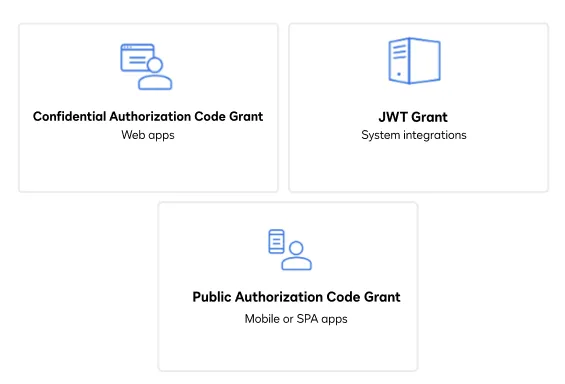
To make the API call shown in this how-to, you need a valid OAuth access token with the `dtr.rooms.write` scope enabled. Docusign supports access tokens for three different recommended OAuth grant types: Public Authorization Code Grant, Confidential Authorization Code Grant, and JSON Web Token (JWT) Grant. Choose the OAuth grant type appropriate for your scenario.
> **Note**
>
> See [Authentication](/docs/rooms-api/rooms101/auth) for guidance on your options to get an OAuth token.
## Step 2. Construct your API headers
After you have a valid OAuth access token, you are ready to construct the API headers that you will pass to the API call. Construct your headers like this, but make sure to substitute your valid OAuth access token for \{ACCESS_TOKEN}.
**`Bash`**
```bash title="Bash"
declare -a Headers=('--header' "Authorization: Bearer ${ACCESS_TOKEN}"
'--header' "Accept: application/json"
'--header' "Content-Type: application/json")
```
**`C#`**
```csharp title="C#"
var apiClient = new DocuSignClient(basePath);
apiClient.Configuration.DefaultHeader.Add("Authorization", $"Bearer {accessToken}");
var roomsApi = new RoomsApi(apiClient);
```
**`Java`**
```java title="Java"
protected static ApiClient createApiClient(String basePath, String userAccessToken) {
ApiClient apiClient = new ApiClient(basePath);
apiClient.addDefaultHeader(HttpHeaders.AUTHORIZATION, BEARER_AUTHENTICATION + userAccessToken);
apiClient.addAuthorization("docusignAccessCode", new OAuth());
return apiClient;
}
/**
* Creates a new instance of the RoomsApi. This method
* creates an instance of the ApiClient class silently.
*
* @param basePath URL to Rooms REST API
* @param userAccessToken user's access token
* @return an instance of the {@link RoomsApi}
*/
protected static RoomsApi createRoomsApiClient(String basePath, String userAccessToken) {
ApiClient apiClient = createApiClient(basePath, userAccessToken);
return new RoomsApi(apiClient);
}
/**
* Creates a new instance of the rooms RolesApi. This method
* creates an instance of the ApiClient class silently.
*
* @param basePath URL to Rooms REST API
* @param userAccessToken user's access token
* @return an instance of the {@link RolesApi}
*/
protected static RolesApi createRolesApiClient(String basePath, String userAccessToken) {
ApiClient apiClient = createApiClient(basePath, userAccessToken);
return new RolesApi(apiClient);
}
```
**`Node.js`**
```javascript title="Node.js"
let dsApiClient = new docusignRooms.ApiClient();
dsApiClient.setBasePath(args.basePath);
dsApiClient.addDefaultHeader('Authorization', 'Bearer ' + args.accessToken);
```
**`PHP`**
```php title="PHP"
$config = new Configuration();
$config->setHost('https://demo.rooms.docusign.com/restapi');
$config->addDefaultHeader('Authorization', 'Bearer ' . $args['ds_access_token']);
$this->apiClient = new ApiClient($config);
```
**`PowerShell`**
```text title="PowerShell"
$headers = New-Object "System.Collections.Generic.Dictionary[[String],[String]]"
$headers.add("Authorization", "Bearer $accessToken")
$headers.add("Accept", "application/json")
$headers.add("Content-Type", "application/json")
```
**`Python`**
```python title="Python"
api_client = create_rooms_api_client(access_token=args["access_token"])
```
**`Ruby`**
```ruby title="Ruby"
configuration = DocuSign_Rooms::Configuration.new
configuration.host = Rails.configuration.rooms_host
api_client = DocuSign_Rooms::ApiClient.new(configuration)
api_client.set_default_header('Authorization', "Bearer #{args[:access_token]}")
```
## Step 3. Construct the request body
Next, create the request body. Set your `formIDs`, `roomID`, and `xFrameAllowedUrl` domain in your request body. The `formIDs` allows you to add multiple forms to the form fill session. The `xFrameAllowedUrl` is the domain where you want to embed the form. Here’s how you make the request, but make sure to substitute your room ID for \{$room_id}, your form IDs for {$library_form_id} and enter your domain next to `xFrameAllowedUrl` as shown in the gist.
**`Bash`**
```bash title="Bash"
request_data=$(mktemp /tmp/request-rooms.XXXXXX)
printf \
'{
"roomId": '$room_id',
"formIds": ["'$library_form_id'"],
"xFrameAllowedUrl": "https://iframetester.com"
}' >$request_data
```
**`C#`**
```csharp title="C#"
public static ExternalFormFillSession CreateSession(
string basePath,
string accessToken,
string accountId,
ExternalFormFillSessionForCreate sessionForCreate)
```
**`Java`**
```java title="Java"
ExternalFormFillSessionForCreate sessionToCreate = new ExternalFormFillSessionForCreate();
sessionToCreate.setRoomId(args.getRoomId());
sessionToCreate.setFormId(args.getDocumentId());
sessionToCreate.setXFrameAllowedUrl("http://localhost:8080");
```
**`Node.js`**
```javascript title="Node.js"
let requestBody = { formId: args.docuSignFormId, roomId: args.roomId, xFrameAllowedUrl: 'http://localhost:3000' };
```
**`PHP`**
```php title="PHP"
$room_id = $this->args['room_id'];
$form_id = $this->args['form_id'];
$this->args['x_frame_allowed_url'] = "http://localhost:8080";
```
**`PowerShell`**
```text title="PowerShell"
$body =
@"
{
"roomId": "$roomId",
"formId": "$formId",
"xFrameAllowedUrl": "https://iframetester.com/"
}
"@
```
**`Python`**
```python title="Python"
request_body = ExternalFormFillSessionForCreate(
room_id=args['room_id'],
form_id=args['form_id'],
x_frame_allowed_url=args['x_frame_allowed_url']
)
```
**`Ruby`**
```ruby title="Ruby"
def body(args)
DocuSign_Rooms::ExternalFormFillSessionForCreate.new({
formId: args[:form_id],
roomId: args[:room_id],
xFrameAllowedUrl: "http://#{args[:allowed_host]}"
})
end
```
## Step 4. Call the Rooms API
Now that you have constructed your API headers and request body, make a request to the Rooms API to return an external form fill session. Here's how you make the call, but make sure to substitute your API account ID for \{account_id}.
**`Bash`**
```bash title="Bash"
response=$(mktemp /tmp/response-rooms.XXXXXX)
curl --request POST https://demo.rooms.docusign.com/restapi/v2/accounts/${account_id}/external_form_fill_sessions \
"${Headers[@]}" \
--data-binary @${request_data} \
--output ${response}
if grep -q FORM_NOT_IN_ROOM "$response"
then
echo ""
echo "" Problem: Selected room does not have any forms. Add a form to a room using example 4.
exit 0
else
echo ""
echo "URL to be Embedded:"
cat $response
echo ""
fi
```
**`C#`**
```csharp title="C#"
var url = externalFormFillSessionsApi.CreateExternalFormFillSessionWithHttpInfo(accountId, sessionForCreate);
url.Headers.TryGetValue("X-RateLimit-Remaining", out string remaining);
url.Headers.TryGetValue("X-RateLimit-Reset", out string reset);
if (reset != null && remaining != null)
{
DateTime resetDate = DateTimeOffset.FromUnixTimeSeconds(long.Parse(reset)).UtcDateTime;
Console.WriteLine("API calls remaining: " + remaining);
Console.WriteLine("Next Reset: " + resetDate);
}
return url.Data;
```
**`Java`**
```java title="Java"
ExternalFormFillSession formFillSession = (new ExternalFormSessionService()).createSession(
externalFormFillSessionsApi,
this.session.getAccountId(),
sessionToCreate);
```
**`Node.js`**
```javascript title="Node.js"
let externalFormFillSessionApi =
new docusignRooms.ExternalFormFillSessionsApi(dsApiClient);
let externalForm = null;
externalForm = await new Promise((resolve, reject) => {
externalFormFillSessionApi.createExternalFormFillSession(
args.accountId,
{ body: requestBody },
(err, data, response) => {
if (err) return reject(err);
resolve({ data, response });
});
});
let headers = externalForm.response.headers;
let remaining = headers['x-ratelimit-remaining'];
let reset = headers['x-ratelimit-reset'];
if (remaining && reset) {
const resetInstant = new Date(Number(reset) * 1000);
console.log(`API calls remaining: ${remaining}`);
console.log(`Next Reset: ${resetInstant.toISOString()}`);
}
return externalForm.data;
```
**`PHP`**
```php title="PHP"
public static function createExternalFormFillSession($args, $clientService)
{
$form_session_api = $clientService->getExternalFormFillSessionsApi();
try {
$form_for_add = new ExternalFormFillSessionForCreate($args);
$response = $form_session_api->createExternalFormFillSessionWithHttpInfo($args["account_id"], $form_for_add);
$remaining = $response[2]['x-ratelimit-remaining'] ?? null;
$reset = $response[2]['x-ratelimit-reset'] ?? null;
if ($remaining !== null && $reset !== null) {
$resetInstant = (new DateTime())->setTimestamp((int)$reset);
error_log("API calls remaining: $remaining");
error_log("Next Reset: " . $resetInstant->format(\DateTime::ATOM));
}
} catch (ApiException $e) {
error_log($e);
$clientService->showErrorTemplate($e);
exit;
}
return $response[0];
}
```
**`PowerShell`**
```text title="PowerShell"
$uri = "https://demo.rooms.docusign.com/restapi/v2/accounts/$APIAccountId/external_form_fill_sessions"
try {
Write-Output "Response:"
$response = Invoke-WebRequest -uri $uri -UseBasicParsing -headers $headers -body $body -method POST
$response.Content | ConvertFrom-Json | ConvertTo-Json
```
**`Python`**
```python title="Python"
form_fill_session_api = ExternalFormFillSessionsApi(api_client)
(results, status, headers) = form_fill_session_api.create_external_form_fill_session_with_http_info(
body=request_body,
account_id=args["account_id"]
)
remaining = headers.get("X-RateLimit-Remaining")
reset = headers.get("X-RateLimit-Reset")
if remaining is not None and reset is not None:
reset_date = dt.fromtimestamp(int(reset), tz=timezone.utc)
print(f"API calls remaining: {remaining}")
print(f"Next Reset: {reset_date}")
```
**`Ruby`**
```ruby title="Ruby"
rooms_api = DocuSign_Rooms::ExternalFormFillSessionsApi.new(api_client)
results, _status, headers = rooms_api.create_external_form_fill_session_with_http_info(args[:account_id], body(args))
remaining = headers['X-RateLimit-Remaining']
reset = headers['X-RateLimit-Reset']
if remaining && reset
reset_date = Time.at(reset.to_i).utc
puts "API calls remaining: #{remaining}"
puts "Next Reset: #{reset_date}"
end
```
## Expected response
Copy the return `url` from the JSON response, and paste it in the corresponding line in the next step.
```text
{
"url": "https://demo.rooms.docusign.com:443/Views/FormFillSession?token=eyJhbG...MDpcpY"
}
```
## Step 5. Embed the form fill session
Paste the `url` generated in the prior step. Redirect your app's internal browser to this URL to begin the external form fill session.
> **Note**
>
> View the source code for this how-to on GitHub: [Bash](https://github.com/docusign/code-examples-bash/blob/master/examples/Rooms/eg006CreateAnExternalFormFillSessionController.sh), [C#](https://github.com/docusign/code-examples-csharp/blob/master/launcher-csharp/Rooms/Examples/CreateExternalFormFillSession.cs), [Java](https://github.com/docusign/code-examples-java/blob/master/src/main/java/com/docusign/controller/rooms/examples/R006ControllerCreateExternalFormFillSession.java), [Node](https://github.com/docusign/code-examples-node/blob/master/lib/rooms/examples/createExternalFormFillSession.js), [PHP](https://github.com/docusign/code-examples-php/blob/master/src/Services/Examples/Rooms/CreateExternalFormFillSessionService.php), [PowerShell](https://github.com/docusign/code-examples-powershell/blob/master/examples/Rooms/eg006CreateAnExternalFormFillSessionController.ps1), [Python](https://github.com/docusign/code-examples-python/blob/master/app/rooms/examples/eg006_create_external_form_fill_session.py), or [Ruby](https://github.com/docusign/code-examples-ruby/blob/master/app/services/room_api/eg006_create_an_external_form_fill_session_service.rb).
**`Bash`**
```bash title="Bash"
embed_url=`cat $response | grep url | sed 's/.*\"url\":\"//' | sed 's/\".*//'`
redirect_url="https://iframetester.com/?url=${embed_url}"
echo ""
echo "The embedded form URL is ${redirect_url}"
echo ""
echo "Attempting to automatically open your browser..."
```
**`C#`**
```csharp title="C#"
this.ViewBag.Url = externalFormFillSession.Url;
this.ViewBag.JsonUrl = externalFormFillSession.ToJson();
return this.View("embed");
```
**`Java`**
```java title="Java"
DoneExample.createDefault(this.title)
.withMessage(getTextForCodeExample().ResultsPageText)
.withJsonObject(formFillSession)
.withFormFill(formFillSession.getUrl())
.addToModel(model, config);
return DONE_EXAMPLE_PAGE;
```
**`Node.js`**
```javascript title="Node.js"
```
**`PHP`**
```php title="PHP"
if ($createExternalFormResponse) {
$createExternalFormJSON = json_decode((string)$createExternalFormResponse, true);
$this->clientService->showDoneTemplateFromManifest(
$this->codeExampleText,
"",
"Results from the Forms::CreateExternalFormFillSession:
"
        . stripslashes($createExternalFormResponse) . "
",
$createExternalFormJSON['url'],
);
}
```
**`PowerShell`**
```text title="PowerShell"
$signingUrl = $($response.Content | ConvertFrom-Json).url
$redirectUrl = "https://iframetester.com/?url="+$signingUrl
Write-Output "The embedded form URL is $redirectUrl"
Write-Output "Attempting to automatically open your browser..."
Start-Process $redirectUrl
```
**`Python`**
```python title="Python"
```
**`Ruby`**
```ruby title="Ruby"
-->