> You are reading the Docusign Developer Documentation. For clean Markdown of any page, append .md to the page URL.
>
> Documentation indexes by section:
> - APIs and SDKs: https://docusign.docs.buildwithfern.com/docs/llms.txt
> - Platform 101: https://docusign.docs.buildwithfern.com/platform/llms.txt
> - Extension Apps: https://docusign.docs.buildwithfern.com/extension-apps/llms.txt
> - Docusign CLI: https://docusign.docs.buildwithfern.com/docusign-cli/llms.txt
>
> Authentication (OAuth, JWT Grant, M2M): https://docusign.docs.buildwithfern.com/platform/auth
> Webhooks and Connect: https://docusign.docs.buildwithfern.com/platform/webhooks
>
> OpenAPI specifications: https://docusign.docs.buildwithfern.com/openapi.json
> MCP server: https://docusign.docs.buildwithfern.com/_mcp/server

# Credential API Login

The Login method can be used to authenticate and retrieve Docusign Connect API credentials based on an email and password. This method will return an array of valid Docusign Connect API accounts that match the email and password provided.

## Schema
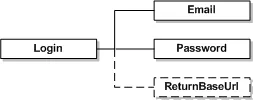
![Login](/_fern-files/_img/0bcf68cacc07b3ff67b50285867bb123e8256b6bd378e2f2938c5774437d6370.webp)

| Name          | Schema Type | Description                                                                                                                                                                                   |
| ------------- | ----------- | --------------------------------------------------------------------------------------------------------------------------------------------------------------------------------------------- |
| Email         | String      | Email to authenticate with. Place your bracketed integrators key in front of the email if you have received one from Docusign. Sample: \[integrator key]email                                 |
| Password      | String      | Password to authenticate with.                                                                                                                                                                |
| ReturnBaseUrl | Boolean     | When true, the response will return the BaseUrl string. This contains information about the server location of your account. The string is should be used in the header for future API calls. |

## Sample Request XML:

The following are samples of the SOAP 1.1 and SOAP 1.2 request and response. The placeholders shown need to be replaced with actual values.

### SOAP 1.1

**Request:**

```

POST /api/3.0/credential.asmx HTTP/1.1
Host: www.docusign.net
Content-Type: text/xml; charset=utf-8
Content-Length: length
SOAPAction: "http://www.docusign.net/API/Credential/Login"
<?xml version="1.0" encoding="utf-8"?>
<soap:Envelope xmlns:xsi="http://www.w3.org/2001/XMLSchema-instance" xmlns:xsd="http://www.w3.org/2001/XMLSchema" xmlns:soap="http://schemas.xmlsoap.org/soap/envelope/">
    <soap:Body>
        <Login xmlns="http://www.docusign.net/API/Credential">
            <Email>string</Email>
            <Password>string</Password>
        </Login>
    </soap:Body>
</soap:Envelope>

```

**Response:**

```

HTTP/1.1 200 OK
Content-Type: text/xml; charset=utf-8
Content-Length: length
<?xml version="1.0" encoding="utf-8"?>
<soap:Envelope xmlns:xsi="http://www.w3.org/2001/XMLSchema-instance" xmlns:xsd="http://www.w3.org/2001/XMLSchema" xmlns:soap="http://schemas.xmlsoap.org/soap/envelope/">
    <soap:Body>
        <LoginResponse xmlns="http://www.docusign.net/API/Credential">
            <LoginResult>
                <Success>boolean</Success>
                <ErrorCode>User_Does_Not_Exist_In_System or Account_Lacks_Permissions or User_Lacks_Permissions or User_Authentication_Failed or Unspecified_Error or Success</ErrorCode>
                <AuthenticationMessage>string</AuthenticationMessage>
                <Accounts>
                    <Account>
                        <AccountID>string</AccountID>
                        <AccountName>string</AccountName>
                        <UserID>string</UserID>
                        <UserName>string</UserName>
                        <Email>string</Email>
                    </Account>
                    <Account>
                        <AccountID>string</AccountID>
                        <AccountName>string</AccountName>
                        <UserID>string</UserID>
                        <UserName>string</UserName>
                        <Email>string</Email>
                    </Account>
                </Accounts>
            </LoginResult>
        </LoginResponse>
    </soap:Body>
</soap:Envelope>

```

### SOAP 1.2

**Request:**

```

POST /api/3.0/credential.asmx HTTP/1.1
Host: www.docusign.net
Content-Type: application/soap+xml; charset=utf-8
Content-Length: length
<?xml version="1.0" encoding="utf-8"?>
<soap12:Envelope xmlns:xsi="http://www.w3.org/2001/XMLSchema-instance" xmlns:xsd="http://www.w3.org/2001/XMLSchema" xmlns:soap12="http://www.w3.org/2003/05/soap-envelope">
    <soap12:Body>
        <Login xmlns="http://www.docusign.net/API/Credential">
            <Email>string</Email>
            <Password>string</Password>
        </Login>
    </soap12:Body>
</soap12:Envelope>

```

**Response:**

```

HTTP/1.1 200 OK
Content-Type: application/soap+xml; charset=utf-8
Content-Length: length
<?xml version="1.0" encoding="utf-8"?>
<soap12:Envelope xmlns:xsi="http://www.w3.org/2001/XMLSchema-instance" xmlns:xsd="http://www.w3.org/2001/XMLSchema" xmlns:soap12="http://www.w3.org/2003/05/soap-envelope">
    <soap12:Body>
        <LoginResponse xmlns="http://www.docusign.net/API/Credential">
            <LoginResult>
                <Success>boolean</Success>
                <ErrorCode>User_Does_Not_Exist_In_System or Account_Lacks_Permissions or User_Lacks_Permissions or User_Authentication_Failed or Unspecified_Error or Success</ErrorCode>
                <AuthenticationMessage>string</AuthenticationMessage>
                <Accounts>
                    <Account>
                        <AccountID>string</AccountID>
                        <AccountName>string</AccountName>
                        <UserID>string</UserID>
                        <UserName>string</UserName>
                        <Email>string</Email>
                    </Account>
                    <Account>
                        <AccountID>string</AccountID>
                        <AccountName>string</AccountName>
                        <UserID>string</UserID>
                        <UserName>string</UserName>
                        <Email>string</Email>
                    </Account>
                </Accounts>
            </LoginResult>
        </LoginResponse>
    </soap12:Body>
</soap12:Envelope>

```

## Login Result

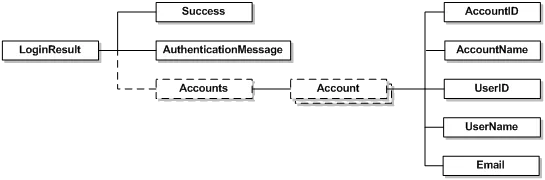
![LoginResult](/_fern-files/_img/309b6372e05e40efc688fd8f2dd0249c2b4be43e8415d3ac4d8f684caf422bc9.webp)

| Name        | Schema Type | Description                                          |
| ----------- | ----------- | ---------------------------------------------------- |
| AccountID   | DSXId       | Account ID of the valid Docusign Connect API user.   |
| AccountName | String      | Account Name of the valid Docusign Connect API user. |
| UserID      | DSXId       | User ID of the valid Docusign Connect API user.      |
| UserName    | String      | Username of the valid Docusign Connect API user.     |
| Email       | String      | Email of the valid Docusign Connect API user.        |